autosar.arch.ParameterComponent
R2026bDescription
An autosar.arch.ParameterComponent object describes an AUTOSAR
parameter software component in AUTOSAR Blockset.
Creation
Create an autosar.arch.ParameterComponent object by using the addComponent
function to add a parameter component to an AUTOSAR architecture model object.
parameterComponent = addComponent(archModel,"ParameterSWC",...
    Kind="ParameterComponent")
autosar.arch.ParameterComponent
objects do not appear in the modeling canvas. Use the programmatic interface to interact with
these objects. When you generate code, the autosar.arch.ParameterComponent
descriptions are in the generated ARXML files.Properties
Object Functions
Examples
This example shows how to reference a component model in an AUTOSAR architecture (requires System Composer™), add a parameter software component, and generate code containing descriptions of the parameter software component, interface, connectors, and ports.
Create an AUTOSAR architecture model, and load example model autosar_swc_parameter.
archModel = autosar.arch.createModel("AUTOSARArchitecture");
load_system("autosar_swc_parameter");
Add a component to the architecture model by using the addComponent function.
component = addComponent(archModel,"SensorComponent", ...
    Kind="SensorActuator");
Link the component model autosar_swc_parameter to the component in the architecture by using the linkToModel function.
linkToModel(component,"autosar_swc_parameter");Add ports to the architecture model canvas by using the addPort function. Connect the architecture to the component by using the connect function.
addPort(archModel,"Sender","SenderPort");
addPort(archModel,"Receiver","ReceivePort");
connect(archModel,archModel.Ports(1),component.Ports(1));
connect(archModel,archModel.Ports(2),component.Ports(2));
Add a parameter software component of type ParameterSender to the architecture model.
parameterComponent = addComponent(archModel,"ParameterProvider",...
    Kind="ParameterComponent")
parameterComponent =
  ParameterComponent with properties:

      Name: 'ParameterProvider'
    Parent: [1×1 autosar.arch.Model]
     Ports: [0×0 autosar.arch.ParameterPort]
Add a parameter sender port to the parameter component. This port must be named ParameterPort to match the name of the ParameterReceiverPort already present in autosar_swc_parameter.
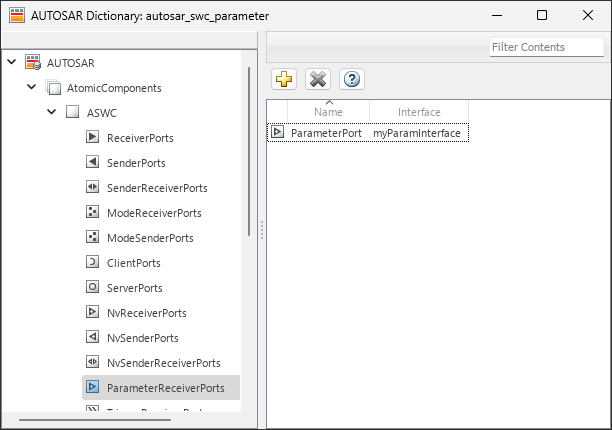
paramPort = addPort(parameterComponent,"ParameterSender",...
    "ParameterPort")
paramPort =
  ParameterPort with properties:

      Name: 'ParameterPort'
    Parent: [1×1 autosar.arch.ParameterComponent]
Export ARXML by using the export function.
evalc("export(archModel)")ans =
'Building component: autosar_swc_parameter (1 out of 1)
### Searching for referenced models in model 'autosar_swc_parameter'.
### Total of 1 models to build.
### Starting top model code generation target build for: autosar_swc_parameter
### Starting build procedure for: autosar_swc_parameter
### Exporting ARXML files for: autosar_swc_parameter
### Successful completion of code generation for: autosar_swc_parameter
Build Summary
Top model targets:
Model Build Reason Status Build Duration
=======================================================================================================
autosar_swc_parameter Target (autosar_swc_parameter.c) did not exist. Code generated. 0h 0m 23.004s
1 of 1 models built (0 models already up to date)
Build duration: 0h 0m 25.714s
Exporting composition: AUTOSARArchitecture
### Generating XML description files for: AUTOSARArchitecture
### Successful completion of export for: AUTOSARArchitecture
### Creating HTML report Architecture Export Report
'
Inspect the ARXML files. The parameter software component descriptions are in the AUTOSARArchitecture_component.arxml file.
<SHORT-NAME>Components</SHORT-NAME>
<ELEMENTS>
    <PARAMETER-SW-COMPONENT-TYPE UUID="...">
        <SHORT-NAME>ParameterProvider</SHORT-NAME>
        <PORTS>
            <P-PORT-PROTOTYPE UUID="...">
                <SHORT-NAME>ParameterPort</SHORT-NAME>
                <PROVIDED-COM-SPECS>
                    <PARAMETER-PROVIDE-COM-SPEC>
                        <INIT-VALUE>
                            <NUMERICAL-VALUE-SPECIFICATION>
                                <SHORT-LABEL>DefaultInitValue_float64_5</SHORT-LABEL>
                                <VALUE>5</VALUE>
                            </NUMERICAL-VALUE-SPECIFICATION>
                        </INIT-VALUE>
                        <PARAMETER-REF DEST="PARAMETER-DATA-PROTOTYPE">/Company/Powertrain/Interfaces/myParamInterface/ParamElement</PARAMETER-REF>
                    </PARAMETER-PROVIDE-COM-SPEC>
                </PROVIDED-COM-SPECS>
            </P-PORT-PROTOTYPE>
        </PORTS>
    </PARAMETER-SW-COMPONENT-TYPE>
</ELEMENTS>
The AUTOSARArchitecture_composition.arxml file contains connector descriptions. The parameter software components are connected to ports of the same name.
<CONNECTORS>
    <ASSEMBLY-SW-CONNECTOR UUID="...">
        <SHORT-NAME>ParameterProvider_ParameterPort_SensorComponent_ParameterPort</SHORT-NAME>
        <PROVIDER-IREF>
            <CONTEXT-COMPONENT-REF DEST="SW-COMPONENT-PROTOTYPE">/Components/AUTOSARArchitecture/ParameterProvider</CONTEXT-COMPONENT-REF>
            <TARGET-P-PORT-REF DEST="P-PORT-PROTOTYPE">/Components/ParameterProvider/ParameterPort</TARGET-P-PORT-REF>
        </PROVIDER-IREF>
        <REQUESTER-IREF>
            <CONTEXT-COMPONENT-REF DEST="SW-COMPONENT-PROTOTYPE">/Components/AUTOSARArchitecture/SensorComponent</CONTEXT-COMPONENT-REF>
            <TARGET-R-PORT-REF DEST="R-PORT-PROTOTYPE">/Components/ASWC/ParameterPort</TARGET-R-PORT-REF>
        </REQUESTER-IREF>
    </ASSEMBLY-SW-CONNECTOR>
Limitations
AUTOSAR architecture models can have only one parameter software component.
AUTOSAR parameter software components must exist at the top level of an architecture modeling hierarchy.
Parameter software component ports must have the same name as mapped parameter receiver ports that exist in at least one of the component models in an architecture model. When these port names match, descriptions of their connectors are included in exported ARXML files. For more information, see Configure AUTOSAR Port Parameters for Communication with Parameter Software Component.
Version History
Introduced in R2025a
See Also
Objects
Functions
addComponent|addComposition|addPort|destroy|find
Topics
- Configure AUTOSAR Port Parameters for Communication with Parameter Software Component
- Configure AUTOSAR Parameters
- Model AUTOSAR Calibration Parameters and Lookup Tables
- Configure AUTOSAR Shared or Per-Instance Parameters
- Configure Parameters and Signals for AUTOSAR Calibration and Measurement
- Port Parameters
- Parameter Interfaces
- Parameter Receiver Ports
- Shared and Per-Instance Parameters

