Model AUTOSAR Adaptive Component and Elements in Simulink
R2026bYou can use AUTOSAR Blockset to create an AUTOSAR adaptive application from a Simulink® model and generate C++ code compliant with the AUTOSAR standard for integration into the AUTOSAR Runtime for Adaptive Applications (ARA) environment. The AUTOSAR Adaptive Platform defines a service-oriented architecture for automotive components that must flexibly adapt to external events and conditions. The Adaptive Platform supports:
High-performance computing with multiple cores and heterogeneous processor types.
Fast communication over Ethernet or network-on-chip interconnects.
Service-based interaction among software components, where application services are discovered dynamically and can run on local or remote Electronic Control Units (ECUs).
Flexible adaptation of running software applications to external events, including over-the-air updates and external monitoring.
For more information about AUTOSAR Adaptive software applications, see Adaptive Platform.
For a Simulink model configured as an AUTOSAR Adaptive software component, you can generate an executable application deployable to a POSIX-based target machine by using the Embedded Coder® Support Package for Service-Oriented Applications on Linux®.
An AUTOSAR adaptive software component provides and consumes services. The adaptive service architecture is flexible, scalable, and distributed. Services are discovered dynamically and can run on local or remote Electronic Control Units (ECUs).
In Simulink, each AUTOSAR Adaptive software component model contains:
An algorithm that performs tasks in response to received events and method invocations.
A software component service interface that defines the communication behavior, execution behavior, and services required by the software component independent of its model algorithm. You configure the software component service interface in the Property Inspector and Service Mappings Editor.
Required and provided ports, through which events are sent and received and methods are invoked.
AUTOSAR Adaptive service interfaces, which contain structural definitions of software component communication, containing events, methods, and namespaces. You view these service interfaces in the AUTOSAR Dictionary.
Create AUTOSAR Adaptive Software Component in Simulink
You can create an AUTOSAR adaptive software component in Simulink by using the AUTOSAR Adaptive software component model template from the Simulink Start Page. For more information, see Create Mapped AUTOSAR Component with Simulink Start Page. Use the AUTOSAR Component Designer app and work through the AUTOSAR Component Quick Start procedure to configure a Simulink model as an AUTOSAR Adaptive software component. Import AUTOSAR software components and compositions from AUTOSAR XML (ARXML) files to Simulink models and to software architecture (requires System Composer™). For more information, see Import AUTOSAR Adaptive Components to Simulink.
Alternatively, you can create AUTOSAR adaptive software components in Simulink programmatically in these ways:
Use
arxml.importer,createComponentAsModel, andimportFromARXMLto import an AUTOSAR software component or composition to Simulink from ARXML files.If you have access to System Composer software, use the
createModelfunction on an Adaptive Component to generate its Simulink behavior model.
Configure Simulink Model as AUTOSAR Adaptive Software Component
Configure a Simulink model for the AUTOSAR Adaptive Platform by setting System
target file to autosar_adaptive.tlc. Then,
open the AUTOSAR Component
Designer app and work through the AUTOSAR Component Quick Start procedure to
map the model to an AUTOSAR Adaptive software component.
Alternatively, you can configure the model programmatically:
Use the
set_paramfunction to set the system target file toautosar_adaptive.tlc.set_param(modelName,"SystemTargetFile","autosar_adaptive.tlc");
Use
autosar.api.createto configure an existing model as an AUTOSAR adaptive software component.
For more information about modeling AUTOSAR Adaptive software components in Simulink, see Model AUTOSAR Adaptive Software Components.
Design AUTOSAR Adaptive Service-Oriented Software
To design the communication and execution behavior of an AUTOSAR Adaptive software component model, configure its service interface, which is composed of communication, execution, and auxiliary service properties. Software component service interfaces define how a software component interacts with other components, the middleware, and services required by the software component at run-time. For more information about AUTOSAR Adaptive software component service interfaces, see AUTOSAR Adaptive Software Components in Simulink.
When you generate code for AUTOSAR Adaptive software component models, the software
generates algorithm C++ code, service implementation code, a deployable executable, and
a complete and integrated main.cpp function alongside exported ARXML
software component and manifest description files. You can verify your generated C++
algorithm code with software-in-the-loop (SIL) simulations.
AUTOSAR Adaptive systems can contain multiple interconnected AUTOSAR Adaptive software components, each with its own service interface. In Simulink, you model AUTOSAR Adaptive systems with software architecture models (requires System Composer). AUTOSAR Adaptive software architecture models enable you to validate your service interface design during normal simulation. When you generate code you can verify the generated C++ algorithm code for each software component referenced by an AUTOSAR Adaptive software architecture by using software-in-the-loop (SIL) simulations.
Define AUTOSAR Adaptive Software Component Ports and Interfaces
An AUTOSAR software component communicates through its ports with other AUTOSAR software components. A port either consumes a service from or provides a service to its communication partners. Each port owned by the component maps to a communication interface called an AUTOSAR Adaptive Service Interface, based on functional requirements of the component. You can view and edit AUTOSAR Adaptive Service Interfaces in the AUTOSAR Dictionary.
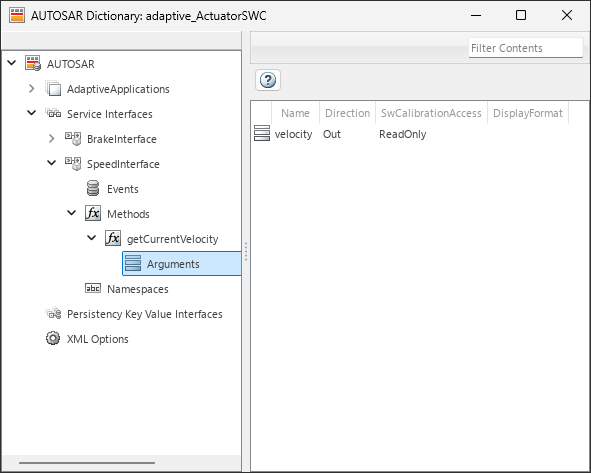
AUTOSAR Adaptive software components use these types of ports:
Required port — Used when a software component consumes a service from other entities
Provided port — Used when a software component provides a service to other entities
Persistency provided-required port — Used when a software component accesses persistent memory
To enable persistent storage, Simulink data stores map to persistency provided-required ports in the AUTOSAR Dictionary. In the AUTOSAR Dictionary, assign each persistency provided-required port of the component to a specific persistency key value interface.

To enable event-based communication, AUTOSAR Blockset uses In Bus Element and Out Bus Element blocks, data ports, and Simulink.dictionary.archdata.DataInterface objects to model and design
AUTOSAR Adaptive software component and composition event-based communication and
execution behavior at run time.
AUTOSAR Adaptive supports client-server communication between application software components. Methods on an AUTOSAR service interface define the interaction between a software component modeled as a server that provides an interface implementation and a software component modeled as a client that requires an interface. With method-based communication, a client application calls a method that executes on the remote server.
To enable method-based communication, AUTOSAR Blockset uses Simulink Function and Function
Caller blocks, function ports, and Simulink.dictionary.archdata.ServiceInterface objects to model and design
AUTOSAR Adaptive software component and composition method communication and execution
behavior at run-time.
Use the Property Inspector and Service Mappings Editor to configure service properties of data and function ports.
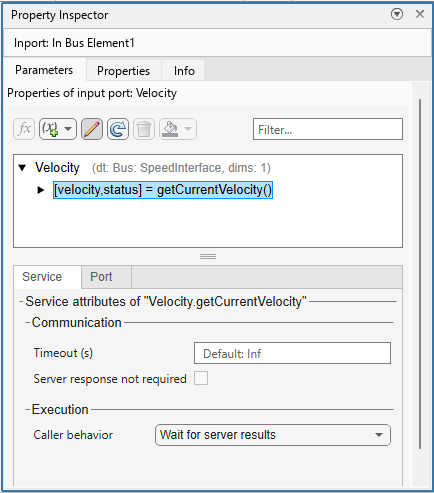
To configure AUTOSAR communication for an adaptive component, specify the services that the component provides or consumes. Configure each required and provided port as software component ports in the Simulink modeling environment. The AUTOSAR Dictionary automatically matches these service properties.
| Interface Type | Description |
|---|---|
| Software component service interface | A declaration of software component communication behavior, execution behavior, and services required by the software component independent of its model algorithm. Configure this service interface in the Simulink modeling environment by setting communication and execution service properties for each software component port and element. |
| AUTOSAR Adaptive Service Interface | A structural definition of service communication for the AUTOSAR Adaptive Platform. In Simulink, the AUTOSAR Adaptive Service Interfaces define methods, events, and namespaces. |
| Sender-receiver interface | A structural definition of data-oriented communication through
software component ports. Use the Architectural Data section of a linked
data dictionary to define sender-receiver interfaces as Simulink.dictionary.archdata.DataInterface
objects. |
| Client-server interface | A structural definition of function-oriented communication through
software component ports. Use the Architectural Data section of a linked
data dictionary to define client-server interfaces as Simulink.dictionary.archdata.ServiceInterface
objects. |
| Persistency key-value interface | A storage mechanism for storing nonvolatile persistent data as named keys to typed values, called key value storages. |
Configure and Generate C++ Algorithm and Service Implementation Code for AUTOSAR Adaptive Platform
You can generate algorithm C++ code, service implementation code, export ARXML descriptions, manifest files, and a standalone executable from AUTOSAR Adaptive software component models. When you generate code the software creates these files:
| Files | Description |
|---|---|
| Contains entry points for the algorithm code. |
| Declares model data structures and provides a public interface to the algorithm entry points and data structures. |
| Declares access APIs that the algorithm calls and that are defined in the service implementation. |
| Contains elements and objects that represent AUTOSAR software components, ports, interfaces, data types, and packages. |
ExecutionManifest.json | Provides deployment-related execution information. The JSON manifest specifies execution scheduling for deployment onto the AUTOSAR adaptive software platform. |
ServiceInstanceManifest.json | Provides deployment-related service interface information. The JSON manifest specifies the service instance configuration for deployment onto the AUTOSAR adaptive software platform. |
| Describes deployment-related content that applies to the configuration of just the underlying machines (that is, without any applications running on the machine) that run an AUTOSAR adaptive application. |
main.cpp | Complete
|
If you build AUTOSAR Adaptive software component models, the software also creates an out-of-the-box executable that can be deployed to a POSIX-based target machine. Use Embedded Coder Support Package for Service-Oriented Applications on Linux to deploy an AUTOSAR adaptive application. For more information, see Build Out of the Box Linux Executable from AUTOSAR Adaptive Model.
For more information about configuring AUTOSAR Code Generation, see Configure AUTOSAR Adaptive Code Generation.
Reuse Software Component Models Across Deployment Targets
You can retarget an AUTOSAR Adaptive software component model without changing the algorithm or software component service interface because the software component service interface is defined independently from the model algorithm. If you have the Software Component Designer for Simulink support package, you can deploy the same model to the Embedded Linux software platform while preserving your software component service interface and AUTOSAR information.
See Also
Topics
- Upgrade AUTOSAR Adaptive Models
- Create and Configure AUTOSAR Adaptive Software Component
- Configure AUTOSAR Adaptive Software Components
- Configure AUTOSAR Adaptive Service Interface Properties
- Configure AUTOSAR Adaptive Code Generation
- Comparison of AUTOSAR Classic and Adaptive Platforms
- Model AUTOSAR Adaptive Software Components
- Model AUTOSAR Adaptive Service Communication and Execution Behavior

