Acquire Counter Input Data
R2026bThis example shows how to configure counter input channels on NI devices and read measurement data. Specifically, it shows how to perform these tasks:
Read a single edge count or frequency value from a counter channel.
Reset counters between reads.
Perform a foreground acquisition of counter data.
Use addinput to
add a counter channel to the DataAcquisition object. You can acquire
counter input data using these channels. The counter input channels support these
measurement types: "EdgeCount", "Frequency",
"PulseWidth", and "Position".
In this example, you use an NI cDAQ-9179 chassis with an NI 9402 counter module
(cDAQ1Mod5) and an NI 9205 analog input module
(cDAQ1Mod1).
Acquire a Single Count
Acquire a single count of falling edges from an NI 9402 with
device ID cDAQ1Mod5. The example assumes that you have
connected an external signal source to the counter channel, and that the count
accumulates over time as the signal is received.
Create a DataAcquisition object by using the daq function.
d = daq("ni");Add a counter input channel with the edge count measurement type, using
the addinput function.
ch = addinput(d,"cDAQ1Mod5","ctr0","EdgeCount")
ch =

    Index    Type      Device       Channel    Measurement Type    Range         Name
    _____    ____    ___________    _______    ________________    _____    ________________

      1      "ci"    "cDAQ1Mod5"    "ctr0"       "EdgeCount"       "n/a"    "cDAQ1Mod5_ctr0"
Change ActiveEdge property of the channel to
'Falling'. View the channel properties.
ch.ActiveEdge = 'Falling';
get(ch)
ActiveEdge: Falling
CountDirection: Increment
InitialCount: 0
Terminal: 'PFI0'
Name: 'cDAQ1Mod5_ctr0'
ID: 'ctr0'
Device: [1x1 daq.ni.DeviceInfo]
MeasurementType: 'EdgeCount'Acquire a single-scan reading of the counter. By default, the read function returns data as a
timetable.
count = read(d)
count =

  timetable

    Time     cDAQ1Mod5_ctr0
    _____    ______________

    0 sec         133
Reset counters to the initial count by using resetcounters, then acquire an updated count value. To
retrieve the count as a numeric scalar, specify
OutputFormat as "Matrix". The
acquired count value is the number of detections since the last
reset.
resetcounters(d);
count = read(d,OutputFormat="Matrix")
count = 71
Acquire a Single Frequency Count
Acquire a single-scan of frequency measurement from an NI
9402 with device ID cDAQ1Mod5.
Create a DataAcquisition object.
d = daq("ni");Add a counter channel with the frequency measurement type.
addinput(d,"cDAQ1Mod5","ctr0","Frequency")
    Index    Type      Device       Channel    Measurement Type    Range         Name
    _____    ____    ___________    _______    ________________    _____    ________________

      1      "ci"    "cDAQ1Mod5"    "ctr0"       "Frequency"       "n/a"    "cDAQ1Mod5_ctr0"
Acquire a single-scan of counter data. The read
function returns the frequency measurement in Hz.
f = read(d,OutputFormat="Matrix")f = 9.5877e+03
If the function returns NaN, verify that the input
signal voltage complies with TTL specifications and that the signal
frequency is within the supported range of the device.
Acquire Counter Data in Foreground
Acquire rising edge count data from an NI 9402 with device ID
cDAQ1Mod5, then plot the acquired data.
Create a DataAcquisition object.
d = daq("ni");Add a counter input channel with the edge count measurement type. By
default, the ActiveEdge property of the channel is
'Rising'
addinput(d,"cDAQ1Mod5","ctr0","EdgeCount")
    Index    Type      Device       Channel    Measurement Type    Range         Name
    _____    ____    ___________    _______    ________________    _____    ________________

      1      "ci"    "cDAQ1Mod5"    "ctr0"       "EdgeCount"       "n/a"    "cDAQ1Mod5_ctr0"
Add an analog input channel with a voltage measurement type.
A DataAcquisition object with only counter channels
defaults to on-demand mode and supports only single-scan reads. To perform a
foreground acquisition, counter channels require a sample clock source,
which can be an external clock or an analog input channel from a clocked
device on the same CompactDAQ chassis. Alternatively, the analog input
channel can be on the same device as the counter channel.
For this example, use an analog channel from NI 9205 device
(cDAQ1Mod1) on the same chassis.
addinput(d,"cDAQ1Mod1","ai1","Voltage");
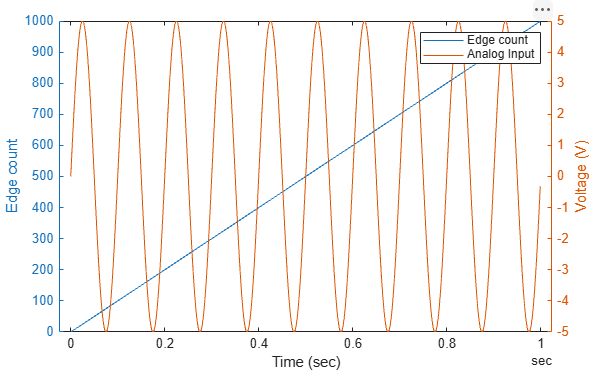
Acquire the data for one second and plot the results.
data = read(d,seconds(1));
yyaxis left
plot(data.Time,data.cDAQ1Mod5_ctr0)
ylabel("Edge count")
yyaxis right
plot(data.Time,data.cDAQ1Mod1_ai1)
ylabel("Voltage (V)")
xlabel("Time (sec)")
legend("Edge count","Analog Input")
The plot displays the results from both channels. The edge count is a linear ramp on the left axis, where each detected edge increments the count. The analog input is a time-varying voltage signal on the right axis.
See Also
Functions
daq|addinput|read|resetcounters

