Generate Data Continuously in Background Using NI Devices
R2026bThis example shows how to generate analog output data using non-blocking commands. When you use non-blocking commands, MATLAB® generates data in the background while you to continue working in the MATLAB command window. In contrast, foreground generation causes MATLAB to wait for the entire data generation to complete before you can execute your next command.
Create Interface to Device and Add Analog Output Channels
Use the daq function to create a DataAcquisition object and the addoutput function to add three output channels. Set the data scan rate to 10000 samples per second. This example uses an NI 9263 module in a National Instruments™ CompactDAQ Chassis NI cDAQ-9178. The device is module 2 in the chassis.
dq = daq("ni");
dq.Rate = 10000;
addoutput(dq,"cDAQ1Mod2",0:2,"Voltage");
Create Synchronized Signals
Generate output signals by creating a pattern of data and repeatedly writing the dat to the output device. The data for each channel is column based and the output signals are synchronized to a common clock.
Create three waveforms:
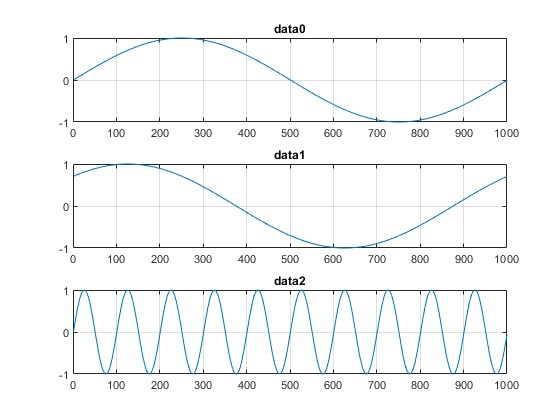
data0— one cycle of a sine wavedata1— one cycle of a sine wave with a phase lag of 45°data2— 10 cycles of a sine wave
data0 = sin(linspace(0,2*pi,1001))';
data1 = sin(linspace(0,2*pi,1001) + pi/4)';
data2 = sin(linspace(0,2*pi*10,1001))';
These waveforms contain sin(0) and sin(2*pi). To repeat the waveforms coherently, remove the final point.
data0(end) = [];
data1(end) = [];
data2(end) = [];
At a generation rate of 10000 scans per second, you can expect to observe data0 and data1 as 10 Hz sine waves and data2 as a 100 Hz sine wave. Plot the three waveforms to confirm.
tiledlayout(3,1)
nexttile
plot(data0)
title("data0")
grid on
nexttile
plot(data1)
title("data1")
grid on;
nexttile
plot(data2)
title("data2")
grid on;
Queue Output Data and Start Background Generation
To start continuous background generation immediately, queue half a second of data using preload. The preloaded data provides an initial buffer that allows background generation to start reliably and prevents the device from running out of queued output data. This example preloads 5000 data points because the device scan rate is defined as 10000 scans per second. To create the 5000-point queue for the three output channels, group the three 1000-point waveforms into a matrix and repeat them sequentially five times.
queueData = repmat([data0,data1,data2],5,1);
preload(dq,queueData);
Initiate the generation using start. MATLAB immediately returns control to the command line, so you can perform other operations while the generation continues in the background. The "Repeat Output" option in start causes the device to generate the queued data in a repeating loop.
start(dq,"RepeatOutput")Generate Output Data Dynamically Using MATLAB Functions
Alternatively, if you want to generate output data dynamically during background generation, configure a callback using the ScansRequiredFcn property of the DataAcquisition object. MATLAB invokes this callback when the number of queued output scans falls below the value specified by ScansRequiredFcnCount property, which by default is set to Rate/2. The code below is functionally equivalent to the previous command using start with the "RepeatOutput" option.
    dq.ScansRequiredFcn = @(src,~)write(src,repmat([data0,data1,data2],5,1));
    preload(dq,zeros(dq.Rate/2,3));
    start(dq,"continuous")
The syntax @(src,~) defines an anonymous function with two inputs. MATLAB passes the DataAcquisition object that triggers the callback as the first input, src. The second input contains event information, which is not used in this example. The code above uses an anonymous function as the callback so it can access variables (data0, data1 and data2) from the surrounding workspace without defining a separate function file.
Monitor Data Generation
To monitor the number of scans output by the hardware for the duration of the generation, check the NumScansOutputByHardware property of the DataAcquisition object. Use a loop with pause to check and display this value every tenth of a second.
t = tic;
while toc(t) < 1.0
    pause(0.1)
    fprintf("Scans output by hardware = %d\n", dq.NumScansOutputByHardware)
end

fprintf("Generation has terminated with %d scans output by hardware\n", dq.NumScansOutputByHardware);
Scans output by hardware = 1109
Scans output by hardware = 2089
Scans output by hardware = 3100
Scans output by hardware = 4095
Scans output by hardware = 5093
Scans output by hardware = 6094
Scans output by hardware = 7082
Scans output by hardware = 8082
Scans output by hardware = 9088
Scans output by hardware = 10099
Generation has terminated with 10099 scans output by hardware
Stop Continuous Background Generation
Background generation runs simultaneously with other operations in MATLAB. Explicitly call stop to end the background generation.
stop(dq)

