Log Analog Input Data to a File Using NI Devices
R2026bThis example shows how to save data acquired in the background to a file.
Create a DataAcquisition with Analog Input Channels
Create a DataAcquisition and add two analog input channels with Voltage measurement type. For this example use a National Instruments™ X Series data acquisition device, NI PCIe-6363 card with ID Dev1.
d = daqlist("ni")
d =

  12×4 table

     DeviceID                 Description                    Model             DeviceInfo
    ___________    __________________________________    _____________    ____________________

    "cDAQ1Mod1"    "National Instruments NI 9205"        "NI 9205"        [1×1 daq.DeviceInfo]
    "cDAQ1Mod2"    "National Instruments NI 9263"        "NI 9263"        [1×1 daq.DeviceInfo]
    "cDAQ1Mod3"    "National Instruments NI 9234"        "NI 9234"        [1×1 daq.DeviceInfo]
    "cDAQ1Mod4"    "National Instruments NI 9201"        "NI 9201"        [1×1 daq.DeviceInfo]
    "cDAQ1Mod5"    "National Instruments NI 9402"        "NI 9402"        [1×1 daq.DeviceInfo]
    "cDAQ1Mod6"    "National Instruments NI 9213"        "NI 9213"        [1×1 daq.DeviceInfo]
    "cDAQ1Mod7"    "National Instruments NI 9219"        "NI 9219"        [1×1 daq.DeviceInfo]
    "cDAQ1Mod8"    "National Instruments NI 9265"        "NI 9265"        [1×1 daq.DeviceInfo]
    "Dev1"         "National Instruments PCIe-6363"      "PCIe-6363"      [1×1 daq.DeviceInfo]
    "Dev2"         "National Instruments NI ELVIS II"    "NI ELVIS II"    [1×1 daq.DeviceInfo]
    "Dev3"         "National Instruments PCIe-6363"      "PCIe-6363"      [1×1 daq.DeviceInfo]
    "Dev4"         "National Instruments PCIe-6363"      "PCIe-6363"      [1×1 daq.DeviceInfo]
deviceInfo = d{9, "DeviceInfo"}
deviceInfo =

ni: National Instruments PCIe-6363 (Device ID: 'Dev1')
   Analog input supports:
      7 ranges supported
      Rates from 0.0 to 2000000.0 scans/sec
      32 channels ('ai0' - 'ai31')
      'Voltage' measurement type

   Analog output supports:
      -5.0 to +5.0 Volts,-10 to +10 Volts ranges
      Rates from 0.0 to 2000000.0 scans/sec
      4 channels ('ao0','ao1','ao2','ao3')
      'Voltage' measurement type

   Digital IO supports:
      39 channels ('port0/line0' - 'port2/line6')
      'InputOnly','OutputOnly','Bidirectional' measurement types

   Counter input supports:
      Rates from 0.1 to 100000000.0 scans/sec
      4 channels ('ctr0','ctr1','ctr2','ctr3')
      'EdgeCount','PulseWidth','Frequency','Position' measurement types

   Counter output supports:
      Rates from 0.1 to 100000000.0 scans/sec
      4 channels ('ctr0','ctr1','ctr2','ctr3')
      'PulseGeneration' measurement type
dq = daq("ni");
addinput(dq, "Dev1", 0:1, "Voltage");
dq.Channels
ans =

    Index    Type    Device    Channel    Measurement Type          Range              Name       TEDS Enabled
    _____    ____    ______    _______    ________________    __________________    __________    ____________

      1      "ai"    "Dev1"     "ai0"     "Voltage (Diff)"    "-10 to +10 Volts"    "Dev1_ai0"      "false"
      2      "ai"    "Dev1"     "ai1"     "Voltage (Diff)"    "-10 to +10 Volts"    "Dev1_ai1"      "false"
Create a Log File
Create the file log.bin and open it. The file identifier is used to write to the file.
fid1 = fopen("log.bin","w");
Set the ScansAvailableFcn
During a background acquisition, the DataAcquisition can be directed to handle acquired data in a specified way using the ScansAvailableFcn property.
dq.ScansAvailableFcn = @(src, evt) logData(src, evt, fid1);
Acquire Data in the Background
Use start to acquire data for five seconds.
start(dq, "Duration", seconds(5))
During normal operation, other MATLAB® commands can execute during this acquisition. For this example, use pause in a loop to monitor the number of scans acquired for the duration of the acquisition.
while dq.Running
    pause(0.5)
    fprintf("While loop: Scans acquired = %d\n", dq.NumScansAcquired)
end

fprintf("Acquisition has terminated with %d scans acquired\n", dq.NumScansAcquired);
Close the Log File
fclose(fid1);
Load Data from the Log File
Load file contents as a 3-column matrix into data.
fid2 = fopen('log.bin','r');
[data,count] = fread(fid2,[3,inf],'double');
fclose(fid2);
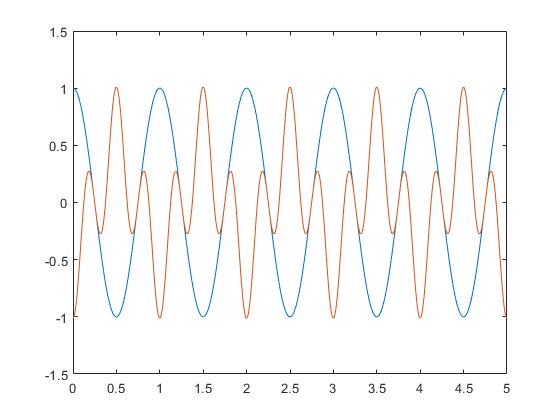
Assign and Plot the Data
t = data(1,:);
ch = data(2:3,:);
plot(t, ch);
function logData(src, ~, fid)
[data, timestamps, ~] = read(src, src.ScansAvailableFcnCount, "OutputFormat", "Matrix");

data = [timestamps, data]' ;
fwrite(fid,data,'double');
end
While loop: Scans acquired = 500
While loop: Scans acquired = 1000
While loop: Scans acquired = 1500
While loop: Scans acquired = 2000
While loop: Scans acquired = 2500
While loop: Scans acquired = 3000
While loop: Scans acquired = 3500
While loop: Scans acquired = 4000
While loop: Scans acquired = 4500
While loop: Scans acquired = 5000
Acquisition has terminated with 5000 scans acquired

