Contenu principal

Double-Acting Actuator (TL)

R2026b

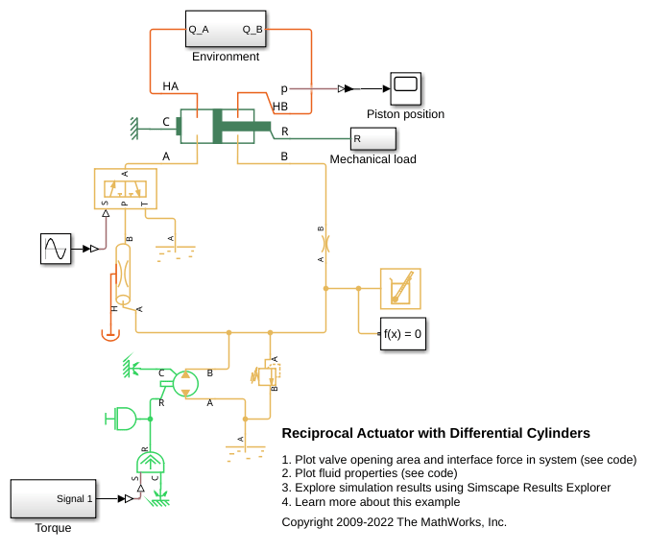
Double-acting linear actuator in a thermal liquid network

  • Double-Acting Actuator (TL) block

Libraries:
Simscape / Fluids / Thermal Liquid / Actuators

Description

The Double-Acting Actuator (TL) block models a linear actuator with a piston controlled by two opposing thermal liquid chambers. The actuator generates force in the extension and retraction strokes. The generated force depends on the pressure difference between the two chambers.

The figure shows the key components of the actuator. Ports A and B represent the thermal liquid chamber inlets. Port R represents the translating actuator piston and port C represents the actuator case. Ports HA and HB represent the thermal interfaces between each chamber and the environment. The moving piston is adiabatic.

This diagram shows the block behavior when Mechanical orientation is Pressure at A causes positive displacement of R relative to C.

Double-Acting Actuator Schematic

Displacement

The block measures the piston displacement as the position at port R relative to port C. The Mechanical orientation parameter identifies the direction of piston displacement. The piston displacement is neutral, or 0, when the chamber A volume is equal to the value of the Dead volume in chamber A parameter. When the Piston displacement from chamber A cap parameter is Provide input signal from Multibody joint, you input the piston displacement using port p. You can ensure that the derivative of the position signal is equal to the piston velocity by using a Translational Multibody Interface block to provide the piston displacement.

The direction of the piston motion depends on the Mechanical orientation parameter. If the mechanical orientation is positive, then the piston translation is positive in relation to the actuator case when the gauge pressure at port A is positive. The direction of motion reverses when the mechanical orientation is negative.

Hard Stop

A set of hard stops limit the piston range of motion. The block uses an implementation of the Translational Hard Stop block, which treats hard stops like spring-damper systems. The spring stiffness coefficient controls the restorative component of the hard-stop contact force and the damping coefficient the dissipative component.

The hard stops are located at the distal ends of the piston stroke. If the mechanical orientation is positive, then the lower hard stop is at x = 0, and the upper hard stop is at x = +stroke. If the mechanical orientation is negative, then the lower hard stop is at x = -stroke, and the upper hard stop is at x = 0.

Cushion

The block can model cushioning toward the extremes of the piston stroke. Select Cylinder end cushioning to slow the piston motion as it approaches the maximum extension, defined by the Piston stroke parameter. For more information on the functionality of a cylinder cushion, see the Cylinder Cushion (TL) block.

Friction

The block can model friction against piston motion. When you select Cylinder friction, the resulting friction is a combination of the Stribeck, Coulomb, and viscous effects. The block measures the pressure difference between the chamber pressure and the environment pressure. For more information on the friction model and its limitations, see the Cylinder Friction (TL) block.

Block Composite

This block is a composite component based on these Simscape™ Foundation blocks:

Diagram of elements that make up the block.

If you select Cylinder friction, Cylinder A end cushioning, or Cylinder B end cushioning, the block composite also includes the Cylinder Friction (TL) block or two Cylinder Cushion (TL) blocks.

Diagram of elements that make up the block with friction and cushion.

Examples

Ports

Input

expand all

Physical signal input associated with the piston position, in m. Connect this port to a Simscape Multibody™ network using a Translational Multibody Interface block.

Dependencies

To enable this port, set Piston displacement from chamber A cap to Provide input signal from Multibody joint.

Programmatic Use

Port: p_in

Output

expand all

Physical signal port associated with the piston position.

Dependencies

To enable this port, set Piston displacement from chamber A cap to Calculate from velocity of port R relative to port C.

Programmatic Use

Port: p_out

Conserving

expand all

Thermal liquid conserving port associated with the inlet to chamber A.

Programmatic Use

Port: A

Thermal liquid conserving port associated with the inlet to chamber B.

Programmatic Use

Port: B

Mechanical translational conserving port associated with the actuator piston.

Programmatic Use

Port: R

Mechanical translational conserving port associated with the actuator casing.

Programmatic Use

Port: C

Thermal conserving port associated with chamber A.

Programmatic Use

Port: HA

Thermal conserving port associated with chamber B.

Programmatic Use

Port: HB

Parameters

expand all

Actuator

Whether to model the same fluid in both actuator chambers. If you select this parameter, the actuator propagates fluid properties through both chambers. Clear this parameter to model each chamber as a different fluid, where each chamber is connected to an isolated fluid network.

Programmatic Use

Parameter: single_fluid
Values: "true" | "false"

Piston displacement direction. When you set this parameter to:

  • Pressure at A causes positive displacement of R relative to C, the piston displacement is positive when the volume of liquid at port A is expanding. This motion corresponds to rod extension.

  • Pressure at A causes negative displacement of R relative to C, the piston displacement is negative when the volume of liquid at port A is expanding. This motion corresponds to rod contraction.

Programmatic Use

Parameter: mech_orientation
Values: "foundation.enum.MechOrientationTranslational.Positive" | "foundation.enum.MechOrientationTranslational.Negative"

Cross-sectional area of the piston rod on the chamber A side.

Programmatic Use

Parameter: piston_area_A

Cross-sectional area of the piston rod on the chamber B side.

Programmatic Use

Parameter: piston_area_B

Maximum piston travel distance.

Programmatic Use

Parameter: stroke

Volume of liquid when the piston displacement is 0 in chamber A. This parameter is the liquid volume when the piston is against the actuator end cap.

Programmatic Use

Parameter: dead_volume_A

Volume of liquid when the piston displacement is 0 in chamber B. This parameter is the liquid volume when the piston is against the actuator end cap.

Programmatic Use

Parameter: dead_volume_B

Environment reference pressure. The Atmospheric pressure option sets the environmental pressure to 0.101325 MPa.

Programmatic Use

Parameter: environment_spec
Values: "foundation.enum.pressure_spec.atmospheric" | "foundation.enum.pressure_spec.specified"
Parameter: environment_spec_A
Values: "foundation.enum.pressure_spec.atmospheric" | "foundation.enum.pressure_spec.specified"
Parameter: environment_spec_B
Values: "foundation.enum.pressure_spec.atmospheric" | "foundation.enum.pressure_spec.specified"

User-defined environmental pressure.

Dependencies

To enable this parameter, set Environment pressure specification to Specified pressure.

Programmatic Use

Parameter: environment_pressure

Parameter: environment_p_A

Parameter: environment_p_B

Hard Stop

Hard stop model to use when the piston is at full extension or full extraction. See the Translational Hard Stop block for more information.

Programmatic Use

Parameter: hardstop_model
Values: "simscape.enum.hardstop.smooth" | "simscape.enum.hardstop.fullundamped" | "simscape.enum.hardstop.fulldamped" | "simscape.enum.hardstop.modechart"

Piston stiffness coefficient.

Dependencies

To enable this parameter, set Hard stop model to one of these settings:

  • Stiffness and damping applied smoothly through transition region, damped rebound

  • Full stiffness and damping applied at bounds, undamped rebound

  • Full stiffness and damping applied at bounds, damped rebound

Programmatic Use

Parameter: stiff_coeff

Piston damping coefficient.

Dependencies

To enable this parameter, set Hard stop model to one of these settings:

  • Stiffness and damping applied smoothly through transition region, damped rebound

  • Full stiffness and damping applied at bounds, undamped rebound

  • Full stiffness and damping applied at bounds, damped rebound

Programmatic Use

Parameter: damping_coeff

Application range of the hard stop force model. The block does not apply the hard stop model when the maximum extension or retraction of the piston is outside of this range. In this situation, there is no additional force on the piston.

Dependencies

To enable this parameter, set Hard stop model to Stiffness and damping applied smoothly through transition region, damped rebound.

Programmatic Use

Parameter: transition

Ratio of the final to the initial relative speed between the slider and the stop after the slider bounces.

Dependencies

To enable this parameter, set Hard stop model to Based on coefficient of restitution.

Programmatic Use

Parameter: coeff_rest

Threshold relative speed between the slider and stop before collision. When the slider hits the case with a speed less than the value of the Static contact speed threshold parameter, they stay in contact. Otherwise, the slider bounces. To avoid modeling static contact between the slider and the case, set this parameter to 0.

Dependencies

To enable this parameter, set Hard stop model to Based on coefficient of restitution.

Programmatic Use

Parameter: v_tol

Minimum force needed to release the slider from a static contact mode.

Dependencies

To enable this parameter, set Hard stop model to Based on coefficient of restitution.

Programmatic Use

Parameter: f_tol

Cushion A

Whether to model piston slow-down at the maximum extension. See the Cylinder Cushion (TL) block for more information.

Programmatic Use

Parameter: cushion_A_spec
Values: "true" | "false"

Area of the plunger inside the actuator cushion element.

Dependencies

To enable this parameter, select Cylinder A end cushioning.

Programmatic Use

Parameter: area_plunger_A

Length of the cushion plunger.

Dependencies

To enable this parameter, select Cylinder A end cushioning.

Programmatic Use

Parameter: length_plunger_A

Area of the orifice between the cushion chambers.

Dependencies

To enable this parameter, select Cylinder A end cushioning.

Programmatic Use

Parameter: area_cushion_orifice_A

Gap area between the cushion plunger and sleeve. This value contributes to numerical stability by maintaining continuity in the flow.

Dependencies

To enable this parameter, select Cylinder A end cushioning.

Programmatic Use

Parameter: area_leak_plunger_A

Pressure beyond which the valve operation triggers. When the pressure difference between port A and Penv meets or exceeds the value of this parameter, the cushion valve begins to open.

Dependencies

To enable this parameter, select Cylinder A end cushioning.

Programmatic Use

Parameter: p_crack_differential_A

Maximum cushion valve differential pressure. This parameter provides an upper limit to the pressure so that system pressures remain realistic.

Dependencies

To enable this parameter, select Cylinder A end cushioning.

Programmatic Use

Parameter: press_max_differential_A

Cross-sectional area of the cushion valve in the fully open position.

Dependencies

To enable this parameter, select Cylinder A end cushioning.

Programmatic Use

Parameter: check_valve_area_max_A

Sum of all gaps when the cushion check valve is in the fully closed position. Any area smaller than this value saturates to the specified leakage area. This value contributes to numerical stability by maintaining continuity in the flow.

Dependencies

To enable this parameter, select Cylinder A end cushioning.

Programmatic Use

Parameter: check_valve_area_leak_A

Continuous smoothing factor that introduces a layer of gradual change to the flow response when the variable orifice and check valve are in near-open or near-closed positions. Set this value to a nonzero value less than one to increase the stability of your simulation in these regimes.

Dependencies

To enable this parameter, select Cylinder A end cushioning.

Programmatic Use

Parameter: smoothing_factor_A

Cushion B

Whether to model piston slow-down at the maximum extension. See the Cylinder Cushion (TL) block for more information.

Programmatic Use

Parameter: cushion_B_spec
Values: "true" | "false"

Area of the plunger inside the actuator cushion element.

Dependencies

To enable this parameter, select Cylinder B end cushioning.

Programmatic Use

Parameter: area_plunger_B

Length of the cushion plunger.

Dependencies

To enable this parameter, select Cylinder B end cushioning.

Programmatic Use

Parameter: length_plunger_B

Area of the orifice between the cushion chambers.

Dependencies

To enable this parameter, select Cylinder B end cushioning.

Programmatic Use

Parameter: area_cushion_orifice_B

Gap area between the cushion plunger and sleeve. This value contributes to numerical stability by maintaining continuity in the flow.

Dependencies

To enable this parameter, select Cylinder B end cushioning.

Programmatic Use

Parameter: area_leak_plunger_B

Pressure beyond which the valve operation triggers. When the pressure difference between port A and Penv meets or exceeds the value of this parameter, the cushion valve begins to open.

Dependencies

To enable this parameter, select Cylinder B end cushioning.

Programmatic Use

Parameter: p_crack_differential_B

Maximum cushion valve differential pressure. This parameter provides an upper limit to the pressure so that system pressures remain realistic.

Dependencies

To enable this parameter, select Cylinder B end cushioning.

Programmatic Use

Parameter: press_max_differential_B

Cross-sectional area of the cushion valve in the fully open position.

Dependencies

To enable this parameter, select Cylinder B end cushioning.

Programmatic Use

Parameter: check_valve_area_max_B

Sum of all gaps when the cushion check valve is in the fully closed position. Any area smaller than this value saturates to the specified leakage area. This value contributes to numerical stability by maintaining continuity in the flow.

Dependencies

To enable this parameter, select Cylinder B end cushioning.

Programmatic Use

Parameter: check_valve_area_leak_B

Continuous smoothing factor that introduces a layer of gradual change to the flow response when the variable orifice and check valve are in near-open or near-closed positions. Set this value to a nonzero value less than one to increase the stability of your simulation in these regimes.

Dependencies

To enable this parameter, select Cylinder B end cushioning.

Programmatic Use

Parameter: smoothing_factor_B

Friction

Whether to model friction against piston motion. The block accounts for Coulomb, Stribeck, and viscous friction. See the Cylinder Friction (TL) block for more information.

Programmatic Use

Parameter: friction_spec
Values: "true" | "false"

Ratio of the breakaway force to the Coulomb friction force.

Dependencies

To enable this parameter, select Cylinder friction.

Programmatic Use

Parameter: breakaway_Coulomb_ratio

Threshold velocity for the motion against the friction force to begin.

Dependencies

To enable this parameter, select Cylinder friction.

Programmatic Use

Parameter: breakaway_velocity

Force on the cylinder when it is in the neutral position.

Dependencies

To enable this parameter, select Cylinder friction.

Programmatic Use

Parameter: preload_force

Coulomb force coefficient of friction.

Dependencies

To enable this parameter, select Cylinder friction.

Programmatic Use

Parameter: Coulomb_coeff

Viscous friction coefficient.

Dependencies

To enable this parameter, select Cylinder friction.

Programmatic Use

Parameter: viscous_coeff

Initial Conditions

Method for determining the piston position. The block can receive the position from a Multibody block when set to Provide input signal from Multibody joint, or can calculate the position internally and report the position at port p. The position is between 0 and the value of the Piston stroke parameter when the mechanical orientation is positive and between 0 and the negative value of the Piston stroke parameter when the mechanical orientation is negative.

Programmatic Use

Parameter: displacement_spec
Values: "foundation.enum.DisplacementSpec.Calculate" | "foundation.enum.DisplacementSpec.InputSignal"

Piston position at the start of the simulation.

Dependencies

To enable this parameter, set Piston displacement to Calculate from velocity of port R relative to port C.

Programmatic Use

Parameter: x0

Whether to model the dynamic compressibility of the liquid. Dynamic compressibility affects the transient response of the system at small timescales. If you select this parameter, the pressure responds dynamically based on the accumulation of fluid mass in the volume. If you clear this parameter, the volume does not accumulate mass and the pressure response is instantaneous. Clearing this setting can improve simulation performance, but may have a negative effect on the simulation robustness. Only clear this setting for small fluid volumes or models with long simulation times.

Programmatic Use

Parameter: dynamic_compressibility

Parameter: compressibility

Initial temperature of the liquid volume in the actuator.

Programmatic Use

Parameter: T0_A

Initial temperature of the liquid volume in the actuator.

Programmatic Use

Parameter: T0_B

Starting liquid pressure for compressible fluids.

Dependencies

To enable this parameter, select Enable dynamic compressibility.

Programmatic Use

Parameter: p0_A

Starting liquid pressure for compressible fluids.

Dependencies

To enable this parameter, select Enable dynamic compressibility.

Programmatic Use

Parameter: p0_B

Liquid pressure at nominal operating conditions in chamber A. The block uses this value to calculate the nominal density to use in the mass conservation equation when dynamic compressibility is disabled.

Dependencies

To enable this parameter, clear the Enable dynamic compressibility checkbox.

Programmatic Use

Parameter: p_nominal_A

Liquid pressure at nominal operating conditions in chamber B. The block uses this value to calculate the nominal density to use in the mass conservation equation when dynamic compressibility is disabled.

Dependencies

To enable this parameter, clear the Enable dynamic compressibility checkbox.

Programmatic Use

Parameter: p_nominal_B

Liquid temperature at nominal operating conditions in chamber A. The block uses this value to calculate the nominal density to use in the mass conservation equation when dynamic compressibility is disabled.

Dependencies

To enable this parameter, clear the Enable dynamic compressibility checkbox.

Programmatic Use

Parameter: T_nominal_A

Liquid temperature at nominal operating conditions in chamber B. The block uses this value to calculate the nominal density to use in the mass conservation equation when dynamic compressibility is disabled.

Dependencies

To enable this parameter, clear the Enable dynamic compressibility checkbox.

Programmatic Use

Parameter: T_nominal_B

Extended Capabilities

expand all

C/C++ Code Generation
Generate C and C++ code using Simulink® Coder™.

Version History

Introduced in R2016a

expand all