Run MapReduce on a Parallel Pool
R2026bStart Parallel Pool
If you have Parallel Computing Toolbox™ installed, execution of mapreduce can open a parallel pool on the cluster specified by your
default profile, for use as the execution environment.
You can set your parallel settings so that a pool does not automatically open. In
this case, you must explicitly start a pool if you want mapreduce
to use it for parallelization of its work. To learn more about parallel settings,
see Specify Your Parallel Settings.
For example, this conceptual code starts a pool with 12 workers. Then it sets the
execution environment to the pool using mapreducer, which creates the
MapReducer object mr. Finally, it uses
mr to run mapreduce on the transformed datastore
tds.
p = parpool('Processes',12);
mr = mapreducer(p);
outds = mapreduce(tds,@mapFun,@reduceFun,mr)
Note
mapreducecan run on any cluster that supports parallel pools. The example in this topic uses a local cluster, which works for all Parallel Computing Toolbox installations.When running parallel
mapreduceon a cluster, the order of the key-value pairs in the output is different compared to runningmapreducein MATLAB®. If your application depends on the arrangement of data in the output, you must sort the data according to your own requirements.
Compare Performance of Parallel MapReduce
This example shows how to run MapReduce computations on a parallel pool of workers and compare the performance of mapreduce on the client and on a parallel pool. In this example, you compute the grouped mean of a dataset using the mapreduce function.
First, you run the mapreduce function on the MATLAB® client session, then on parallel on a local cluster. You use the mapreducer function to explicitly control the execution environment.
Begin by starting a parallel pool of four workers using local Processes profile.
p = parpool("Processes",4);Create two MapReducer objects for specifying the different execution environments for mapreduce.
First, create a SerialMapReducer object for serial execution on the client.
onClient = mapreducer(0);
Then, create a ParallelMapReducer object for parallel execution on the open parallel pool.
onPool = mapreducer(p);
Prepare Sample Dataset
The sample dataset file, energyGridEvents.parquet, contains data representing events at each substation and feeder of an large energy grid. Use a datastore to preview the data in the file. The data has 10 columns.
filename = "energyGridEvents.parquet";
preview(parquetDatastore(filename))
ans = 8×10 table
01-Jan-2000 00:33:59 "North" "S173" "F1057" "EquipmentFault" 4 0 01-Jan-2000 00:59:59 "Mitigated" "Equipment"
01-Jan-2000 00:39:19 "West" "S270" "F0022" "FrequencyDeviation" 1 876 01-Jan-2000 00:47:19 "Resolved" "Equipment"
01-Jan-2000 00:46:13 "East" "S284" "F1123" "Outage" 5 115885 04-Jan-2000 16:31:13 "Mitigated" "Equipment"
01-Jan-2000 02:13:30 "East" "S089" "F0044" "StormImpact" 4 53753 02-Jan-2000 22:33:30 "Open" "Weather"
01-Jan-2000 03:05:16 "Central" "S254" "F1738" "VoltageDip" 2 1931 01-Jan-2000 03:16:16 "Resolved" "HumanError"
01-Jan-2000 03:10:49 "Central" "S371" "F0593" "Outage" 3 25535 02-Jan-2000 03:57:49 "Mitigated" "Weather"
01-Jan-2000 03:40:03 "North" "S102" "F1322" "EquipmentFault" 4 0 01-Jan-2000 05:16:03 "Resolved" "Unknown"
01-Jan-2000 07:23:46 "East" "S272" "F1723" "StormImpact" 4 87741 02-Jan-2000 18:38:46 "Resolved" "Weather"
The energyGridEvents.parquet file is a relatively small data set so you are unlikely to observe any improved performance with the parallel pool when compared to the MATLAB client session. To increase the dataset size, you can create multiple copies of the file.
This code creates a subfolder in your current folder and makes 20 copies of the energyGridEvents.parquet file, which occupies approximately 100 MB of disk space. To confirm that you want to increase the dataset size, select "true" from the drop-down list before running the example. To run the example with a single copy of the energyGridEvents.parquet file, select "false" from the drop-down list.
increaseDatasetIfTrue =select; if increaseDatasetIfTrue if ~isfolder("dataFolder") mkdir("dataFolder") end for c = 1:50 filepath = fullfile("dataFolder", ... strcat("events_",num2str(c),".parquet")); copyfile(filename,filepath); end dataRoot = "dataFolder"; else dataRoot = filename; end
Create Datastore on Larger Dataset
Create a ParquetDatastore datastore object using the larger event dataset. To calculate the duration of events that have customer impact, you require only the EventTime, RestorationTime, and CustomersAffected variables.
selectedVariables = ["EventTime","RestorationTime","CustomersAffected"];
ds = parquetDatastore(dataRoot, ...
    SelectedVariableNames=selectedVariables);
Create a row filter using the ParquetDatastore object. Then, use the row filter to select rows with CustomerAffected values greater than 0.
rf = rowfilter(ds);
ds.RowFilter = rf.CustomersAffected>0;
Preview the datastore.
preview(ds)
ans = 8×3 table
    01-Jan-2000 00:39:19    01-Jan-2000 00:47:19       876
    01-Jan-2000 00:46:13    04-Jan-2000 16:31:13    115885
    01-Jan-2000 02:13:30    02-Jan-2000 22:33:30     53753
    01-Jan-2000 03:05:16    01-Jan-2000 03:16:16      1931
    01-Jan-2000 03:10:49    02-Jan-2000 03:57:49     25535
    01-Jan-2000 07:23:46    02-Jan-2000 18:38:46     87741
    01-Jan-2000 12:57:06    02-Jan-2000 14:56:06     16922
    01-Jan-2000 13:23:56    02-Jan-2000 15:52:56      6694
Run MapReduce Operation on Client
Run the MapReduce computation to calculate the mean event duration in hours, grouped by the day of the week that the event began. To run the mapreduce function on the MATLAB client session, specify the SerialMapReducer object onClient as the execution environment. The map and reduce functions are defined at the end of this example.
serialMeanEventDurationByDay = mapreduce(ds, ...
    @meanEventDurationMapper,...
    @meanEventDurationReducer,onClient);
********************************
*      MAPREDUCE PROGRESS      *
********************************
Map   0% Reduce   0%
Map  10% Reduce   0%
Map  20% Reduce   0%
Map  30% Reduce   0%
Map  40% Reduce   0%
Map  50% Reduce   0%
Map  60% Reduce   0%
Map  70% Reduce   0%
Map  80% Reduce   0%
Map  90% Reduce   0%
Map 100% Reduce   0%
Map 100% Reduce  14%
Map 100% Reduce  29%
Map 100% Reduce  43%
Map 100% Reduce  57%
Map 100% Reduce  71%
Map 100% Reduce  86%
Map 100% Reduce 100%
The mapreduce function returns a KeyValueDatastore object, serialMeanEventDurationByDay, that points to a result file it creates in the current folder.
Read the final result from the output datastore, serialMeanEventDurationByDay.
readall(serialMeanEventDurationByDay)
ans = 7×2 table
       'Sunday'    23.3503
       'Monday'    15.7961
      'Tuesday'    10.5672
    'Wednesday'    10.6704
     'Thursday'    10.4908
       'Friday'    15.7035
     'Saturday'    23.1165
Run mapreduce Calculations on Pool
Next, run the MapReduce computation on the open parallel pool by specifying the ParallelMapReducer object onPool in the mapreduce function. The map and reduce functions are defined at the end of this example. Note that the display text indicates that the mapreduce function is running in parallel.
parallelMeanEventDurationByDay = mapreduce(ds, ...
    @meanEventDurationMapper, ...
    @meanEventDurationReducer,onPool);
Parallel mapreduce execution on the parallel pool:
********************************
*      MAPREDUCE PROGRESS      *
********************************
Map   0% Reduce   0%
Map   1% Reduce   0%
Map   2% Reduce   0%
Map   3% Reduce   0%
Map   4% Reduce   0%
Map   5% Reduce   0%
Map   6% Reduce   0%
Map   7% Reduce   0%
Map   8% Reduce   0%
Map   9% Reduce   0%
Map  10% Reduce   0%
Map  11% Reduce   0%
Map  12% Reduce   0%
Map  13% Reduce   0%
Map  14% Reduce   0%
Map  15% Reduce   0%
Map  16% Reduce   0%
Map  17% Reduce   0%
Map  18% Reduce   0%
Map  19% Reduce   0%
Map  20% Reduce   0%
Map  21% Reduce   0%
Map  22% Reduce   0%
Map  23% Reduce   0%
Map  24% Reduce   0%
Map  25% Reduce   0%
Map  26% Reduce   0%
Map  27% Reduce   0%
Map  28% Reduce   0%
Map  29% Reduce   0%
Map  30% Reduce   0%
Map  31% Reduce   0%
Map  32% Reduce   0%
Map  33% Reduce   0%
Map  34% Reduce   0%
Map  35% Reduce   0%
Map  36% Reduce   0%
Map  37% Reduce   0%
Map  38% Reduce   0%
Map  39% Reduce   0%
Map  40% Reduce   0%
Map  41% Reduce   0%
Map  42% Reduce   0%
Map  43% Reduce   0%
Map  44% Reduce   0%
Map  45% Reduce   0%
Map  46% Reduce   0%
Map  47% Reduce   0%
Map  48% Reduce   0%
Map  49% Reduce   0%
Map  50% Reduce   0%
Map  51% Reduce   0%
Map  52% Reduce   0%
Map  53% Reduce   0%
Map  54% Reduce   0%
Map  55% Reduce   0%
Map  56% Reduce   0%
Map  57% Reduce   0%
Map  58% Reduce   0%
Map  59% Reduce   0%
Map  60% Reduce   0%
Map  61% Reduce   0%
Map  62% Reduce   0%
Map  63% Reduce   0%
Map  64% Reduce   0%
Map  65% Reduce   0%
Map  66% Reduce   0%
Map  67% Reduce   0%
Map  68% Reduce   0%
Map  69% Reduce   0%
Map  70% Reduce   0%
Map  71% Reduce   0%
Map  72% Reduce   0%
Map  73% Reduce   0%
Map  74% Reduce   0%
Map  75% Reduce   0%
Map  76% Reduce   0%
Map  77% Reduce   0%
Map  78% Reduce   0%
Map  79% Reduce   0%
Map  80% Reduce   0%
Map  81% Reduce   0%
Map  82% Reduce   0%
Map  83% Reduce   0%
Map  84% Reduce   0%
Map  85% Reduce   0%
Map  86% Reduce   0%
Map  87% Reduce   0%
Map  88% Reduce   0%
Map  89% Reduce   0%
Map  90% Reduce   0%
Map  91% Reduce   0%
Map  92% Reduce   0%
Map  93% Reduce   0%
Map  94% Reduce   0%
Map  95% Reduce   0%
Map  96% Reduce   0%
Map  97% Reduce   0%
Map  98% Reduce   0%
Map  99% Reduce   0%
Map 100% Reduce   0%
Map 100% Reduce 100%
The mapreduce function returns a KeyValueDatastore object, parallelMeanEventDurationByDay, that points to four result files it creates in the current folder. Each result file corresponds to the results each worker computes.
Read the final result from the output datastore, parallelMeanEventDurationByDay.
readall(parallelMeanEventDurationByDay)
ans = 7×2 table
       'Friday'    15.7035
       'Monday'    15.7961
    'Wednesday'    10.6704
       'Sunday'    23.3503
     'Thursday'    10.4908
     'Saturday'    23.1165
      'Tuesday'    10.5672
Compare Execution Times
Time the execution of the MapReduce computation on the MATLAB client and the parallel pool using the timeit function. The timeit function takes a several minutes to complete.
tClient = timeit(@() ...
    mapreduce(ds,@meanEventDurationMapper, ...
    @meanEventDurationReducer,onClient,Display="off"));
tPool = timeit(@() ...
    mapreduce(ds,@meanEventDurationMapper, ...
    @meanEventDurationReducer,onPool,Display="off"));
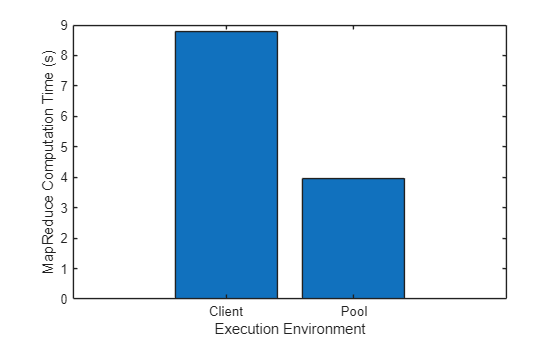
Compare the execution of the MapReduce computation on the MATLAB client and the parallel pool.
disp("Speedup of mapreduce computation on" + ...
" a parallel pool compared to the MATLAB client: " + ...
round(tClient/tPool) + "x")
Speedup of mapreduce computation on a parallel pool compared to the MATLAB client: 3x
figure
executionEnvironment = ["Client" "Pool"];
bar(executionEnvironment,[tClient tPool])
xlabel("Execution Environment")
ylabel("MapReduce Computation Time (s)")
Clean Up Files
Delete the event dataset and the mapreduce result MAT files in the current folder.
rmdir("dataFolder","s")
delete("result*")
Supporting Functions
The map function meanEventDurationMapper groups events by the day they started, removes any rows with missing values, and compute the count and sum of event duration for each day in hours. The function adds the results to a KeyValueStore object as intermediate key-value pairs. where the key is the day of the week, for example, "Sunday", and the value is a two-element vector containing the count and sum of event durations for that day.
function meanEventDurationMapper(data,~,intermKVStore)
eventTime = data.EventTime;

% Calculate event duration in hours
eventDuration = data.RestorationTime - data.EventTime;
eventDuration = hours(eventDuration);

% Remove rows with missing values
notNaN = ~isnan(eventDuration);
eventTime = eventTime(notNaN);
eventDuration = eventDuration(notNaN);

% Compute the count and sum of event duration per event start day
[s,dayOfWeek,n] = groupsummary(eventDuration,eventTime,"dayname","sum");
dayOfWeek = string(dayOfWeek);
sumAndCount = num2cell([n,s],2);
addmulti(intermKVStore,dayOfWeek,sumAndCount);
end
The reduce function meanEventDurationReducer receives a list of the intermediate count and sum of delays for the day specified by the input key, intermKey, and sums up the values into the total count and total sum. Then, the function calculates the overall mean, and adds one final key-value pair to the output KeyValueStore object. This key-value pair represents the mean event duration for that day of the week.
function meanEventDurationReducer(intermKey,intermValIter,outKVStore)
totalCount = 0;
totalSum = 0;

% Accumulate intermediate results for one day
while hasnext(intermValIter)
    intermValue = getnext(intermValIter);
    totalCount = totalCount + intermValue(1);
    totalSum = totalSum + intermValue(2);
end

% Add results to the output datastore
meanDuration = totalSum/totalCount;
add(outKVStore,intermKey,meanDuration);
end

