Covariance Estimator
R2026bCovariance Estimator block
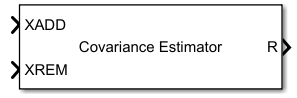
To add a block to a model, double-click the canvas and start typing the block name. Then, select the block from the list.
Libraries:
Phased Array System Toolbox /
Detection
Description
Ports
Input
Input snapshot, specified as a Qadd-by-N complex-valued matrix. Each of the Qadd rows represents a single snapshot and each snapshot is an N-dimensional vector. N must be fixed.
Data Types: single | double
Complex Number Support: Yes
Snapshots to be removed, specified as a Qrem-by-N complex-valued matrix. Each row of Qrem represents a single snapshot. Each snapshot is an N-dimensional vector.
Dependencies
To enable this port, set the Estimation mode to
Update and downdate.
Data Types: single | double
Complex Number Support: Yes
Diagonal loading factor, specified as a nonnegative scalar.
Dependencies
To enable this port, set the Diagonal loading parameter or method
property to "Input port".
Output
Estimated covariance matrix, output as an N-by-N Hermitian matrix.
Data Types: single | double
Complex Number Support: Yes
Parameters
To edit block parameters interactively, use the Property Inspector. From the Simulink® Toolstrip, on the Simulation tab, in the Prepare gallery, select Property Inspector.
Method used to estimate the covariance matrix, specified as "SCM"
or "NSCM".
Use
"SCM"to specify the sample covariance matrix.Use
"NSCM"to specify the normalized sample covariance matrix.
Example: "NSCM"
Data Types: char | string
Specify the diagonal loading applied to the covariance matrix to improve numeric
stability and robustness. Specify the value as a nonnegative scalar, "Input
port", or "Shrinkage".
Setting the
DiagonalLoadingproperty to a nonnegative scalar adds its value to the diagonal elements of the covariance matrix.Setting the
DiagonalLoadingproperty to"Input port"uses the input argumentepsilonto set the diagonal loading property.Setting the
DiagonalLoadingproperty to"Shrinkage"uses a shrinkage-based method to set the diagonal loading property.
Example: DiagonalLoading="Shrinkage"
Data Types: single | double | char | string
Estimation mode used to create or modify the covariance matrix, specified as
"Batch", "Update", or "Update and
downdate".
Set this parameter to
"Batch"to estimate the covariance matrix solely from current data snapshotsxadd.Set this parameter to
"Update"to update the existing covariance matrix from current data snapshots,xadd, and the previous stored covariance matrix.Set this parameter to
"Update and downdate"to update the existing covariance matrix from current data snapshots,xadd, and remove any contributions of the snapshots inxrem.
Example: Mode="Update and downdate"
Data Types: char | string
Block simulation, specified as Interpreted Execution or
Code
                Generation
. If you want your block to use the
MATLAB® interpreter, choose Interpreted Execution. If
you want your block to run as compiled code, choose Code
Generation. Compiled code requires time to compile but usually runs
faster.
Interpreted execution is useful when you are developing and tuning a model. The block
runs the underlying System object™ in MATLAB. You can change and execute your model quickly. When you are satisfied
with your results, you can then run the block using Code
Generation. Long simulations run faster with generated code than in
interpreted execution. You can run repeated executions without recompiling, but if you
change any block parameters, then the block automatically recompiles before
execution.
This table shows how the Simulate using parameter affects the overall simulation behavior.
When the Simulink model is in Accelerator mode, the block mode specified
using Simulate using overrides the simulation mode.
Acceleration Modes
| Block Simulation | Simulation Behavior | ||
Normal | Accelerator | Rapid Accelerator | |
Interpreted Execution | The block executes using the MATLAB interpreter. | The block executes using the MATLAB interpreter. | Creates a standalone executable from the model. |
Code Generation | The block is compiled. | All blocks in the model are compiled. | |
For more information, see Choosing a Simulation Mode (Simulink).
Programmatic Use
Block Parameter:
SimulateUsing |
| Type: enum |
Values:
Interpreted Execution, Code
Generation |
Default:
Interpreted Execution |
Version History
Introduced in R2026b
See Also
phased.CovarianceEstimator | whiteningmat | Whitening Matrix
MATLAB Command
You clicked a link that corresponds to this MATLAB command:
Run the command by entering it in the MATLAB Command Window. Web browsers do not support MATLAB commands.


Sélectionner un site web
Choisissez un site web pour accéder au contenu traduit dans votre langue (lorsqu'il est disponible) et voir les événements et les offres locales. D’après votre position, nous vous recommandons de sélectionner la région suivante : .
Vous pouvez également sélectionner un site web dans la liste suivante :
Comment optimiser les performances du site
Pour optimiser les performances du site, sélectionnez la région Chine (en chinois ou en anglais). Les sites de MathWorks pour les autres pays ne sont pas optimisés pour les visites provenant de votre région.
Amériques
- América Latina (Español)
- Canada (English)
- United States (English)
Europe
- Belgium (English)
- Denmark (English)
- Deutschland (Deutsch)
- España (Español)
- Finland (English)
- France (Français)
- Ireland (English)
- Italia (Italiano)
- Luxembourg (English)
- Netherlands (English)
- Norway (English)
- Österreich (Deutsch)
- Portugal (English)
- Sweden (English)
- Switzerland
- United Kingdom (English)