plotResponse
System object: phased.ShortDipoleAntennaElement
Namespace: phased
Plot response pattern of antenna
Syntax
plotResponse(H,FREQ)
plotResponse(H,FREQ,Name,Value)
hPlot = plotResponse(___)
Description
plotResponse( plots
the element response pattern along the azimuth cut, where the elevation
angle is 0. The operating frequency is specified in H,FREQ)FREQ.
plotResponse(
plots the element response with additional options specified by one
or more H,FREQ,Name,Value)Name,Value pair arguments.
returns handles of the lines or surface in the figure window, using
any of the input arguments in the previous syntaxes.hPlot = plotResponse(___)
Input Arguments
| Element System object™ |
| Operating frequency in Hertz specified as a scalar or 1–by-K row
vector. |
Name-Value Arguments
Specify optional pairs of arguments as
Name1=Value1,...,NameN=ValueN, where Name is
the argument name and Value is the corresponding value.
Name-value arguments must appear after other arguments, but the order of the
pairs does not matter.
Before R2021a, use commas to separate each name and value, and enclose
Name in quotes.
| Cut angle specified as a scalar. This argument is applicable
only when Default: | ||||||||||
| Format of the plot, using one of Default: | ||||||||||
| Set this value to Default: | ||||||||||
| Set this value to This parameter applies only when Default: | ||||||||||
| Specify the polarization options for plotting the antenna response
pattern. The allowable values are
For antennas that do not support polarization, the
only allowed value is Default: | ||||||||||
| Cut of the response. Valid values depend on
If you set | ||||||||||
| The unit of the plot. Valid values are
Default: | ||||||||||
| Azimuth angles for plotting element response, specified as a
row vector. The Default: | ||||||||||
| Elevation angles for plotting element response, specified as
a row vector. The Default: | ||||||||||
| U coordinate values for plotting element
response, specified as a row vector. The Default: | ||||||||||
| V coordinate values for plotting element
response, specified as a row vector. The Default: |
Examples
Specify a short-dipole antenna element with its dipole axis pointing along the z-axis. To do so, set the 'AxisDirection' value to 'Z'.
sSD = phased.ShortDipoleAntennaElement(... 'FrequencyRange',[100 900]*1e6,'AxisDirection','Z');
Plot the antenna's vertical polarization response at 200 MHz as a 3-D polar plot.
fc = 200e6; plotResponse(sSD,fc,'Format','Polar',... 'RespCut','3D','Polarization','V');
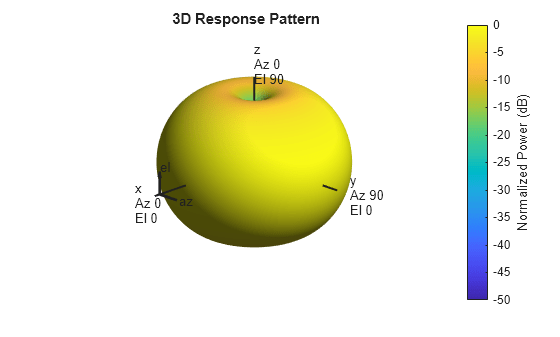
As the above figure shows, the antenna pattern is that of a vertically-oriented dipole and has its maximum at the equator and nulls at the poles.
This example shows how to construct a short-dipole antenna element with its dipole axis pointing along the z-axis and how to plot the response over a selected range of angles. The antenna operating frequency spans the range 100 to 900 MHz.
To construct a z-directed short-dipole antenna, set the 'AxisDirection' value to 'Z'.
sSD = phased.ShortDipoleAntennaElement(... 'FrequencyRange',[100 900]*1e6,'AxisDirection','Z');
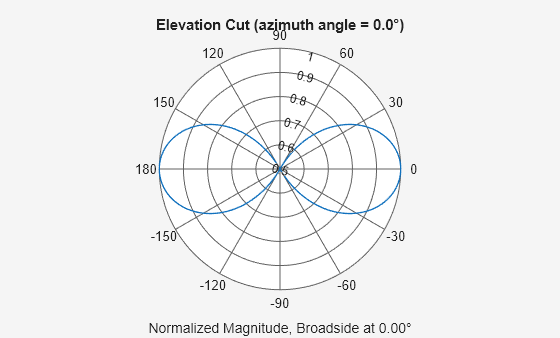
Plot the antenna's vertical polarization response at 200 MHz as an elevation cut at a fixed azimuth angle. Use the 'ElevationAngles' property to restrict the plot from -60 to 60 degrees elevation in 0.1 degree increments.
plotResponse(sSD,200e6,'Format','Polar',... 'RespCut','El','Polarization','V',... 'ElevationAngles',[-60:0.1:60],'Unit','mag');
This example shows how to construct a short-dipole antenna element with its dipole axis pointing along the y-axis and how to plot the directivity. The antenna operating frequency spans the range 100 to 900 MHz.
To construct a y-directed short-dipole antenna, set the 'AxisDirection' value to 'Y'.
sSD = phased.ShortDipoleAntennaElement(... 'FrequencyRange',[100 900]*1e6,'AxisDirection','Y');
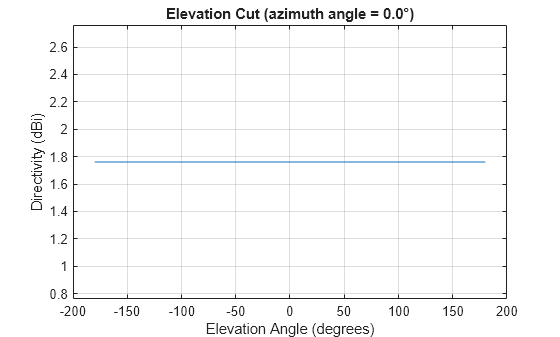
Plot the antenna's directivity at 500 MHz as an elevation cut at a fixed azimuth angle.
plotResponse(sSD,500e6,'Format','Line',... 'RespCut','El','Unit','dbi');
MATLAB Command
You clicked a link that corresponds to this MATLAB command:
Run the command by entering it in the MATLAB Command Window. Web browsers do not support MATLAB commands.
Sélectionner un site web
Choisissez un site web pour accéder au contenu traduit dans votre langue (lorsqu'il est disponible) et voir les événements et les offres locales. D’après votre position, nous vous recommandons de sélectionner la région suivante : .
Vous pouvez également sélectionner un site web dans la liste suivante :
Comment optimiser les performances du site
Pour optimiser les performances du site, sélectionnez la région Chine (en chinois ou en anglais). Les sites de MathWorks pour les autres pays ne sont pas optimisés pour les visites provenant de votre région.
Amériques
- América Latina (Español)
- Canada (English)
- United States (English)
Europe
- Belgium (English)
- Denmark (English)
- Deutschland (Deutsch)
- España (Español)
- Finland (English)
- France (Français)
- Ireland (English)
- Italia (Italiano)
- Luxembourg (English)
- Netherlands (English)
- Norway (English)
- Österreich (Deutsch)
- Portugal (English)
- Sweden (English)
- Switzerland
- United Kingdom (English)