Anatomy of Run-Time Environment Function Stubs Generated from AUTOSAR Design Specifications
If you use the AUTOSAR methodology for software development, you can use Polyspace®
Test™ to author tests for code implementation of AUTOSAR software components. Polyspace
Test supports the AUTOSAR methodology with capabilities such as AUTOSAR-aware smart stubbing. This topic describes the structure of the function stub generated for a Runtime Environment (Rte_) function. For the full test authoring workflow for AUTOSAR code, see Create Project and Write Tests for AUTOSAR Software Component Implementations.
How AUTOSAR Stubs Differ from Regular Stubs
If you create a Polyspace Platform workspace from AUTOSAR design specifications (ARXML files) and generate stubs for the Runtime Environment (Rte_) functions in the project, these AUTOSAR-aware stubs differ from regular function stubs in the following ways:
By default, the stubs export variables that allow you to control the stub behavior directly from the tests without modifying the stub definitions.
In a regular stub, if you want to control the stub behavior from a test, you have to export variables from the stub definitions yourself. For an example, see Change Mock or Stub Implementation Based on Test.
The stub bodies contain pre-conditions that test whether the stub input values fall within the design range of their data types defined in the ARXML specifications.
The stub bodies contain post-conditions that test whether the stub return values and potentially modified input values fall within the design range of their data types defined in the ARXML specifications.
When you author a new test, the variables exported from the stubs have default values that are designed to pass the pre-conditions and post-conditions in the stub bodies. If you modify these default values and your new values violate a data type constraint, you see a test failure resulting from a failed pre-condition or post-condition in a stub body. For an example, see Test That Fails Checks in Stubs.
Structure of AUTOSAR Stubs
Suppose that you generate a stub for an Rte_ function:
Rte_ReturnType Rte_Read_swc001_MyRead_int10to100(Int10to100Ref aData)
Rte_ReturnType and Int10to100Ref are generated from design specifications in an AUTOSAR XML (ARXML) file.To view or edit the generated stub:
In the Polyspace Platform user interface, on the Projects pane, under the Test Artifacts node, right-click the stub name and select Edit Stub/Mock.
In the Function Editor window, you can see the following information:
Exported declarations: This section contains
externdeclarations for variables that are exported from the stub and can be used directly in tests. For more information on using stub exports in tests to control the stub behavior, see Change Mock or Stub Implementation Based on Test.Header: This section contains header inclusions for all the variables, functions, types and macros used in the stub body. In particular, note the inclusion of these generated headers:
Rte_swc001.h: This header contains a declaration of the function being stubbed and other type definitions.psar_type_validation_swc001.h: This header contains a definition of the macros being used in the pre-conditions and post-conditions in the stub function body.
The stub function body. This section contains any initialization that might be needed and the pre-conditions and post-conditions. Pre-conditions appear for input parameters and post-conditions appear for return values and output parameters. Both the pre-conditions and post-conditions test if the parameters/return values fall within the range specified by their data types (with the data type constraints determined from the ARXML specifications).
If you want to modify the generated stub body, enter any code to replace the comment
/* ... */(that lies between the pre-conditions/initializations and the later post-conditions). If you are introducing new types in your code, make sure that the types are defined in the included headers in the Header section. You can also remove any precondition or postcondition from the generated stubs.If you generate a function stub for the above
Rte_function, it contains two post-conditions:PST_VERIFY_Rte_ReturnType(aStatus); PST_VERIFY_Int10to100Ref(aData);The assessment macro
PST_VERIFY_Rte_ReturnTypechecks that the return value of the stub satisfies the constraints of the data typeRte_ReturnType. The assessment macroPST_VERIFY_Int10to100Refchecks that the value pointed by the output parameter satisfies the constraints of the data typeInt10to100. To see the definition of the assessment macros, you can open the header filepsar_type_validation_swc001.hmentioned in the Header section of the stub. Alternatively, since the assessment macros are generated from the design specifications in the ARXML file, to modify the constraints, you can look up the constraints in the AUTOSAR design specifications – either in the software you typically use for managing the design specifications or in the files generated during creation of the Polyspace Platform workspace (see next section).
Relation Between Generated AUTOSAR Stubs and AUTOSAR Design Specifications
The AUTOSAR stubs contain preconditions and postconditions that check if inputs and outputs of Rte_ functions satisfy the constraints on their data types. If a test failure occurs because of a data type constraint violation in a stub, you can find the data type constraint in your AUTOSAR design specifications (ARXML file). If you need to modify the constraint, you will typically open the AUTOSAR design specifications in the software you use for designing
AUTOSAR software components. To view the constraint, you can also look in the files generated during creation of the Polyspace Platform workspace from AUTOSAR design specifications. This section shows how to look up the data type constraints in files generated during Polyspace workspace creation.
Suppose that you want to look up the data type constraint behind the following post-condition check in the stub for the function Rte_Read_swc001_MyRead_int10to100() given in the previous section.:
PST_VERIFY_Rte_ReturnType(aStatus);To find an AUTOSAR data type constraint from the Polyspace Platform user interface:
On the Projects pane, under the Code node of your project, right-click the folder containing the file
psar_prove_main.cand select Open Folder. This folder contains all generated artifacts for the AUTOSAR software component behavior corresponding to the project.Open the generated HTML file
psar_behavior.xhtml, which shows all information extracted from the AUTOSAR design specifications for a software component behavior.In the left navigation of the HTML, select the filter all RTE-API functions and click on Search. This action filters the view to only the
Rte_functions called in the source code implementation of a software component. In this filtered view, locate the function nameRte_Read_swc001_MyRead_int10to100and click on definition.In the function definition, click on the link
aStatusand expand as needed to find the data typeRte_ReturnTypeand constraints on the type.For instance, you might see a data type constraint like this:
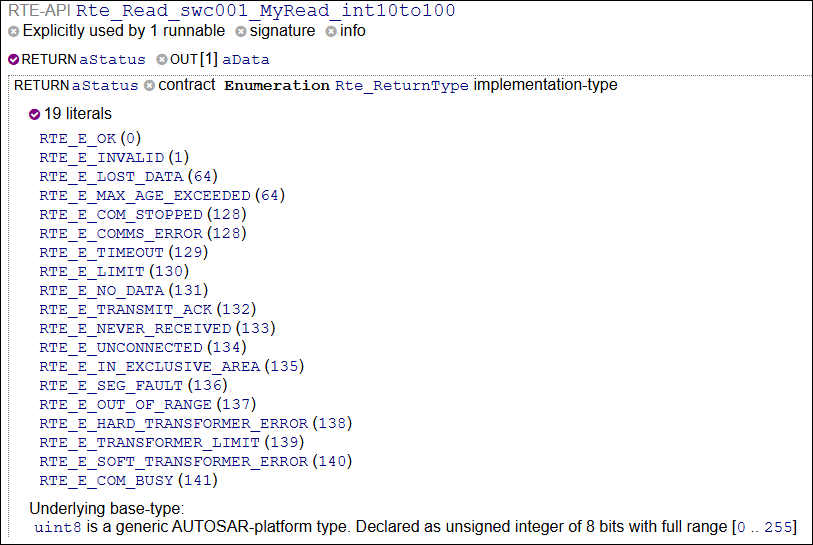
This data type constraint indicates that the type
Rte_ReturnTypeis anEnumerationtype with allowed valuesRTE_E_OK,RTE_E_INVALID, and so on. The macroPST_VERIFY_Rte_ReturnTypechecks whether variables with this data type have values that are in this allowed list (you can verify this by checking out the macro definition in the header filepsar_validation.has mentioned earlier).

