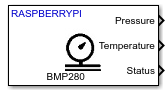
BMP280 Pressure Sensor
Measure barometric air pressure and ambient temperature from BMP280 sensor
Since R2022b
Libraries:
Raspberry Pi Blockset /
Sensors /
Environmental Sensors
Description
The BMP280 Pressure Sensor block measures barometric air pressure and ambient temperature using the BMP280 Pressure sensor interfaced with the Raspberry Pi® board.
Note
To generate code C/C++ code for this block, you must have an Embedded Coder® license.
Ports
Output
The block outputs barometric air pressure in Pascal (Pa).
Dependencies
This output port appears only if you select the Pressure (Pa) parameter.
Data Types: double
The block outputs the ambient temperature in ℃.
Dependencies
This output port appears only if you select the Temperature (℃) parameter.
Data Types: double
The block outputs the status of barometric air pressure and ambient temperature
measurements. 0 indicates that the data read is new,
1 indicates that the data read is not new.
Dependencies
This output port appears only if you select the Status parameter.
Data Types: uint8
Parameters
General
Specify the module on the board that you are using for I2C communication.
The I2C addresses to communicate with the accelerometer peripheral on the BMP280 sensor are decided by the state of the SDO pin on the hardware board. This table provides the I2C addresses corresponding to the pin and their state.
| Pin Name | Pin State | I2C address |
|---|---|---|
| SDO | 0 | 0x76 |
| 1 | 0x77 |
Select the output data type of the sensor from which the block reads the values.
The default data type for Raspberry Pi hardware is double. Use this parameter to change the
values to double, or uint32 if required.
Specify how often this block reads the data from the BMP280 sensor. When you set this parameter to -1, Simulink determines the best sample time for the block based on the block context within the model.
Select Outputs
Select this parameter to set Pressure as one of the output ports.
Select this parameter to set Temperature as one of the output ports.
Select this parameter to set Status as one of the output ports.
IIR filter settings
Select the filter coefficient value of the sensor, which helps in reducing the bandwidth of output signals.
The default filter coefficient value for Raspberry Pi hardware is 0. Use this parameter to change the
values, if required.
When filter is enabled, the sensor uses this formula to get the latest measurement calculation.
dt = (dadc / f) +
dt-1 (1 - 1 / f), where
dt is the current data,
dt-1 is the previous data,
dadc is the prefiltered data, and
f is the filter coefficient.
Sensitivity
Select the pressure sensitivity factor, which the sensor uses to read values during changing air pressure.
The default data type for Raspberry Pi hardware is 2.62. Use this parameter to change the
values, if required.
Select the temperature sensitivity factor, which the sensor uses to read values during changing temperature conditions.
The default data type for Raspberry Pi hardware is 0.005. Use this parameter to change the
values, if required.
Extended Capabilities
To generate code C/C++ code for this block, you must have an Embedded Coder license. For more information on selecting the right product stack according to your development goals, see Product Stack for Raspberry Pi Blockset.
Version History
Introduced in R2022b
See Also
MATLAB Command
You clicked a link that corresponds to this MATLAB command:
Run the command by entering it in the MATLAB Command Window. Web browsers do not support MATLAB commands.
Sélectionner un site web
Choisissez un site web pour accéder au contenu traduit dans votre langue (lorsqu'il est disponible) et voir les événements et les offres locales. D’après votre position, nous vous recommandons de sélectionner la région suivante : .
Vous pouvez également sélectionner un site web dans la liste suivante :
Comment optimiser les performances du site
Pour optimiser les performances du site, sélectionnez la région Chine (en chinois ou en anglais). Les sites de MathWorks pour les autres pays ne sont pas optimisés pour les visites provenant de votre région.
Amériques
- América Latina (Español)
- Canada (English)
- United States (English)
Europe
- Belgium (English)
- Denmark (English)
- Deutschland (Deutsch)
- España (Español)
- Finland (English)
- France (Français)
- Ireland (English)
- Italia (Italiano)
- Luxembourg (English)
- Netherlands (English)
- Norway (English)
- Österreich (Deutsch)
- Portugal (English)
- Sweden (English)
- Switzerland
- United Kingdom (English)