Model Configuration Raspberry Pi Blockset
R2026bHardware Implementation Overview
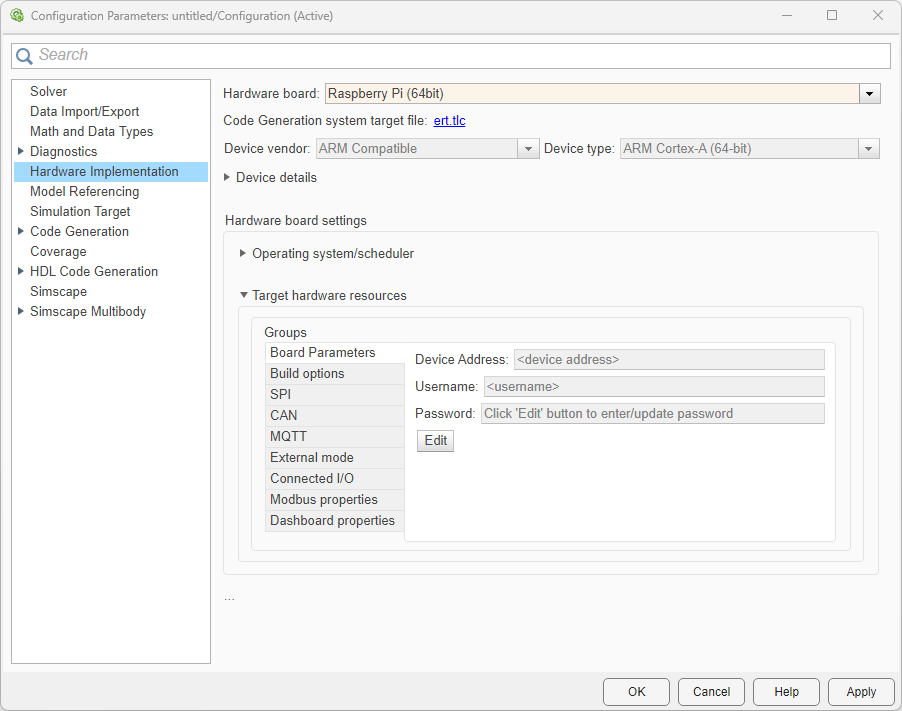
On the Modeling tab of the toolstrip, select Model Settings.
In the Configuration Parameter dialog box, select Hardware Implementation.
Set the Hardware board parameter to
Raspberry Pi. This selection populates the Hardware board settings parameters with the default values for the Raspberry Pi® hardware. You can adjust these parameters to suit your particular use case.Click Apply.
Hardware Implementation pane parameters do not control hardware or compiler behavior. The parameters describe hardware and compiler properties for the MATLAB® software.
Specifying hardware characteristics enables simulation of the model to detect error conditions that can arise when executing code, such as hardware overflow.
MATLAB uses the information to generate code for the platform that runs as efficiently as possible. MATLAB software also uses the information to give bit-true agreement for the results of integer and fixed-point operations in simulation and generated code.
See Also
Hardware Implementation Options (Simulink Coder)
Scheduler options
| Parameter | Description | Default Value |
|---|---|---|
| Base rate trigger | Set source of scheduler interrupt | Operating system timer |
Board Parameters
| Parameter | Description | Default Value |
|---|---|---|
| Device Address | IP address or host name of the hardware board. | <empty> |
| Device Name | Device name of your Raspberry Pi board in Simulink® Online™ | <empty> |
| Username | Root user name for Linux® running on the hardware board. | <empty> |
| Password | Root password for Linux running on the hardware board. | <empty> |
Build options
| Parameter | Description | Default Value |
|---|---|---|
| Build action | Option to specify whether you want only build or build and run actions during code generation. | Build and run |
| Build directory | Build directory for Linux running on the hardware board. | /home/pi |
| Enable parallel build | Enable Simulink to compile generated code and driver source code in parallel. | On |
| Run on boot | Automatically starts a Simulink model deployed on the hardware every time you restart the hardware. | Off |
| Start-up delay (in seconds) | Delay build or build and run by given amount of time | 3 |
SPI
| Parameter | Description | Default Value |
|---|---|---|
| SPI0 CE0 Bus Speed (kHz) | Bus speed in kilo hertz for SPI 0 channel 0. | 500 KHz |
| SPI0 CE1 Bus Speed (kHz) | Bus speed in kilo hertz for SPI 0 channel 1. | 500 KHz |
| SPI1 CE0 Bus Speed (kHz) | Bus speed in kilo hertz for SPI 1 channel 0. | 500 KHz |
| SPI1 CE1 Bus Speed (kHz) | Bus speed in kilo hertz for SPI 1 channel 1. | 500 KHz |
| SPI1 CE2 Bus Speed (kHz) | Bus speed in kilo hertz for SPI 1 channel 2. | 500 KHz |
CAN
| Parameter | Description | Default Value |
|---|---|---|
| Interface configuration | CAN interface configuration method | Specify via Simulink |
| Number of interfaces | Number of CAN interfaces to configure | 1 |
| CAN Name | SocketCAN interface name | can0 |
| CAN Type | CAN interface type | Real |
| CAN protocol | CAN communication protocol selection | Classical CAN |
| Bus speed (kbps) | CAN bus bit rate for classical CAN communication | 500 |
| Nominal bitrate (kbps) | Arbitration phase bit rate for CAN FD communication | 500 |
| Data bitrate (kbps) | Data phase bit rate for CAN FD communication | 2000 |
| Transmit queue buffer size | Transmit queue length for SocketCAN interface | 65536 |
| Filter configuration (all interfaces) | CAN message filtering mode selection | Allow all messages |
| ID type | CAN identifier format for acceptance filter | Normal |
| Acceptance Mask | CAN identifier bit mask for filtering | 0 |
| Acceptance filter | CAN identifier filter value | 255 |
| Inverse filter | Invert filter criterion to reject matching messages | Off |
MQTT
| Parameter | Description | Default Value |
|---|---|---|
| Encryption type | Communication encryption type between MQTT client and MQTT broker | None |
| Broker | Select the MQTT broker service provider that receives, filters, and sends messages to the clients. | ThingSpeak |
| Broker address | Address of the MQTT broker | mqtt3.thingspeak.com |
| Configuration file path on target | Location of configuration file on the Raspberry Pi | <empty> |
| Print diagnostic messages | Enable logging of diagnostic message | On |
| Port | Port number for MQTT communication | 1883 |
| CA Server certificate path | Server root certificate download path | <empty> |
| Username | User name for MQTT broker to authenticate the client | <empty> |
| Password | Password for MQTT broker to authenticate the client | <empty> |
| Client ID | Unique identifier of MQTT client | <empty> |
External mode
| Parameter | Description | Default Value |
|---|---|---|
| Communication interface | The transport layer External mode uses to exchange data between the host computer and the target hardware | XCP on TCP/IP |
| Host interface | Host-side interface for XCP external mode communication | Simulink |
| CAN Vendor | CAN hardware vendor for host-side XCP on CAN communication | First available vendor |
| CAN Device | CAN hardware device for host-side XCP on CAN communication | First available device |
| CAN Channel | CAN hardware channel for host-side XCP on CAN communication | First available channel |
| CAN interface name | SocketCAN interface name on the target for XCP on CAN communication | can0 |
| Extended CAN ID | Use extended 29-bit CAN identifiers for XCP external mode communication | Off |
| CAN ID command | CAN identifier for XCP command messages from host to target | 2 |
| CAN ID response | CAN identifier for XCP response messages from target to host | 3 |
| Run external mode in a background | The option to force the External mode engine to run the generated code in a background task. | Not selected |
| Logging buffer size (in bytes) | The buffer size for logging data in Universal Measurement and Calibration Protocol (XCP)-based External mode. | 1000000 |
| Port | The port the External mode uses for communications between the hardware board and host computer. | 17725 |
| Verbose | Option to view the External Mode execution progress and updates in the Diagnostic Viewer or in the MATLAB Command Window. | off |
| Set logging buffer size automatically | Automatically preallocate buffer size | <empty> |
| Set XCP target polling time | Set XCP-based target polling time for Simulink models automatically or manually. | Automatically |
| Polling time (in seconds) | Enter polling time in seconds. | 2 |
Connected I/O
| Parameter | Description | Default Value |
|---|---|---|
| Communication Interface | Transport layer used to exchange data between host computer and hardware | TCP/IP |
Modbus properties
| Parameter | Description | Default Value |
|---|---|---|
| Communication Interface | Type of communication interface that the blocks use for Modbus® communication | TCP/IP |
| Mode | Modbus mode of operation | Client |
| Remote Server IP port number | IP port number of the client device on the TCP/IP network | 502 |
| Local IP port number | IP port number of the server device(s) on the TCP/IP network | 502 |
| Configure Coils | Configure coil register parameters | Selected |
| Start address | Starting address of the coil register | 0 |
| Quantity | Quantity of coil register | 1 |
| Configure Discrete Inputs | Configure discrete input register parameters | Selected |
| Start Address | Starting address of the coil register | 0 |
| Quantity | Quantity of coil register | 1 |
| Configure Holding registers | Configure holding register parameters | Selected |
| Start address | Starting address of holding register | 0 |
| Quantity | Quantity of holding register | 1 |
| Configure Input registers | Configure input register parameters | Selected |
| Start address | Starting address of input register | 0 |
| Quantity | Quantity of input register | 1 |
| Received timeout (ms) | Maximum time in milliseconds the client waits for a response from Modbus server | 100 |
Dashboard properties
| Parameter | Description | Default Value |
|---|---|---|
| Enable deployment for Dashboard blocks | Enable deployment of Customizable Dashboard blocks on Raspberry Pi hardware boards | Not selected |
| IP address type | Select IP address that the web server uses to host dashboard | Device address |
| IP address | Enter IP address of device that hosts the dashboard on a web browser | 192.168.1.10 |
| WebSocket port | Enter port number for the WebSocket server | 8000 |
| HTTP port | Enter port number for the HTTP server | 8888 |

