Manage Validation Metrics with MATLAB Unit Tests
R2026bThis example shows how to define and calculate model validation metrics with MATLAB unit tests, using a probability of default (PD) model validation example. In this example, you define each model validation metric as a MATLAB unit test, and then supply data as external parameters. This allows you to reuse the same MATLAB unit test with multiple models and compare against model validation metric thresholds. Open the example to get the supporting files you need.
Define Thresholds
Create a parameterized test suite object that contains numeric thresholds defined for model validation metrics. The threshold properties of the test suite contain numeric values that are compared against the actual metrics. If the metrics do not pass the threshold criteria, the unit test case will be marked as a failure.
ParameterizedPDTestSuite
ans =
  ParameterizedPDTestSuite with properties:

              Data: [1×1 struct]
       KSThreshold: {[0]}
    AUROCThreshold: {[0.2000]}
      CAPThreshold: {[0.2000]}
Prepare Data
Load an existing credit scorecard to validate.
modelDataFile = "PDModel.mat";
inputData = load(modelDataFile);
Set the response variable and default indicator.
responseVar = "status";
outcomeIndicator = 1;
Extract the scorecard and key data.
sc = inputData.sc;
model1 = struct('ModelScores', sc.score, 'ModelPDs', probdefault(sc), 'DefaultIndicators', sc.Data.(responseVar) == outcomeIndicator );
Prepare a second data set with randomly generated values.
model2 = struct('ModelScores', unifrnd(min(sc.score),max(sc.score), size(sc.score)), ...
    'ModelPDs', rand(size(probdefault(sc))), 'DefaultIndicators', sc.Data.(responseVar) == outcomeIndicator );
Run Tests
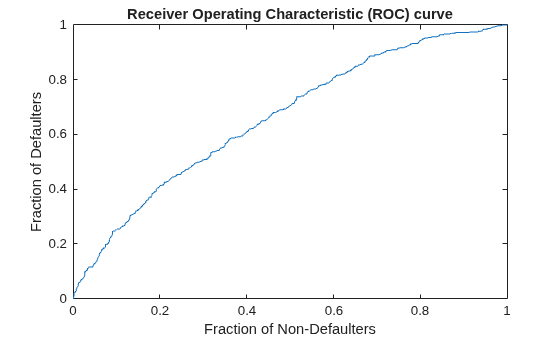
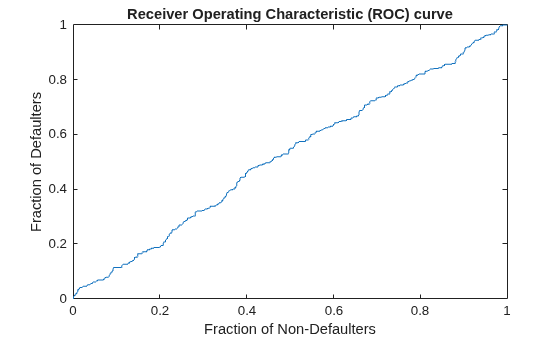
Run tests on both data sets. You supply both data sets to the test suite as External Parameters. The results capture the visualizations from the validation metrics, and test whether each validation metric passes the defined threshold. Because the second data set contains random data, a unit test related to the Cumulative Accuracy Profile (CAP) metric fails. From the name of the failed test, you can identify which data set and metric failed, allowing you to investigate further the cause of the failure.
import matlab.unittest.TestSuite
import matlab.unittest.parameters.Parameter
param = Parameter.fromData('Data', ...
    struct('Model1',model1,'Model2',model2));
suite = TestSuite.fromClass(?ParameterizedPDTestSuite,"ExternalParameters",param);
run(suite)
Running ParameterizedPDTestSuite
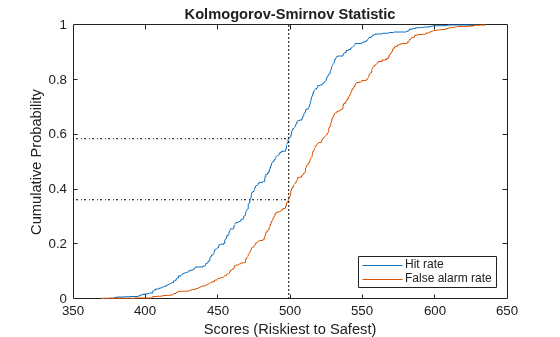
.
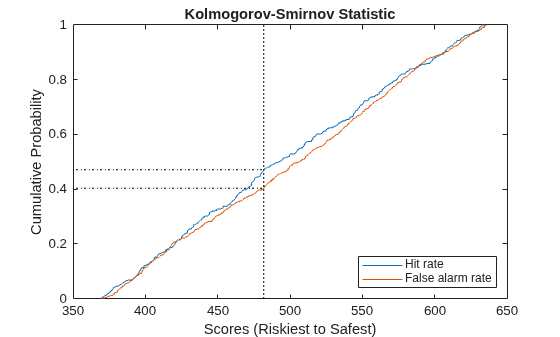
.
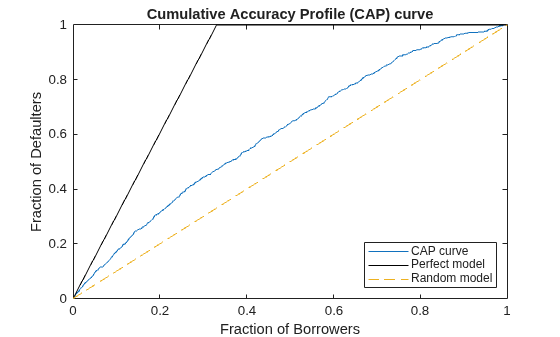
.
================================================================================
Verification failed in ParameterizedPDTestSuite/testCAP(Data=Model2#ext,CAPThreshold=0.2).
    ----------------
    Test Diagnostic:
    ----------------
    Value 0.042978 is less than set threshold 0.2
    ---------------------
    Framework Diagnostic:
    ---------------------
    verifyGreaterThanOrEqual failed.
    --> The value must be greater than or equal to the minimum value.

    Actual Value:
       0.042978001261014
    Minimum Value (Inclusive):
       0.200000000000000
    ------------------
    Stack Information:
    ------------------
    In /tmp/Bdoc26b_3351752_720061/tp7ce2dfd8/mrm-ex21244219/PDTestSuite.m (PDTestSuite.testCAP) at 22
================================================================================
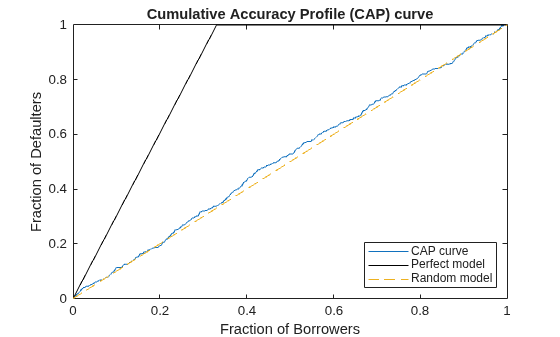
.
.
.
Done ParameterizedPDTestSuite
__________

Failure Summary:

     Name                                                                Failed  Incomplete  Reason(s)
    =================================================================================================================
     ParameterizedPDTestSuite/testCAP(Data=Model2#ext,CAPThreshold=0.2)    X                 Failed by verification.
ans =
  1×6 TestResult array with properties:

    Name
    Passed
    Failed
    Incomplete
    Duration
    Details

Totals:
   5 Passed, 1 Failed, 0 Incomplete.
   2.8914 seconds testing time.
Modify Thresholds
You can also supply different or multiple values for thresholds. In this section you pass two thresholds for the Kolmogorov-Smirnov statistic. From the names of the generated unit tests in the suite, you can see that tests will be run using both values of the threshold you specified. This allows you to automate parameter sweeps over thresholds.
param = Parameter.fromData('KSThreshold',{0.1,0.2});
suite = TestSuite.fromClass(?ParameterizedPDTestSuite,"ExternalParameters",param)
suite =
  1×4 Test array with properties:

    Name
    ProcedureName
    TestClass
    BaseFolder
    Parameterization
    SharedTestFixtures
    Tags

Tests Include:
    5 Unique Parameterizations, 0 Shared Test Fixture Classes, 0 Tags.
suite.Name
ans =
'ParameterizedPDTestSuite/testKS(Data=example,KSThreshold=0.1#ext)'
ans =
'ParameterizedPDTestSuite/testKS(Data=example,KSThreshold=0.2#ext)'
ans =
'ParameterizedPDTestSuite/testCAP(Data=example,CAPThreshold=0.2)'
ans =
'ParameterizedPDTestSuite/testAUROC(Data=example,AUROCThreshold=0.2)'

