Log signals to MDF file
R2026bModel Configuration Pane: Code Generation / Interface
Description
Generate code that logs signals and outputs to an ASAM Measurement Data Format (MDF) file. After executing the generated code on your target hardware, you can view the time series of generated code variables by importing the MDF file into the Simulation Data Inspector. You can also use Vehicle Network Toolbox™ MDF-file functions to analyze the time series.
Dependencies
Logged data must be of these types:
Boolean
Signed and unsigned 8, 16, 32, and 64-bit integers (
int8,uint8,int16,uint16,int32,uint32,int64,uint64)Floating point
single,double,half)Unnested and nested compositions of the preceding types (for example, buses that contain arrays of complex integers)
These model configuration parameter settings:
Set Type to
Fixed-step.Select Treat each discrete rate as a separate task.
Set Save format to
Dataset.Select Signal logging to log signal data.
Select Output to log root-level output data of the top model.
Settings
Off (default) | On- On
Generate code that logs data to an MDF file.
- Off
Do not generate code that logs data to an MDF file.
Examples
This example shows how you can generate code that logs signals and outputs to an MDF file.
Create a simple model:
Open Simulink® and create a simple model,
mdfTest, which contains these blocks:Sine Wave
Gain
Outport
Double-click the Sine Wave block. Set Sample time to 0.1, and then click OK.
Double-click the Gain block. Set Gain to 2, and then click OK.
Connect the Sine Wave block to the Gain block and name the connection
Test Signal.Connect the Gain block to the Outport block and name the connection
Output Signal.Configure
Test Signalfor logging:Select
Test Signal.In the Prepare gallery, click Log Signals.
Verify that the Signal logging and Output check boxes are selected.

Run a model simulation and view signal and output data:
In the Simulate section, click Run.
When the simulation is complete, in the Review Results gallery, click Data Inspector. The Simulation Data Inspector displays
Test SignalandOutput Signal.
Use Embedded Coder® to generate code that logs signal and output data to an MDF file:
In the Apps gallery, under Code Generation, click Embedded Coder.
On the C Code tab, in the Prepare gallery, click Settings, which opens the Configuration Parameters dialog box.
Specify these settings:
Log signals to MDF file — On
Solver Type — Fixed-step
Fixed-step size (fundamental sample time) — 0.1
Treat each discrete rate as a separate task — On
Support long long — On
In the Generate Code section, click Build. The software generates and builds code, producing an executable file. For example,
mdfTest.exe.
Run the file on your target hardware, which, in this example, is your development computer. In the Command Window, enter:
system('mdfTest')mdfTest.mf4.Import the MDF file into the Simulation Data Inspector. In the Command Window, enter:
mdfVisualize('mdfTest.mf4')The Simulation Data Inspector displays the values of the logged variables and the simulation time for each rate against the timestamp at which the values were logged – information that the file stores. To display the logged variables against the simulation time, create XY plots.
Click the Visualizations and layouts button and use the signals to create XY plots.
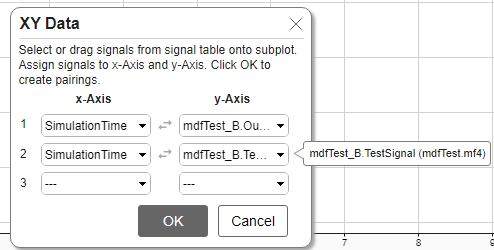
When you click OK, the Simulation Data Inspector displays data from the MDF file.
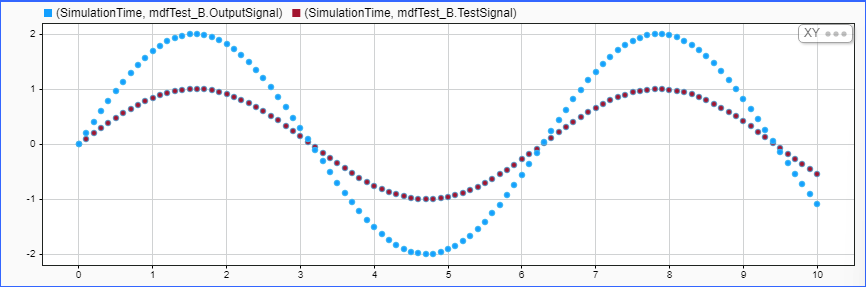
You can also use Vehicle Network Toolbox MDF-file functions to analyze the time series. For example, to read the data, run:
mdfData = mdfRead('mdfTest.mf4')Recommended Settings
| Application | Setting |
|---|---|
| Debugging | On |
| Traceability | No impact |
| Efficiency | Off |
| Safety precaution | No recommendation |
Programmatic Use
Parameter:
LogToMDFFile |
| Type: character vector |
Value:
'on' | 'off'
|
Default:
'off' |
Limitations
Logging to an MDF file is not supported:
For fixed-point data and strings.
If model configuration parameter External mode is selected.
For models configured to use service code interfaces and intended for component deployment.
Version History
Introduced in R2024a

