Read Data from MDF Files Using ARXML
R2026bThis example shows you how to read data from an MDF file using ARXML as the database.
View Details of the MDF File
View metadata of an MDF file using the mdfInfo function.
mdfInfo("MDF_ARXML.mf4")ans =
MDFInfo with properties:
File Details
Name: "MDF_ARXML.mf4"
Path: "C:\ExampleManager772791\user.Example_ARXMLCANDecoding\vnt-ex37098395\MDF_ARXML.mf4"
Author: ""
Department: ""
Project: ""
Subject: ""
Comment: ""
Version: "4.20"
InitialTimestamp: 2024-11-15 23:06:16.345000000
Creator Details
ProgramIdentifier: "MDF4Lib"
CreatorVendorName: "Vector Informatik GmbH"
CreatorToolName: "CANoe"
CreatorToolVersion: "18.2.65"
CreatorUserName: "siyingl"
CreatorComment: "Created using MdfLog version 1.7.7.0 and Mdf4Lib version 1.9.0.0 X64 (2022-08-31)"
File Contents
Attachment: [5×7 table]
ChannelGroupCount: 5
Event: [0×8 eventtable]
Identify CAN Data Frames
According to the ASAM MDF associated standard for bus logging, the event types defined for a CAN bus system can be "CAN_DataFrame", "CAN_RemoteFrame", "CAN_ErrorFrame" or "CAN_OverloadFrame". This example focuses on extracting the CAN data frames, so the bus logging standard will be discussed using "CAN_DataFrame" event type as example. Additionally, note that a standard CAN data frame has up to 8 bytes for its payload and is used to transfer signal values.
The standard specifies that the channel names of the event structure should be prefixed by the event type name, for instance, "CAN_DataFrame". Typically a dot is used as separator character to specify the member channels, for instance, "CAN_DataFrame.ID" or "CAN_DataFrame.DataLength".
Use the mdfChannelInfo function to locate channel names matching "CAN_DataFrame.*". A table with information on matched channels is returned.
mdfChannelInfo("MDF_ARXML.mf4", Channel="CAN_DataFrame.*")
ans = 24×13 table
      "CAN_DataFrame.BitCount"    2       6    CAN2    <undefined>    <undefined>    CAN_DataFrame      "BitCount"    <undefined>                                         Frame length in bits.    CAN2    <undefined>    CAN2
      "CAN_DataFrame.BitCount"    3    6070    CAN1    <undefined>    <undefined>    CAN_DataFrame      "BitCount"    <undefined>                                         Frame length in bits.    CAN1    <undefined>    CAN1
    "CAN_DataFrame.BusChannel"    2       6    CAN2    <undefined>    <undefined>    CAN_DataFrame    "BusChannel"    <undefined>    Logical bus channel number the frame was sent or received.    CAN2    <undefined>    CAN2
    "CAN_DataFrame.BusChannel"    3    6070    CAN1    <undefined>    <undefined>    CAN_DataFrame    "BusChannel"    <undefined>    Logical bus channel number the frame was sent or received.    CAN1    <undefined>    CAN1
           "CAN_DataFrame.DLC"    2       6    CAN2    <undefined>    <undefined>    CAN_DataFrame           "DLC"    <undefined>                                             Data length code.    CAN2    <undefined>    CAN2
           "CAN_DataFrame.DLC"    3    6070    CAN1    <undefined>    <undefined>    CAN_DataFrame           "DLC"    <undefined>                                             Data length code.    CAN1    <undefined>    CAN1
     "CAN_DataFrame.DataBytes"    2       6    CAN2    <undefined>    <undefined>    CAN_DataFrame     "DataBytes"    <undefined>              Payload data bytes containing the signal values.    CAN2    <undefined>    CAN2
     "CAN_DataFrame.DataBytes"    3    6070    CAN1    <undefined>    <undefined>    CAN_DataFrame     "DataBytes"    <undefined>              Payload data bytes containing the signal values.    CAN1    <undefined>    CAN1
    "CAN_DataFrame.DataLength"    2       6    CAN2    <undefined>    <undefined>    CAN_DataFrame    "DataLength"    <undefined>                            Length of stored payload in bytes.    CAN2    <undefined>    CAN2
    "CAN_DataFrame.DataLength"    3    6070    CAN1    <undefined>    <undefined>    CAN_DataFrame    "DataLength"    <undefined>                            Length of stored payload in bytes.    CAN1    <undefined>    CAN1
           "CAN_DataFrame.Dir"    2       6    CAN2    <undefined>    <undefined>    CAN_DataFrame           "Dir"    <undefined>                 Bit signal indicating the direction (Rx, Tx).    CAN2    <undefined>    CAN2
           "CAN_DataFrame.Dir"    3    6070    CAN1    <undefined>    <undefined>    CAN_DataFrame           "Dir"    <undefined>                 Bit signal indicating the direction (Rx, Tx).    CAN1    <undefined>    CAN1
         "CAN_DataFrame.Flags"    2       6    CAN2    <undefined>    <undefined>    CAN_DataFrame         "Flags"    <undefined>                     Combination of bit flags for the message.    CAN2    <undefined>    CAN2
         "CAN_DataFrame.Flags"    3    6070    CAN1    <undefined>    <undefined>    CAN_DataFrame         "Flags"    <undefined>                     Combination of bit flags for the message.    CAN1    <undefined>    CAN1
      ⋮
The data of interest was logged from the CAN 1 network. The output above shows that the data from CAN 1 network has been stored in channel group 3 of the MDF file. View details about channel group 3 using the mdfChannelGroupInfo function by specifying the GroupNumber option.
mdfChannelGroupInfo("MDF_ARXML.mf4", GroupNumber=3)ans = 1×13 table
3 CAN1 <undefined> 6070 163890 1 <undefined> CAN_DataFrame <undefined> 2 2 1 0
View details about all the channels within channel group 3 using mdfChannelInfo.
mdfChannelInfo("MDF_ARXML.mf4", GroupNumber=3)ans = 13×13 table
"CAN_DataFrame.BitCount" 3 6070 CAN1 <undefined> <undefined> CAN_DataFrame "BitCount" <undefined> Frame length in bits. CAN1 <undefined> CAN1
"CAN_DataFrame.BusChannel" 3 6070 CAN1 <undefined> <undefined> CAN_DataFrame "BusChannel" <undefined> Logical bus channel number the frame was sent or received. CAN1 <undefined> CAN1
"CAN_DataFrame.DLC" 3 6070 CAN1 <undefined> <undefined> CAN_DataFrame "DLC" <undefined> Data length code. CAN1 <undefined> CAN1
"CAN_DataFrame.DataBytes" 3 6070 CAN1 <undefined> <undefined> CAN_DataFrame "DataBytes" <undefined> Payload data bytes containing the signal values. CAN1 <undefined> CAN1
"CAN_DataFrame.DataLength" 3 6070 CAN1 <undefined> <undefined> CAN_DataFrame "DataLength" <undefined> Length of stored payload in bytes. CAN1 <undefined> CAN1
"CAN_DataFrame.Dir" 3 6070 CAN1 <undefined> <undefined> CAN_DataFrame "Dir" <undefined> Bit signal indicating the direction (Rx, Tx). CAN1 <undefined> CAN1
"CAN_DataFrame.Flags" 3 6070 CAN1 <undefined> <undefined> CAN_DataFrame "Flags" <undefined> Combination of bit flags for the message. CAN1 <undefined> CAN1
"CAN_DataFrame.FrameDuration" 3 6070 CAN1 <undefined> <undefined> CAN_DataFrame "FrameDuration" ns Duration for transmission of the frame in nanoseconds. CAN1 <undefined> CAN1
"CAN_DataFrame.ID" 3 6070 CAN1 <undefined> <undefined> CAN_DataFrame "ID" <undefined> ID of the CAN message. CAN1 <undefined> CAN1
"CAN_DataFrame.IDE" 3 6070 CAN1 <undefined> <undefined> CAN_DataFrame "IDE" <undefined> Identifier Extension bit. CAN1 <undefined> CAN1
"CAN_DataFrame.SingleWire" 3 6070 CAN1 <undefined> <undefined> CAN_DataFrame "SingleWire" <undefined> Bit flag indicating a single wire operation. CAN1 <undefined> CAN1
"CAN_DataFrame.WakeUp" 3 6070 CAN1 <undefined> <undefined> CAN_DataFrame "WakeUp" <undefined> Bit flag indicating a wake-up message (high voltage). CAN1 <undefined> CAN1
"t" 3 6070 CAN1 <undefined> <undefined> CAN_DataFrame "" s <undefined> CAN1 <undefined> <undefined>
Read MDF Data from the MDF File
Read all data in channel group 3 into a timetable using the mdfRead function. The timetable is structured to follow the ASAM MDF standard logging format. Each row represents one raw CAN frame from the bus, while each column represents a channel within the specified channel group.
mdfData = mdfRead("MDF_ARXML.mf4", GroupNumber=3);
mdfData{1}
ans = 6070×12 timetable
0.050294 sec 1 1 "Tx" 0 0 2147485696 1 288000 147 8 8 [250,0,16,0,4,0,1,0]
0.050526 sec 1 1 "Tx" 0 0 3 0 226000 116 8 8 [210,236,104,118,52,187,124,192]
0.050694 sec 1 1 "Tx" 0 0 16 0 162000 84 4 4 [0,3,89,100]
0.050898 sec 1 1 "Tx" 0 0 2047 0 198000 102 6 6 [226,99,235,64,255,255]
0.051184 sec 1 1 "Tx" 0 0 2684354559 1 280000 143 8 8 [0,0,45,10,68,26,184,161]
0.10029 sec 1 1 "Tx" 0 0 2147485696 1 286000 146 8 8 [237,0,12,0,6,0,0,0]
0.10053 sec 1 1 "Tx" 0 0 3 0 236000 121 8 8 [0,56,252,27,254,13,75,64]
0.10071 sec 1 1 "Tx" 0 0 16 0 166000 86 4 4 [0,252,200,92]
0.10091 sec 1 1 "Tx" 0 0 2047 0 196000 101 6 6 [68,41,41,64,249,255]
0.1012 sec 1 1 "Tx" 0 0 2684354559 1 282000 144 8 8 [0,64,126,0,196,46,248,98]
0.15029 sec 1 1 "Tx" 0 0 2147485696 1 286000 146 8 8 [118,0,24,0,4,0,0,0]
0.15052 sec 1 1 "Tx" 0 0 3 0 226000 116 8 8 [120,21,188,10,94,69,132,64]
0.15069 sec 1 1 "Tx" 0 0 16 0 162000 84 4 4 [0,252,161,14]
0.15089 sec 1 1 "Tx" 0 0 2047 0 196000 101 6 6 [41,48,20,192,254,255]
⋮
Decode CAN Messages Using the ARXML File Object
Open the ARXML file DecodingExample.arxml using arxmlDatabase function.
arxmlObj = arxmlDatabase("DecodingExample.arxml")arxmlObj =
Database with properties:
Name: "DecodingExample.arxml"
Path: "C:\ExampleManager772791\user.Example_ARXMLCANDecoding\vnt-ex37098395\DecodingExample.arxml"
CAN: [1×1 shared.vnt.arxml.protocol.CAN]
Create the decoded CAN Message Timetable by calling the canMessageTimetable function. The timetable of ASAM standard logging format data is converted into a Vehicle Network Toolbox™ CAN message timetable. The arxmlObj is used for the value of the Database input argument for the function, that will provide the reference database information for decoding the data.
decodedData = canMessageTimetable(mdfData{1}, arxmlObj)decodedData = 6070×8 timetable
0.050294 sec 2048 1 'Frame2' [250,0,16,0,4,0,1,0] 8 1×1 struct 0 0
0.050526 sec 3 0 'Frame4' [210,236,104,118,52,187,124,192] 8 1×1 struct 0 0
0.050694 sec 16 0 'Frame5' [0,3,89,100] 4 1×1 struct 0 0
0.050898 sec 2047 0 'Frame1' [226,99,235,64,255,255] 6 1×1 struct 0 0
0.051184 sec 536870911 1 'Frame3' [0,0,45,10,68,26,184,161] 8 1×1 struct 0 0
0.10029 sec 2048 1 'Frame2' [237,0,12,0,6,0,0,0] 8 1×1 struct 0 0
0.10053 sec 3 0 'Frame4' [0,56,252,27,254,13,75,64] 8 1×1 struct 0 0
0.10071 sec 16 0 'Frame5' [0,252,200,92] 4 1×1 struct 0 0
0.10091 sec 2047 0 'Frame1' [68,41,41,64,249,255] 6 1×1 struct 0 0
0.1012 sec 536870911 1 'Frame3' [0,64,126,0,196,46,248,98] 8 1×1 struct 0 0
0.15029 sec 2048 1 'Frame2' [118,0,24,0,4,0,0,0] 8 1×1 struct 0 0
0.15052 sec 3 0 'Frame4' [120,21,188,10,94,69,132,64] 8 1×1 struct 0 0
0.15069 sec 16 0 'Frame5' [0,252,161,14] 4 1×1 struct 0 0
0.15089 sec 2047 0 'Frame1' [41,48,20,192,254,255] 6 1×1 struct 0 0
⋮
Decoded signals from the CAN raw message are stored in the Signals column.
decodedData.Signals{1}ans = struct with fields:
Signal5: 27
Signal11: 7
Repackage and Visualize Signal Values of Interest
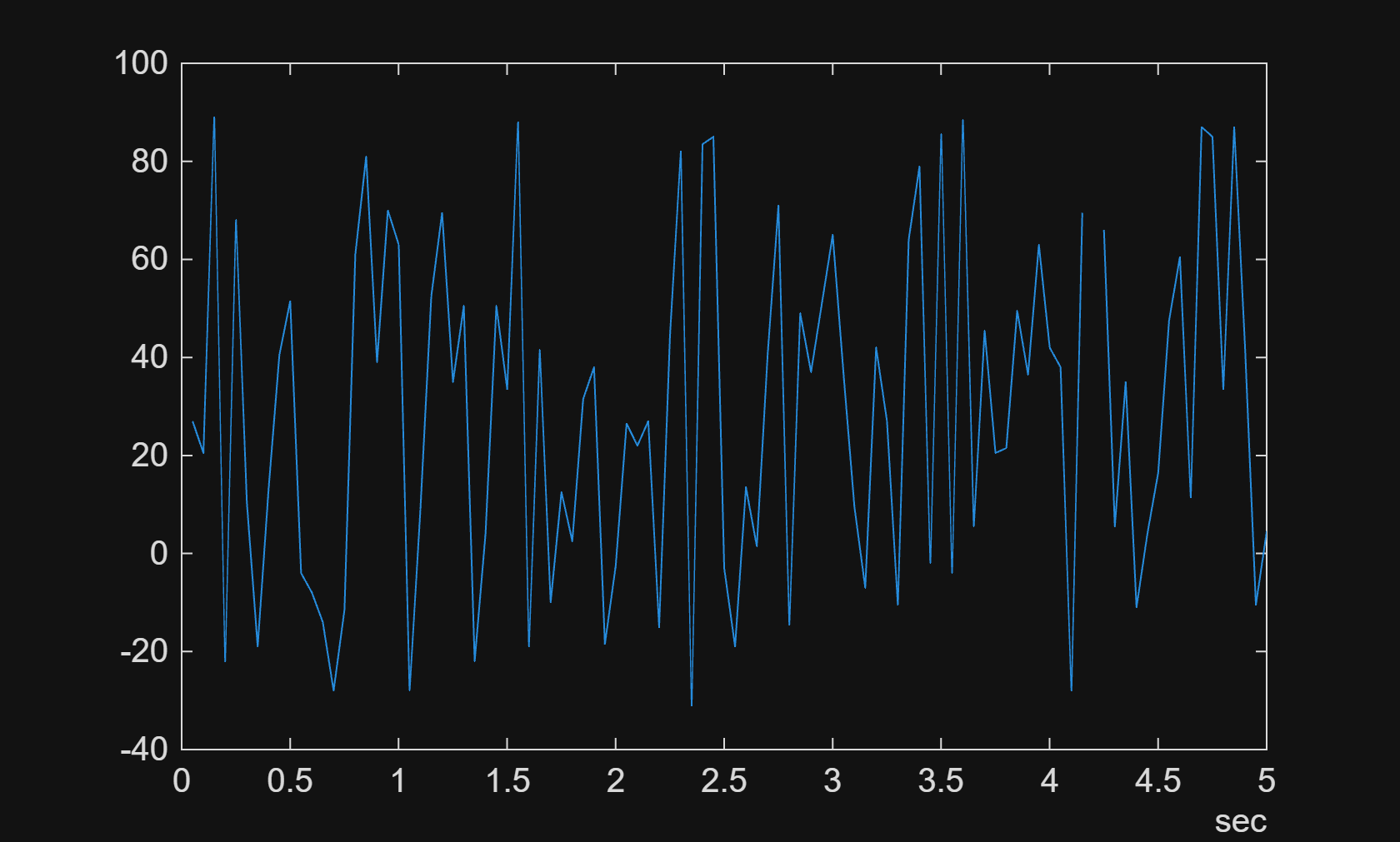
Use the canSignalTimetable to observe the signal values. The example will examine the value of the Signal5 in the Frame2.
signalTimetable = canSignalTimetable(decodedData, "Frame2")signalTimetable = 1214×2 timetable
0.050294 sec 27 7
0.10029 sec 20.5000 6.5000
0.15029 sec 89 8
0.20029 sec -22 8
0.25029 sec 68 7
0.30029 sec 10.5000 7
0.35029 sec -19 7.5000
0.40029 sec 13 6
0.4503 sec 40.5000 5.5000
0.50029 sec 51.5000 6.5000
0.55029 sec -4 6.5000
0.60029 sec -8 6.5000
0.65029 sec -14 5.5000
0.70029 sec -28 6.5000
⋮
To visualize the signals of interest, columns from the signal timetables can be plotted over time for further analysis. The plot will show the first 5 seconds value for the Signal5.
plot(signalTimetable.Time, signalTimetable.Signal5);
xlim(seconds([0 5]));
Close ARXML File
Close access to the ARXML file by clearing its variable from the workspace.
clear arxmlObj
