deriveMinMax
R2026bDerive range information for model
Syntax
Description
Examples
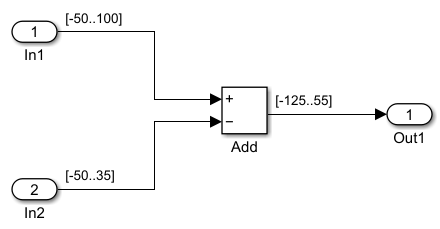
Suppose you have the ex_derived_min_max_1 model
from the Derive Ranges Using Design Ranges example. The block diagram displays the design
minimum and maximum values specified for each block in the model:
In1design range is[-50..100].In2design range is[-50..35].Add block design range is
[-125..55].
Create a DataTypeWorkflow.Converter object for this model.
model = 'ex_derived_min_max_1';
converter = DataTypeWorkflow.Converter(model);
Use the deriveMinMax function to perform derived range analysis
on this converter object.
deriveMinMax(converter)
The DerivedMin and DerivedMax properties
of the DataTypeWorkflow.Result object contain the calculated derived
minimum and maximum values for each block in this model.
result = results(converter,'Run 1')result =
1×4 Result array with properties:
ResultName
SpecifiedDataType
CompiledDataType
ProposedDataType
Wraps
Saturations
WholeNumber
SimMin
SimMax
DerivedMin
DerivedMax
RunName
Comments
DesignMin
DesignMaxDisplay the derived minimum and maximum range values collected for each block in this model.
name = arrayfun(@(r) r.ResultName,result,'UniformOutput',false).';
minVal = arrayfun(@(r) r.DesignMin,result,'UniformOutput',false).';
maxVal = arrayfun(@(r) r.DesignMax,result,'UniformOutput',false).';
T = table(name,minVal,maxVal,'VariableNames',{'Block','DesignMin','DesignMax'});
disp(T)
                    Block                     DesignMin       DesignMax
    _____________________________________    ____________    ____________

    {'ex_derived_min_max_1/In1'         }    {[     -50]}    {[     100]}
    {'ex_derived_min_max_1/In2'         }    {[     -50]}    {[      35]}
    {'ex_derived_min_max_1/Add : Output'}    {[    -125]}    {[      55]}
    {'ex_derived_min_max_1/Out1'        }    {0×0 double}    {0×0 double}
You can compare these results to the values returned by the Fixed-Point Tool for the same model in the Derive Ranges Using Design Ranges example.
Input Arguments
Tips
If you encounter any issues during the derivation, you can query them using the proposalIssues object function.
Alternatives
The deriveMinMax function is equivalent to the
Collect Ranges button in the Fixed-Point Tool when
the Range Collection Mode is set to Derived
ranges.
Version History
Introduced in R2014b

