assignData
Assign new data to spectral image data cube
Description
Add-On Required: This feature requires the Hyperspectral Imaging Library for Image Processing Toolbox add-on.
assigns the specified newspcube = assignData(spcube,row,column,band,data)data to a hyperspectral or multispectral data
cube. The function reads the data cube stored in the hypercube or
multicube object spcube, assigns the new data to
the spectral bands band at the locations specified by
row and column, and returns a new
hypercube or multicube object.
Note
The Hyperspectral Imaging Library for Image Processing Toolbox™ requires desktop MATLAB®, as MATLAB Online™ and MATLAB Mobile™ do not support the library.
Examples
Read hyperspectral data from an ENVI format file.
hcube = imhypercube("paviaU.dat");Normalize the reflectance values to the range [0, 1].
datacube = gather(hcube); data = rescale(datacube);
Assign the normalized reflectance values to the data cube.
newhcube = assignData(hcube,":",":",":",data);
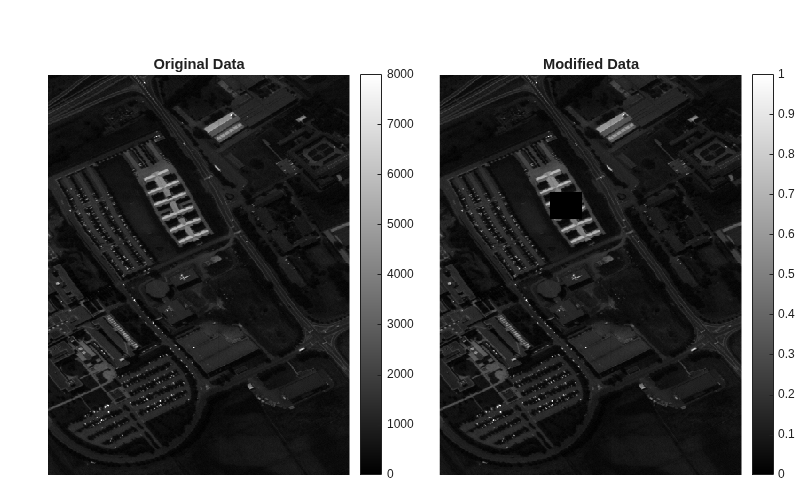
Specify the row and column indices of a region of interest (ROI). Assign all indices within the ROI a value of zero.
row = 180:220;
column = 125:160;
newhcube = assignData(newhcube,row,column,":",0);
newdatacube = gather(newhcube);Display the original and the modified versions of a spectral band.
fig = figure(Position=[0 0 800 500]); axes1 = axes(Parent=fig,Position=[0.06 0.05 0.45 0.8]); imagesc(datacube(:,:,10),Parent=axes1); title("Original Data") colorbar axis off axes2 = axes(Parent=fig,Position=[0.55 0.05 0.45 0.8]); imagesc(newdatacube(:,:,10),Parent=axes2); title("Modified Data") colorbar axis off colormap gray
Download Landsat 8 multispectral data.
zipfile = "LC08_L1TP_113082_20211206_20211215_02_T1.zip"; landsat8Data_url = "https://ssd.mathworks.com/supportfiles/image/data/" + zipfile; hyper.internal.downloadLandsatDataset(landsat8Data_url,zipfile) filepath = fullfile("LC08_L1TP_113082_20211206_20211215_02_T1","LC08_L1TP_113082_20211206_20211215_02_T1_MTL.txt");
Read a multispectral image into the workspace, and resample it to a uniform resolution..
mcube = immulticube(filepath); mcube = resampleBands(mcube,30); datacube = gather(mcube);
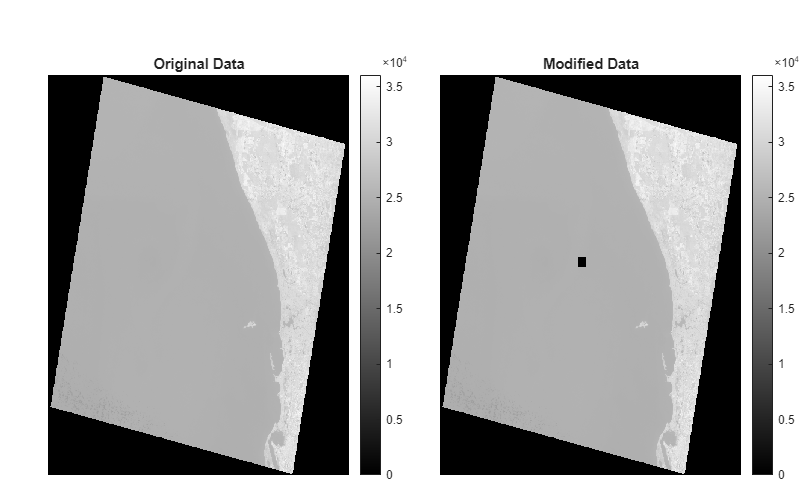
Specify the row and column indices of a region of interest (ROI). Assign all indices within the ROI a value of zero.
row = 3500:3700; column = 3500:3700; bands = 7:10; newmcube = assignData(mcube,row,column,bands,0); newdatacube = gather(newmcube);
Display the original and the modified versions of a spectral band.
fig = figure(Position=[0 0 800 500]); axes1 = axes(Parent=fig,Position=[0.06 0.05 0.45 0.8]); imagesc(datacube(:,:,10),Parent=axes1); title("Original Data") colorbar axis off axes2 = axes(Parent=fig,Position=[0.55 0.05 0.45 0.8]); imagesc(newdatacube(:,:,10),Parent=axes2); title("Modified Data") colorbar axis off colormap gray
Input Arguments
Input spectral data, specified as a hypercube or
multicube
object. If spcube is a multicube object, all its
spectral bands must have the same data resolution. If all spectral bands of the
multicube object do not have the same resolution, resample the
bands using the resampleBands function, or select bands with uniform resolution using the
selectBands
function.
Row indices of the data cube, specified as a positive integer or a vector of positive integers.
To select a particular row or rows, specify the row index as a positive integer or
vector of positive integers respectively. If the data cube is of size
M-by-N-by-C, the specified
row index values must all be less than or equal to M. To specify a
range of row indices, or indices at a regular interval, use the colon
operator. For example, row = 1:10.
Data Types: single | double | int8 | int16 | int32 | int64 | uint8 | uint16 | uint32 | uint64
Column indices of the data cube, specified as a positive integer or a vector of positive integers.
To select a particular column or columns, specify the column index as a positive
integer or vector of positive integers respectively. If the data cube is of size
M-by-N-by-C, the specified
column index values must all be less than or equal to N. To specify a
range of column indices, or indices at a regular interval, use the colon
operator. For example, column = 1:10.
Data Types: single | double | int8 | int16 | int32 | int64 | uint8 | uint16 | uint32 | uint64
Spectral band numbers, specified as a positive integer or a vector of positive integers.
To select a particular band or bands, specify the band number as a positive integer
or vector of positive integers respectively. If the data cube is of size
M-by-N-by-C, the specified
band number values must all be less than or equal to C. To specify a
range of band numbers or numbers at a regular interval, use the colon
operator. For example, band = 1:10.
Data Types: single | double | int8 | int16 | int32 | int64 | uint8 | uint16 | uint32 | uint64
Values to assign, specified as a scalar, vector, matrix, or 3-D array depending on
the values of the row, column, and
band inputs.
If row is | If column is | If band is | data must be |
|---|---|---|---|
| scalar | scalar | scalar | scalar |
| M- element vector | scalar | scalar | M- element row vector or M-by-1 matrix or M-by-1-by-1 array |
| scalar | N-element vector | scalar | N- element column vector or 1-by-N matrix or 1-by-N-by-1 array |
| scalar | scalar | C-element vector | 1-by-1-by-C array |
| M- element vector | N-element vector | scalar | M-by-N matrix or M-by-N-by-1 array |
| M- element vector | N-element vector | C-element vector | M-by-N-by-C array |
Data Types: single | double | int8 | int16 | int32 | int64 | uint8 | uint16 | uint32 | uint64
Output Arguments
Output spectral data, returned as a hypercube or
multicube object.
Version History
Introduced in R2020a
See Also
hypercube | multicube | removeBands | selectBands | cropData
MATLAB Command
You clicked a link that corresponds to this MATLAB command:
Run the command by entering it in the MATLAB Command Window. Web browsers do not support MATLAB commands.
Sélectionner un site web
Choisissez un site web pour accéder au contenu traduit dans votre langue (lorsqu'il est disponible) et voir les événements et les offres locales. D’après votre position, nous vous recommandons de sélectionner la région suivante : .
Vous pouvez également sélectionner un site web dans la liste suivante :
Comment optimiser les performances du site
Pour optimiser les performances du site, sélectionnez la région Chine (en chinois ou en anglais). Les sites de MathWorks pour les autres pays ne sont pas optimisés pour les visites provenant de votre région.
Amériques
- América Latina (Español)
- Canada (English)
- United States (English)
Europe
- Belgium (English)
- Denmark (English)
- Deutschland (Deutsch)
- España (Español)
- Finland (English)
- France (Français)
- Ireland (English)
- Italia (Italiano)
- Luxembourg (English)
- Netherlands (English)
- Norway (English)
- Österreich (Deutsch)
- Portugal (English)
- Sweden (English)
- Switzerland
- United Kingdom (English)