im2col
R2026bRearrange image blocks into columns
Description
Examples
Create a matrix.
A = reshape(linspace(0,1,16),[4 4])'
A = 4×4
0 0.0667 0.1333 0.2000
0.2667 0.3333 0.4000 0.4667
0.5333 0.6000 0.6667 0.7333
0.8000 0.8667 0.9333 1.0000
Rearrange the values into a column-wise arrangement.
B = im2col(A,[2 2])
B = 4×9
0 0.2667 0.5333 0.0667 0.3333 0.6000 0.1333 0.4000 0.6667
0.2667 0.5333 0.8000 0.3333 0.6000 0.8667 0.4000 0.6667 0.9333
0.0667 0.3333 0.6000 0.1333 0.4000 0.6667 0.2000 0.4667 0.7333
0.3333 0.6000 0.8667 0.4000 0.6667 0.9333 0.4667 0.7333 1.0000
Calculate the mean.
M = mean(B)
M = 1×9
0.1667 0.4333 0.7000 0.2333 0.5000 0.7667 0.3000 0.5667 0.8333
Rearrange the values back into their original, row-wise orientation.
newA = col2im(M,[1 1],[3 3])
newA = 3×3
0.1667 0.2333 0.3000
0.4333 0.5000 0.5667
0.7000 0.7667 0.8333
Input Arguments
Image, specified as a numeric or logical matrix. The image can be a 2-D grayscale image, 2-D binary image, or 2-D indexed image.
Data Types: single | double | int8 | int16 | int32 | int64 | uint8 | uint16 | uint32 | uint64 | logical
Block size, specified as a 2-element vector. m is the
number of rows and n is the number of columns in the
block.
Block type, specified as "sliding" to indicate sliding
neighborhoods or "distinct" to indicate discrete
blocks.
Output Arguments
Image blocks, returned as a numeric matrix or logical matrix with
m*n rows. Each column of B
contains a block or neighborhood of A reshaped as a
column vector. The number of columns depends on whether the blocks represent
discrete blocks or sliding neighborhoods.
For distinct block processing,
Bhas as many columns as there arem-by-nblocks inAafter paddingAto an integer block size. For example, if the size ofAis[mm nn], thenBhasceil(mm/m)*ceil(nn/n)columns.For sliding neighborhood processing,
Bhas as many columns as there arem-by-nneighborhoods ofAwithout padding. For example, if the size ofAis[mm nn], thenBhas((mm-m+1)*(nn-n+1))columns.
Algorithms
im2col first pads A, if needed, so the
size of the image is an integer multiple of
m-by-n. The padding value is
0 when A is of data type
uint8, uint16, or
logical. For other data types, the padding value is
1 when A is interpreted as an indexed
image, and 0 otherwise.
im2col then rearranges each
m-by-n block of the image or region into a
column in a temporary matrix. im2col orders the columns of
B so that they can be reshaped to form a matrix according
to the reshape function. The order of the
columns in matrix B is determined by traversing the image
A in a column-wise manner. For example, if
A consists of distinct blocks Aij
arranged as A = [A11 A12; A21 A22], then B = [A11(:)
A21(:) A12(:) A22(:)].
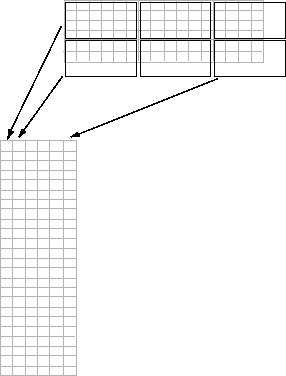
The following figure illustrates this process. A 6-by-16 image is processed in
4-by-6 blocks. im2col first zero-pads the image to make the
size 8-by-18 (six 4-by-6 blocks), and then rearranges the blocks into six columns of
24 elements each.
im2col rearranges each sliding
m-by-n neighborhood of the image into a
column in a temporary matrix. The temporary matrix has one column for each
neighborhood in the original image. The order of the columns in matrix
B is determined by traversing the image
A in a column-wise manner.
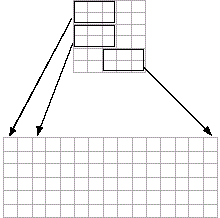
The following figure illustrates this process. In this figure, a small 6-by-5
pixel image is processed in 2-by-3 pixel neighborhoods. im2col
creates one column for each neighborhood in the image, so there are a total of 15
columns in the temporary matrix. Each pixel's column contains the value of the
pixels in its neighborhood, so there are six rows.
Version History
Introduced before R2006a
MATLAB Command
You clicked a link that corresponds to this MATLAB command:
Run the command by entering it in the MATLAB Command Window. Web browsers do not support MATLAB commands.
Sélectionner un site web
Choisissez un site web pour accéder au contenu traduit dans votre langue (lorsqu'il est disponible) et voir les événements et les offres locales. D’après votre position, nous vous recommandons de sélectionner la région suivante : .
Vous pouvez également sélectionner un site web dans la liste suivante :
Comment optimiser les performances du site
Pour optimiser les performances du site, sélectionnez la région Chine (en chinois ou en anglais). Les sites de MathWorks pour les autres pays ne sont pas optimisés pour les visites provenant de votre région.
Amériques
- América Latina (Español)
- Canada (English)
- United States (English)
Europe
- Belgium (English)
- Denmark (English)
- Deutschland (Deutsch)
- España (Español)
- Finland (English)
- France (Français)
- Ireland (English)
- Italia (Italiano)
- Luxembourg (English)
- Netherlands (English)
- Norway (English)
- Österreich (Deutsch)
- Portugal (English)
- Sweden (English)
- Switzerland
- United Kingdom (English)