imoverlay
R2026bBurn binary mask into 2-D image
Description
Examples
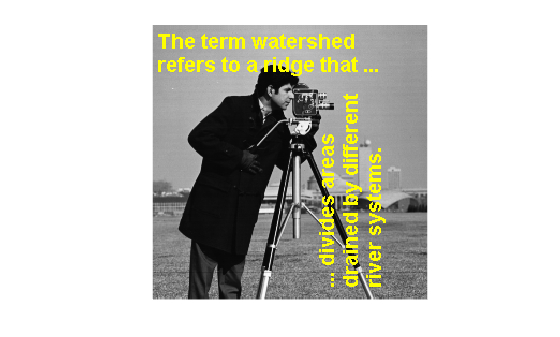
Read a grayscale image into the workspace.
A = imread('cameraman.tif');Read a binary image into the workspace.
BW = imread('text.png');Burn the binary image into the grayscale image, specifying the color to be used for the binary mask.
B = imoverlay(A,BW,'yellow');Display the result.
imshow(B)
Read an RGB image into the workspace.
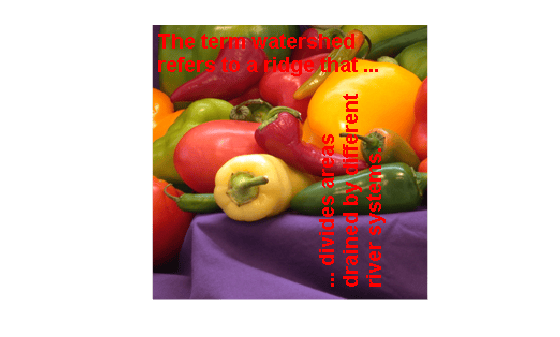
RGB = imread('peppers.png');Read a binary image into the workspace.
BW = imread('text.png');Crop the RGB image to make it the same size as the binary mask.
RGB_cropped = imcrop(RGB,[64,128,255,255]);
Burn the binary image into the cropped RGB image, choosing the color to be used.
B = imoverlay(RGB_cropped,BW,'red');Display the result.
figure
imshow(B)
Input Arguments
Input image, specified as a 2-D grayscale image or 2-D RGB image.
Data Types: single | double | int16 | uint8 | uint16 | logical
Mask image, specified 2-D binary matrix or 2-D numeric matrix of the same size as the first
two dimensions of image A.
Data Types: single | double | int8 | int16 | int32 | uint8 | uint16 | uint32 | logical
Color used for the overlay, specified as an RGB triplet, a hexadecimal color code, a color name, or a short color name.
For a custom color, specify an RGB triplet or a hexadecimal color code.
An RGB triplet is a three-element row vector whose elements specify the intensities of the red, green, and blue components of the color. The intensities must be in the range
[0,1], for example,[0.4 0.6 0.7].A hexadecimal color code is a string scalar or character vector that starts with a hash symbol (
#) followed by three or six hexadecimal digits, which can range from0toF. The values are not case sensitive. Therefore, the color codes"#FF8800","#ff8800","#F80", and"#f80"are equivalent.
Alternatively, you can specify some common colors by name. This table lists the named color options, the equivalent RGB triplets, and the hexadecimal color codes.
| Color Name | Short Name | RGB Triplet | Hexadecimal Color Code | Appearance |
|---|---|---|---|---|
"red" | "r" | [1 0 0] | "#FF0000" |
|
"green" | "g" | [0 1 0] | "#00FF00" |
|
"blue" | "b" | [0 0 1] | "#0000FF" |
|
"cyan"
| "c" | [0 1 1] | "#00FFFF" |
|
"magenta" | "m" | [1 0 1] | "#FF00FF" |
|
"yellow" | "y" | [1 1 0] | "#FFFF00" |
|
"black" | "k" | [0 0 0] | "#000000" |
|
"white" | "w" | [1 1 1] | "#FFFFFF" |
|








This table lists the default color palettes for plots in the light and dark themes.
| Palette | Palette Colors |
|---|---|
Before R2025a: Most plots use these colors by default. |
|
|
|


You can get the RGB triplets and hexadecimal color codes for these palettes using the
orderedcolors
and rgb2hex
functions. For example, get the RGB triplets for the "gem" palette and
convert them to hexadecimal color
codes.
RGB = orderedcolors("gem");
H = rgb2hex(RGB);
Example: "r"
Example: "green"
Example: [0 0.4470
0.7410]
Example: "#00FFFF"

