Share Your Collections
You can have teaching assistants or other instructors assist you with authoring MATLAB® assessment items. These participants can perform the same tasks as you, the original instructor, with one exception: they cannot delete collections they did not create.
People you share your collections with can:
Create, delete, and modify assessment items in the collection. They can also add and remove collaborators.
Use your collection content in MATLAB Grader™ courses and LMS courses.
See collection content listed on their own MATLAB Grader home pages.
Anyone can be a collaborator — there are no license or software maintenance requirements. However, collaborators must have a MathWorks® account.
Collaborators must have a MathWorks account, but they do not need a MATLAB license.
Add Collaborators
To add instructors:
From your content, select a collection.
Click Manage Instructors, located in the center of the collections menu on the top of the screen.
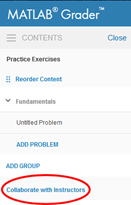
Enter the email addresses associated with the MathWorks accounts of the instructors with whom you want to share the collection. Separate each email address with a comma. For example: instructor1@mycollege.edu, instructor2@mycollege.edu.
Click Send.
MATLAB Grader displays the status of your notifications.
View Collaborators
MATLAB Grader displays collaborators in the Instructors tab, below the enrollment entry field.
If a collaborator signs in to MATLAB Grader with a different email than you sent the invitation to, then that email appears under Accessing As.

