Camera
R2026bDescription
Properties
Camera pose, specified as a rigidtform3d (Image Processing Toolbox)
object.
Camera size, specified as a positive scalar.
Camera label, specified as a string scalar.
Camera color, specified as an RGB triplet.
Transformation applied to the point cloud in the scene, specified as a rigidtform3d (Image Processing Toolbox),
affinetform3d (Image Processing Toolbox), simtform3d (Image Processing Toolbox),
or transltform3d (Image Processing Toolbox).
Transparency of camera faces, specified as a numeric scalar in the range
[0,1]. For cameras displayed using the
"frustrum" style, this property controls the transparency of the
far plane.
Display point cloud in scene, specified as "on" or
"off", or as a numeric or logical 0
(false) or 1 (true). A value
of "on" is equivalent to true and shows the points
magnified. A value of "off" is equivalent to false
and shows points unmagnified, as they would appear from the position of the
camera.
Camera axis visibility, specified as "on" or
"off", or as a numeric or
logical 1 (true) or 0
(false). The visibility value applies to all cameras. A
value of "on" is equivalent to true, and
"off" is equivalent to false. Thus, you can use
the value of the property set by this argument as a logical value. The value is stored
as an on/off logical value of type OnOffSwitchState.
Camera principal axes visibility, specified as "on" or
"off", or as a numeric or
logical 1 (true) or 0
(false). The visibility value applies to all cameras. A
value of "on" is equivalent to true, and
"off" is equivalent to false. Thus, you can use
the value of the property set by this argument as a logical value. The value is stored
as an on/off logical value of type OnOffSwitchState.
Examples
Load a point cloud and camera poses from MAT files. The three cameras are placed in orbit around the point cloud, each looking toward its center.
load("object3d.mat"); load("cameraPoses.mat");
Display the point cloud in pcviewer and add the cameras using addCamera.
pcview = pcviewer(ptCloud);
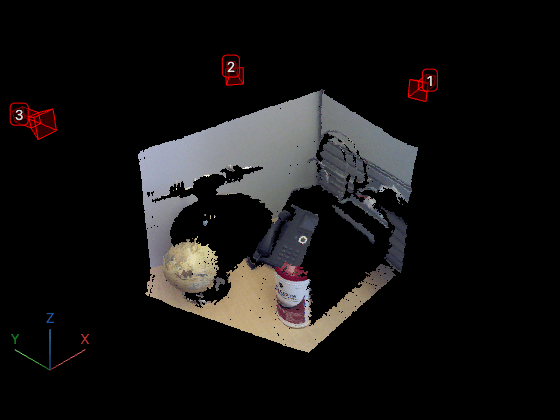
cameras = addCamera(pcview,cameraPoses,Size=0.1,Color=[1 0 0],Label=[1 2 3]);
Version History
Introduced in R2026b
MATLAB Command
You clicked a link that corresponds to this MATLAB command:
Run the command by entering it in the MATLAB Command Window. Web browsers do not support MATLAB commands.
Sélectionner un site web
Choisissez un site web pour accéder au contenu traduit dans votre langue (lorsqu'il est disponible) et voir les événements et les offres locales. D’après votre position, nous vous recommandons de sélectionner la région suivante : .
Vous pouvez également sélectionner un site web dans la liste suivante :
Comment optimiser les performances du site
Pour optimiser les performances du site, sélectionnez la région Chine (en chinois ou en anglais). Les sites de MathWorks pour les autres pays ne sont pas optimisés pour les visites provenant de votre région.
Amériques
- América Latina (Español)
- Canada (English)
- United States (English)
Europe
- Belgium (English)
- Denmark (English)
- Deutschland (Deutsch)
- España (Español)
- Finland (English)
- France (Français)
- Ireland (English)
- Italia (Italiano)
- Luxembourg (English)
- Netherlands (English)
- Norway (English)
- Österreich (Deutsch)
- Portugal (English)
- Sweden (English)
- Switzerland
- United Kingdom (English)