clutterVolumeRCS
Radar cross-section of volume clutter
Description
Examples
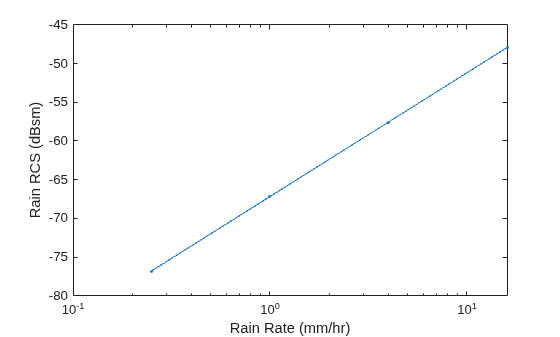
Estimate the radar cross-section of rain for a side-looking airborne SAR operating in the L band at 1.5 GHz. The rain is specified by a range resolution of 15 m, an azimuth resolution of 18 m, and a rain elevation cell resolution of 20 m. The rain rates are 0.25 mm/hr, 1 mm/hr, 4 mm/hr, and 16 mm/hr.
f = 1.5e9; rngres = 15; azres = 18; elres = 20; res = [rngres azres elres]; rr = [0.25 1 4 16];
Compute the rain radar cross-section. Use rainreflectivity to compute the volume reflectivity of the scattering particles.
volref = rainreflectivity(f,rr); rcs = clutterVolumeRCS(volref,res);
Plot the rain radar cross-section as a function of the rain rate. Express the cross-section in dB.
semilogx(rr,pow2db(rcs),'.-') xlabel('Rain Rate (mm/hr)') ylabel('Rain RCS (dBsm)')
Input Arguments
Volume reflectivity of scattering particles in square meters per cubic meter, specified as a scalar or a vector.
Data Types: double
Clutter extent, specified as a positive real scalar or a 1-by-3 row vector.
If specified as a positive real scalar,
volrepresents the volume of the clutter in cubic meters.If specified as a 1-by-3 row vector:
The first element of
volis a positive real scalar that represents the clutter within the range resolution in meters of the radar.The second element of
volis a positive real scalar that represents the clutter within the azimuth (or cross-range) resolution in meters of the radar.The third element of
volis a positive real scalar that represents the clutter within the elevation resolution in meters of the radar.
Data Types: double
Output Arguments
Radar cross-section of volume clutter in square meters, returned as a scalar or a
vector. rcs has the same dimensions as
volrefl.
Extended Capabilities
C/C++ Code Generation
Generate C and C++ code using MATLAB® Coder™.
Version History
Introduced in R2021a
See Also
MATLAB Command
You clicked a link that corresponds to this MATLAB command:
Run the command by entering it in the MATLAB Command Window. Web browsers do not support MATLAB commands.
Sélectionner un site web
Choisissez un site web pour accéder au contenu traduit dans votre langue (lorsqu'il est disponible) et voir les événements et les offres locales. D’après votre position, nous vous recommandons de sélectionner la région suivante : .
Vous pouvez également sélectionner un site web dans la liste suivante :
Comment optimiser les performances du site
Pour optimiser les performances du site, sélectionnez la région Chine (en chinois ou en anglais). Les sites de MathWorks pour les autres pays ne sont pas optimisés pour les visites provenant de votre région.
Amériques
- América Latina (Español)
- Canada (English)
- United States (English)
Europe
- Belgium (English)
- Denmark (English)
- Deutschland (Deutsch)
- España (Español)
- Finland (English)
- France (Français)
- Ireland (English)
- Italia (Italiano)
- Luxembourg (English)
- Netherlands (English)
- Norway (English)
- Österreich (Deutsch)
- Portugal (English)
- Sweden (English)
- Switzerland
- United Kingdom (English)