WebSocket Subscribe
Subscribe to the JSON data received by a WebSocket server
Libraries:
Raspberry Pi Blockset /
Network
Description
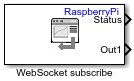
The WebSocket Subscribe block subscribes to the data received by a WebSocket server identified by an IP address and a port. The received data must be in JavaScript Object Notation (JSON) format, which can be interpreted by a WebSocket client to manipulate the data.
Note
To generate code C/C++ code for this block, you must have an Embedded Coder® license.
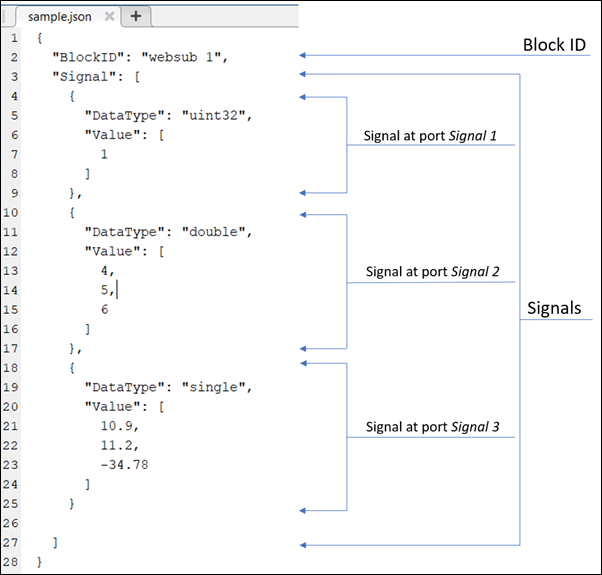
WebSocket JSON Data
This figure shows the signals in JSON format with a unique block label.
Ports
Output
The data received by the WebSocket server, specified as a row vector.
The block provides an option to add up to 10 Out ports to obtain signal data, with each signal being an N-by-1 vector. N is the number of data points in a signal.
Example: [1.5,3]
Dependencies
To enable the port, specify the total number of output signals in the
Number of outputs parameter. When you specify
Number of outputs, the block generates equal number of output
ports. For example, if you specify Number of outputs as
4, the block generates four output ports.
Data Types: single | double | int8 | int16 | int32 | uint8 | uint16 | uint32 | Boolean
The block outputs the status indicating the validity of the received data.
The status is:
1: Valid data0: Received data is empty or is of invalid JSON format-1: Mismatch in number of data fields
Data Types: single | double | int8 | int16 | int32 | uint8 | uint16 | uint32 | Boolean
Parameters
The IP address of the WebSocket server on which the JSON data is hosted.
The port number on the WebSocket server on which the JSON data is hosted.
Note
To avoid any resource conflicts, the Server IP address and Server Port parameters of all the WebSocket Subscribe blocks in a Simulink® model must be unique.
Specify the properties of the data using the Block Parameters dialog box or from a JSON file.
Mask Dialog–– Specify the total number of signal data using the block parameters dialog box. The block generates output ports that are equal in number to the total number of signals specified. You must also specify data size and data type of each signal using the dialog box.JSON file–– If you have a JSON file that contains the signal data, upload the file by clicking the Browse button. On successfully uploading the file, the block generates output ports that are equal in number to the data signals in the specified file. The data size and data type of each signal is inherited from the file.
Specify the total number of output signals received by the WebSocket server. When
you specify a value in this parameter, the block generates output ports that are equal
in number to the value specified in this parameter. For example, if you specify
Number of outputs as 4, the block generates
four output ports.
Dependencies
To enable the parameter, set the Specify output info via
parameter to Mask Dialog.
Specify the total number of data points in an output signal.
Dependencies
To enable the parameter, set the Specify output info via
parameter to Mask Dialog.
The data type of the output signal.
Dependencies
To enable the parameter, set the Specify output info via
parameter to Mask Dialog.
Click the Browse button to choose a JSON file that contains the signal data. On successfully uploading the JSON file, the block generates output ports that are equal in number to the data signals in the specified file. The data size and data type of each signal is inherited from the file.
Dependencies
To enable the parameter, set the Specify output info via
parameter to JSON file.
Specify how often the block receives the data from the WebSocket server. When you
specify Sample time as -1, the block inherits
its sample time based on the context of the block within the model.
Extended Capabilities
To generate code C/C++ code for this block, you must have an Embedded Coder license. For more information on selecting the right product stack according to your development goals, see Product Stack for Raspberry Pi Blockset.
Version History
Introduced in R2020a
MATLAB Command
You clicked a link that corresponds to this MATLAB command:
Run the command by entering it in the MATLAB Command Window. Web browsers do not support MATLAB commands.
Sélectionner un site web
Choisissez un site web pour accéder au contenu traduit dans votre langue (lorsqu'il est disponible) et voir les événements et les offres locales. D’après votre position, nous vous recommandons de sélectionner la région suivante : .
Vous pouvez également sélectionner un site web dans la liste suivante :
Comment optimiser les performances du site
Pour optimiser les performances du site, sélectionnez la région Chine (en chinois ou en anglais). Les sites de MathWorks pour les autres pays ne sont pas optimisés pour les visites provenant de votre région.
Amériques
- América Latina (Español)
- Canada (English)
- United States (English)
Europe
- Belgium (English)
- Denmark (English)
- Deutschland (Deutsch)
- España (Español)
- Finland (English)
- France (Français)
- Ireland (English)
- Italia (Italiano)
- Luxembourg (English)
- Netherlands (English)
- Norway (English)
- Österreich (Deutsch)
- Portugal (English)
- Sweden (English)
- Switzerland
- United Kingdom (English)