Preserve Variant Parameter Expressions from Mask Initialization in Generated Code
R2026bThis example shows how to control variant behavior and generate tunable code by defining variant controls and variant parameters in the mask initialization code of a masked subsystem. You can use this approach to create variant controls and variant variables in mask initialization code and preserve the variant expressions in generated code by using the supported mask initialization syntax.
In this workflow, you create a mask on the Variant Subsystem and define mask dialog parameters to accept the values that control variant behavior. In the mask initialization code, you use these mask dialog parameter values to create two Simulink.VariantControl objects: one that selects the active choice subsystem and one that selects the active values of a Simulink.VariantVariable object (variant parameter). You can then use this variant parameter as the parameter value inside the choice subsystems. Because the mask initialization code uses the supported syntax and sets the activation time to startup, the generated code preserves variant expressions for tunability and initializes variant parameter values in the model initialize function.
Explore Model
Open the model slexVariantParameterWithMaskInit.
model = "slexVariantParameterWithMaskInit";
open_system(model);
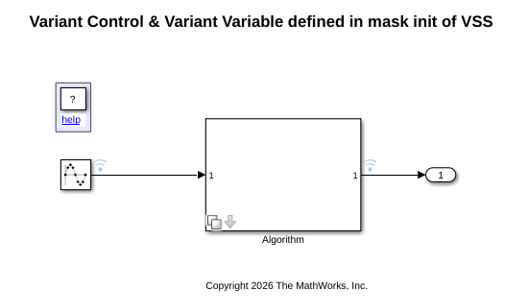
The model slexVariantParameterWithMaskInit uses a masked Variant Subsystem to select algorithm and sensor configuration through mask parameters. The model contains these components:
A Sine Wave source block with amplitude 5 and frequency 1 Hz provides the input signal.
A masked Variant Subsystem block named
Algorithmcontains two variant choices:ScalarProductandTableLookup.ScalarProduct, withpGainas the corresponding variant parameter, multiplies the input by a gain and adds a constant value of 1.TableLookup, withpLUTDataas the corresponding variant parameter, passes the input through a 1-D Lookup Table block with breakpoints [1 2 3 4 5] and lookup table data.
A mask on the
Algorithmsubsystem has two mask parameters,algoTypeandsensorMode. The enumeration class fileAlgoTypes.mdefines the valuesScalarProductandTableLookup. The enumeration class fileSensorModes.mdefines the valuesSensorModeAandSensorModeB. The model workspace contains the variablesvAlgoandvSensorMode. The mask dialog parameteralgoTypeis associated withvAlgo, and the mask dialog parametersensorModeis associated withvSensorMode. When the value ofvAlgochanges, the active choice subsystem changes betweenScalarProductandTableLookup. When the value ofvSensorModechanges, the active variant parameter values change. As a result, the selected sensor mode determines the gain value used by theScalarProductchoice or the table data used by theTableLookupchoice.
An output port
Out1captures the processed output signal.
Define Variant Controls and Variant Parameters in Mask Initialization
The mask initialization callback file dSlexVariantParameterWithMaskInit.m uses the mask parameters to create Simulink.VariantControl objects and variant parameters in the mask workspace. The file uses algoType and sensorMode to create the variant control objects vAlgoInMask and vSensorModeInMask. The variant control vAlgoInMask selects the active choice subsystem. The variant control vSensorModeInMask selects the active values of the variant parameters pGain and pLUTData, which are created as variant parameters and used by child blocks inside the choice subsystems.
To preserve tunability in generated code, use the callback syntax shown in this example when you create variant controls and variant parameters from mask dialog parameters during mask initialization. For more information, see Preserve Tunability of Parameters That Are Modified or Created in Mask Initialization.
classdef dSlexVariantParameterWithMaskInit

%   Copyright 2026 The MathWorks, Inc.

    methods(Static)
        function MaskInitialization(maskInitContext)
            ws = maskInitContext.MaskWorkspace;
            % Create variant controls
            ws.set('vAlgoInMask', ...
                @()dSlexVariantParameterWithMaskInit.createComponentVariantControl(algoType));
            ws.set('vSensorModeInMask', ...
                @()dSlexVariantParameterWithMaskInit.createSensorVariantControl(sensorMode));
            % Create variant variables
            ws.set('pGain', ...
                @()dSlexVariantParameterWithMaskInit.createGainVariantVariable());
            ws.set('pLUTData', ...
                @()dSlexVariantParameterWithMaskInit.createLUTVariantVariable());
        end

        function outParam = createComponentVariantControl(algoType)
            outParam = Simulink.VariantControl('Value', algoType, ...
                'ActivationTime', 'startup');
        end

        function outParam = createSensorVariantControl(sensorMode)
            outParam = Simulink.VariantControl('Value', sensorMode, ...
                'ActivationTime', 'startup');
        end

        function outParam = createGainVariantVariable()
            outParam = Simulink.VariantVariable("Choices", ...
                {"vSensorModeInMask == SensorModes.SensorModeA", -0.25, ...
                 "vSensorModeInMask == SensorModes.SensorModeB", 0.25});
        end

        function outParam = createLUTVariantVariable()
            outParam = Simulink.VariantVariable("Choices", ...
                {"vSensorModeInMask == SensorModes.SensorModeA", [1 0.9 0.8 0.7 0.6], ...
                 "vSensorModeInMask == SensorModes.SensorModeB", [1 1.1 1.2 1.3 1.4]});
        end
    end
end
Generate Code
Generate code to verify that variant controls and variant parameters are preserved as tunable constructs in the generated code.
slbuild(model);
### Searching for referenced models in model 'slexVariantParameterWithMaskInit'.
### Total of 1 models to build.
### Starting top model code generation target build for: slexVariantParameterWithMaskInit
### Successful completion of build procedure for: slexVariantParameterWithMaskInit

Build Summary

Top model targets:

Model                             Build Reason                                                Status                        Build Duration
==========================================================================================================================================
slexVariantParameterWithMaskInit  Target (slexVariantParameterWithMaskInit.c) did not exist.  Code generated and compiled.  0h 0m 11.626s

1 of 1 models built (0 models already up to date)
Build duration: 0h 0m 13.331s
Review Generated Code
The generated code uses the exported global variables vAlgo and vSensorMode, which are associated with the mask dialog parameters, to control variant behavior at startup. To review the generated code:
In the C Code tab, select Open Report.
Open
slexVariantParameterWithMaskInit.c. In the generated code, the model initialization function usesif-elselogic to assign values to the variant parameterspGainandpLUTDatabased on the variant control variablevSensorMode.
cfile = fullfile("slexVariantParameterWithMaskInit_ert_rtw",...
   "slexVariantParameterWithMaskInit.c");
coder.example.extractLines(cfile, ...
    "/* Model initialize function */", ...
    "/* Model terminate function */", 1, 0);
/* Model initialize function */
void slexVariantParameterWithMaskInit_initialize(void)
{
  {
    int32_T i;
    static const real_T tmp[5] = { 1.0, 0.9, 0.8, 0.7, 0.6 };

    static const real_T tmp_0[5] = { 1.0, 1.1, 1.2, 1.3, 1.4 };

    /* Variant Parameters startup activation time */
    if (vSensorMode == SensorModeA) {
      /* Outputs for Atomic SubSystem: '<Root>/Algorithm' */
      slexVariantParameterWithMaskI_P.pGain = -0.25;

      /* End of Outputs for SubSystem: '<Root>/Algorithm' */
      for (i = 0; i < 5; i++) {
        /* Outputs for Atomic SubSystem: '<Root>/Algorithm' */
        slexVariantParameterWithMaskI_P.pLUTData[i] = tmp[i];

        /* End of Outputs for SubSystem: '<Root>/Algorithm' */
      }
    } else if (vSensorMode == SensorModeB) {
      /* Outputs for Atomic SubSystem: '<Root>/Algorithm' */
      slexVariantParameterWithMaskI_P.pGain = 0.25;

      /* End of Outputs for SubSystem: '<Root>/Algorithm' */
      for (i = 0; i < 5; i++) {
        /* Outputs for Atomic SubSystem: '<Root>/Algorithm' */
        slexVariantParameterWithMaskI_P.pLUTData[i] = tmp_0[i];

        /* End of Outputs for SubSystem: '<Root>/Algorithm' */
      }
    }
  }
}
The step function uses if-else logic to select between the two variant subsystem choices based on the variant control variable vAlgo. The function then computes the output by using the selected algorithm and parameter values.
coder.example.extractLines(cfile, ...
    "/* Model step function */", ...
    "/* Model initialize function */", 1, 0);
/* Model step function */
void slexVariantParameterWithMaskInit_step(void)
{
  real_T rtb_SineWave;

  /* Sin: '<Root>/Sine Wave' */
  rtb_SineWave = sin((real_T)slexVariantParameterWithMask_DW.counter * 2.0 *
                     3.141592653589793 / 49.0) * 5.0;

  /* Outputs for Atomic SubSystem: '<Root>/Algorithm' */
  if (vAlgo == ScalarProduct) {
    /* Outputs for Atomic SubSystem: '<S1>/ScalarProduct' */
    /* VariantMerge generated from: '<S1>/Out1' incorporates:
     *  Constant: '<S2>/Constant'
     *  Gain: '<S2>/Gain'
     *  Sum: '<S2>/Add'
     */
    slexVariantParameterWithMaskI_Y.Out1 = slexVariantParameterWithMaskI_P.pGain
      * rtb_SineWave + 1.0;

    /* End of Outputs for SubSystem: '<S1>/ScalarProduct' */
  } else if (vAlgo == TableLookup) {
    /* Outputs for Atomic SubSystem: '<S1>/TableLookup' */
    /* Outputs for Atomic SubSystem: '<Root>/Algorithm' */
    /* VariantMerge generated from: '<S1>/Out1' incorporates:
     *  Lookup_n-D: '<S3>/1-D Lookup Table'
     *  Sin: '<Root>/Sine Wave'
     */
    slexVariantParameterWithMaskI_Y.Out1 = look1_binlxpw(rtb_SineWave,
      slexVariantParameterWith_ConstP.uDLookupTable_bp01Data,
      slexVariantParameterWithMaskI_P.pLUTData, 4U);

    /* End of Outputs for SubSystem: '<Root>/Algorithm' */
    /* End of Outputs for SubSystem: '<S1>/TableLookup' */
  }

  /* End of Outputs for SubSystem: '<Root>/Algorithm' */

  /* Update for Sin: '<Root>/Sine Wave' */
  slexVariantParameterWithMask_DW.counter++;
  if (slexVariantParameterWithMask_DW.counter == 49) {
    slexVariantParameterWithMask_DW.counter = 0;
  }

  /* End of Update for Sin: '<Root>/Sine Wave' */
}
Limitations
This workflow has these limitations:
The workflow does not support
code compileactivation time.
The workflow does not support defining a variant bank in mask initialization.
You cannot use a
Simulink.Parameterobject defined in mask initialization to create a variant control object or variant parameter.
You cannot define a
Simulink.VariantExpressionobject in mask initialization.
If you use a mask parameter to create a variant control object or variant parameter, the mask parameter must be tunable and set to evaluate.
The value of a variant control object cannot be an expression.
If a model argument passed from a top model to a referenced model is used as a mask parameter that defines a variant control in mask initialization, and the variant control determines a variant variable used as a child block parameter value, then simulation in rapid accelerator mode is not supported.
See Also
Simulink.VariantControl | Simulink.VariantVariable

