Contenu principal

readall

Read all signals from datastore

Description

data = readall(sds) reads all signal data from the datastore sds.

example

data = readall(sds,UseParallel=tf) enables you to read data in parallel by setting UseParallel=true. (since R2026a)

To set UseParallel=true, you must have a Parallel Computing Toolbox™ license and specify a signalDatastore object, sds, that contains file data.

Examples

collapse all

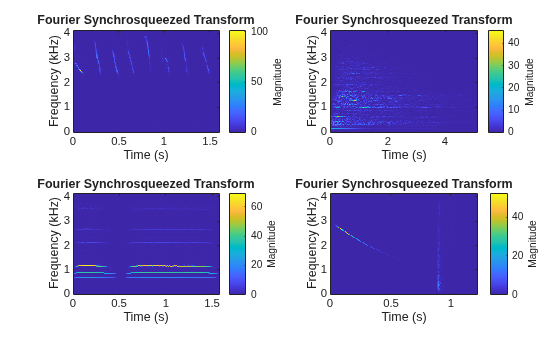
Specify the path to four signals included with MATLAB®. The signals are recordings of a bird chirp, a gong, a train, and a splat. All signals are sampled at 8192 Hz.

folder = fullfile(matlabroot,'toolbox','matlab','audiovideo', ...
         ["chirp.mat","gong.mat","train.mat","splat.mat"]);
fs = 8192;
sds = signalDatastore(folder,'SampleRate',fs);

Read the data in the first variables of all the files in the datastore and plot the Fourier synchrosqueezed transform of each signal.

data = readall(sds);

tiledlayout('flow')
for i = 1:length(data)
    nexttile
    fsst(data{i},fs,'yaxis')
end

Figure contains 4 axes objects. Axes object 1 with title Fourier Synchrosqueezed Transform, xlabel Time (s), ylabel Frequency (kHz) contains an object of type image. Axes object 2 with title Fourier Synchrosqueezed Transform, xlabel Time (s), ylabel Frequency (kHz) contains an object of type image. Axes object 3 with title Fourier Synchrosqueezed Transform, xlabel Time (s), ylabel Frequency (kHz) contains an object of type image. Axes object 4 with title Fourier Synchrosqueezed Transform, xlabel Time (s), ylabel Frequency (kHz) contains an object of type image.

Input Arguments

collapse all

Signal datastore, specified as a signalDatastore object.

Since R2026a

Option to read data in parallel, specified as either false or true.

  • By default, readall does read data in parallel.

  • If you set tf to true, then readall reads data using a parallel pool of workers only if:

    • You have installed Parallel Computing Toolbox.

    • You have enabled automatic pool creation in parallel settings or an open parallel pool exists. For more information on how to control your parallel settings, see Specify Your Parallel Settings (Parallel Computing Toolbox).

    • You have specified a signalDatastore object src that contains file data.

    Otherwise, readall errors out.

Data Types: logical

Output Arguments

collapse all

All signals in the signal datastore, returned as a cell array. Each cell of data contains signals from a file or a member. Use the ReadOutputOrientation property of the datastore to control the orientation of data as either a column array or a row array.

Tips

When reading file data, because this function reads all the data in the files at once, you may run out of memory if your dataset is large.

Version History

Introduced in R2020a

expand all