getEnergyInfo
R2026bSyntax
Description
energyInfo = getEnergyInfo(node)node. The function returns an
EnergyInfo object, which contains information about the types of energy
used by the block and flowing through its ports, energy conversion and dissipation, and the
assumptions used in calculating energy info for the block.
Before you call this function, you must enable energy accounting and simulate the model with Simscape™ data logging turned on either for the whole model or for specific blocks of interest.
To enable energy accounting, in the Configuration Parameters dialog box, at the bottom of the Simscape pane, under Advanced Parameters, select the Enable energy accounting check box.
You can also use the equivalent command-line interface to set the model configuration parameter:
set_param(bdroot,'SimscapeUseEnergyAccounting','on')
energyInfo = getEnergyInfo(node,EnergyUnit = unitname)unitname, when it returns information
about the energy usage for the block. The specified unit must be commensurate with the
default energy unit, J.
[
additionally returns information about the exergy and exergy rate usage for the block as an
energyInfo,exergyInfo] = getEnergyInfo(___)ExergyInfo object. Use this syntax for blocks in the thermal fluid
domains, such as thermal liquid or gas. If the block does not calculate exergy, the
ExergyInfo object is empty.
Examples
This example shows how you can get energy usage for an electrical block in a model.
Open the Permanent Magnet DC Motor example model, which already has data logging enabled for the whole model.
openExample("simscape/PermanentMagnetDCMotorExample")
Enable energy accounting and run the simulation to create the simulation log
variable simlog_PermanentMagnetDCMotor (as specified by the
Workspace variable name model configuration parameter) in your
current workspace:
set_param(bdroot,"SimscapeUseEnergyAccounting","on")
sim("PermanentMagnetDCMotor");
Open the DC Motor subsystem and select the Resistor block.
Find the node corresponding to the selected block:
r = simscape.logging.findNode(simlog_PermanentMagnetDCMotor,gcbh)
r =

  Node with properties:

                  id: 'Rotor_Resistance'
             savable: 1
          exportable: 0
                   i: [1×1 simscape.logging.Node]
    power_dissipated: [1×1 simscape.logging.Node]
                   n: [1×1 simscape.logging.Node]
                   p: [1×1 simscape.logging.Node]
                   v: [1×1 simscape.logging.Node]
Use node r, which is the Node object
corresponding to the rotor resistance, to get the energy and power usage for the
block.
r_energyInfo = getEnergyInfo(r)
r_energyInfo =

  EnergyInfo with properties:

           Path: "PermanentMagnetDCMotor/DC Motor/Rotor↵Resistance"
    Assumptions: [2×5 table]
        Summary: [2×5 table]
          Ports: [1×1 struct]
         Energy: [125×2 timetable]
          Power: [125×2 timetable]
View the energy usage summary.
r_energyInfo.Summary
ans =

  2×5 table

        Type           Ports          External         Converted      Accumulated
    ____________    ____________    _____________    _____________    ___________

    "Electrical"    0.052272 (J)            0 (J)    -0.052272 (J)       0 (J)
    "Thermal"              0 (J)    -0.052272 (J)     0.052272 (J)       0 (J)
The summary shows that the block acquired 0.052272 J of electrical energy through its ports and converted all this energy into thermal. The thermal energy is classified as external, which means that it got dissipated.
You can also check the assumptions used in calculating energy info for the block.
r_energyInfo.Assumptions
ans =

  2×5 table

        Type            Ports            External                 Converted               Accumulated
    ____________    ______________    ______________    _____________________________    ______________

    "Electrical"    "Measured"        "Assumed zero"    "Derived from energy balance"    "Assumed zero"
    "Thermal"       "Assumed zero"    "Measured"        "Derived from energy balance"    "Assumed zero"
The assumptions table shows that the energy usage tool measures electrical energy through the ports and external thermal energy. Converted energy of both types is derived from energy balance. All other types of energy are assumed zero.
The previous example shows how you can get energy usage for an electrical block in default units. To get the same information in different units, for example, in Watt-hours:
Open the Permanent Magnet DC Motor example model, which already has data logging enabled for the whole model.
openExample("simscape/PermanentMagnetDCMotorExample")
Enable energy accounting and run the simulation to create the simulation log
variable simlog_PermanentMagnetDCMotor (as specified by the
Workspace variable name model configuration parameter) in your
current workspace:
set_param(bdroot,"SimscapeUseEnergyAccounting","on")
sim("PermanentMagnetDCMotor");
Get the energy usage for the Rotor Resistor block in the DC
Motor subsystem. You can use tab completion to navigate through the simulation
log data tree. You can also use the simscape.logging.findNode function to find the node corresponding to the
block.
r_energyInfo = getEnergyInfo(simlog_PermanentMagnetDCMotor.DC_Motor.Rotor_Resistance,EnergyUnit="Wh")r_energyInfo =
EnergyInfo with properties:
Path: "PermanentMagnetDCMotor/DC Motor/Rotor↵Resistance"
Assumptions: [2×5 table]
Summary: [2×5 table]
Ports: [1×1 struct]
Energy: [125×2 timetable]
Power: [125×2 timetable]View the energy usage summary.
r_energyInfo.Summary
r_energyInfo.Summary

ans =

  2×5 table

        Type            Ports            External           Converted       Accumulated
    ____________    ______________    _______________    _______________    ___________

    "Electrical"    1.452e-05 (Wh)             0 (Wh)    -1.452e-05 (Wh)      0 (Wh)
    "Thermal"               0 (Wh)    -1.452e-05 (Wh)     1.452e-05 (Wh)      0 (Wh)
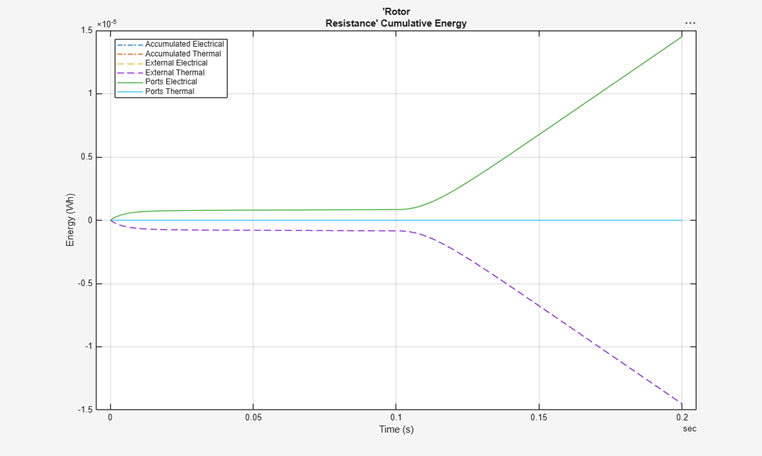
The summary shows the energy table values in Wh.
The plot
object function also uses the specified energy unit to plot the cumulative energy usage
for the block.
plot(r_energyInfo)
This example shows how you can get energy and exergy usage for a thermal liquid block in a model.
Open the Optimal Pipeline Geometry for Heated Oil Transportation example model, which already has data logging enabled for the whole model.
openExample("simscape/OptimalPipelineGeometryForHeatedOilTransportationExample")
Enable energy accounting and run the simulation to create the simulation log
variable simlog_OptimalPipelineGeometryForHeatedOilTransportation (as
specified by the Workspace variable name model configuration
parameter) in your current workspace:
set_param(bdroot,"SimscapeUseEnergyAccounting","on")
sim(bdroot);
Get the energy and exergy usage for the Pipe (TL) block. You can use
tab completion to navigate through the simulation log data tree. You can also use the
simscape.logging.findNode function to find the node corresponding to the
block.
[pipe_energyInfo,pipe_exergyInfo] = getEnergyInfo(simlog_OptimalPipelineGeometryForHeatedOilTransportation.Pipe_TL)
pipe_energyInfo =

  EnergyInfo with properties:

           Path: "OptimalPipelineGeometryForHeatedOilTransportation/Pipe (TL)"
    Assumptions: [2×5 table]
        Summary: [2×5 table]
          Ports: [1×1 struct]
         Energy: [57×2 timetable]
          Power: [57×2 timetable]


pipe_exergyInfo =

  ExergyInfo with properties:

           Path: "OptimalPipelineGeometryForHeatedOilTransportation/Pipe (TL)"
    Assumptions: [2×6 table]
        Summary: [2×6 table]
          Ports: [1×1 struct]
         Exergy: [57×2 timetable]
     ExergyRate: [57×2 timetable]
For a thermal fluid block, comparing energy and exergy tables aids in understanding of how the block works. First, view the energy usage summary.
pipe_energyInfo.Summary
ans =

  2×5 table

         Type               Ports         External       Converted         Accumulated
    _______________    _______________    ________    _______________    _______________

    "Thermal"          -2.3061e+08 (J)     0 (J)       2.3061e+08 (J)              0 (J)
    "ThermalLiquid"     2.2737e+08 (J)     0 (J)      -2.3194e+08 (J)    -4.5711e+06 (J)
The summary shows that the block acquired 2.2737e+08 J of thermal liquid energy through its ports, partially accumulated it and partially converted this energy into thermal. The thermal energy left the block through its thermal port.
Now, view the exergy usage summary.
pipe_exergyInfo.Summary
ans =

  2×6 table

         Type               Ports         External       Converted         Accumulated           Lost
    _______________    _______________    ________    _______________    _______________    ______________

    "Thermal"          -2.7555e+07 (J)     0 (J)       2.7569e+07 (J)              0 (J)         13718 (J)
    "ThermalLiquid"     2.0573e+08 (J)     0 (J)      -2.8869e+07 (J)    -1.6877e+06 (J)    1.7854e+08 (J)
This summary shows the impact of environmental conditions on the fluid flow. The table contains an additional column, which reports the lost, or wasted, exergy. For more information, see Energy Accounting in Fluid Domains.
You can also check the assumptions used in calculating exergy info for the block.
pipe_exergyInfo.Assumptions
ans =

  2×6 table

         Type            Ports          External                 Converted               Accumulated         Lost
    _______________    __________    ______________    _____________________________    ______________    __________

    "Thermal"          "Measured"    "Assumed zero"    "Derived from energy balance"    "Assumed zero"    "Measured"
    "ThermalLiquid"    "Measured"    "Assumed zero"    "Derived from energy balance"    "Measured"        "Measured"
The assumptions table shows that the energy usage tool measures thermal liquid exergy and thermal exergy through the ports, accumulated thermal liquid exergy, and lost exergy of both types. External exergy of both types and accumulated thermal exergy are assumed zero. Converted exergy of both types is derived from energy balance.
Input Arguments
Output Arguments
Version History
Introduced in R2026b

