fprintf
R2026bAffiche un texte variable centré sur l'icône du sous-système masqué
Description
fprintf( applique à formatspec,var)var le format indiqué dans formatspec.
Exemples
Affichez le texte Hello sur l’icône.
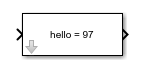
fprintf('Hello');Convertissez le caractère a en entier 97 et affichez-le sur l’icône du bloc.
myvar = 'a'
fprintf('hello = %d',myvar);
Arguments d'entrée
Le texte apparaissant sur le bloc est spécifié en tant que chaîne de caractères ou vecteur de caractères.
Types de données : char | string
Un caractère de conversion pour la variable est indiqué.
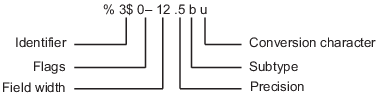
Opérateur de formatage
Un opérateur de formatage débute par le signe du pourcentage, %, et se termine par un caractère de conversion. Le caractère de conversion doit impérativement être indiqué. Vous avez la possibilité d’indiquer l'identifiant, les indicateurs, la largeur du champ, la précision et les opérateurs de sous-type entre % et le caractère de conversion. Les espaces ne sont pas des caractères valides entre les opérateurs et ne sont indiqués ici que pour des raisons de lisibilité.
Caractère de conversion
Ce tableau présente les caractères de conversion permettant de formater les données numériques et les données de caractères en tant que texte.
| Type de valeur | Conversion | Détails |
|---|---|---|
Entier, signé |
| Base 10 |
Entier, non signé |
| Base 10 |
| Base 8 (octal) | |
| Base 16 (hexadécimal), minuscules | |
| Identique à | |
Nombre à virgule flottante |
| Notation en virgule fixe (utilisez un opérateur de précision pour indiquer le nombre de chiffres après la virgule décimale) |
| Notation exponentielle, par exemple | |
| Identique à | |
| Le plus compact de | |
| Le plus compact de | |
Caractères ou chaînes de caractères |
| Caractère unique |
| Vecteur de caractères ou tableau de chaîne de caractères. Le type de texte de sortie est identique au type de |
Types de données : char | string
La variable est formatée sur la base du caractère de formatage indiqué dans formatspec.
Remarque
Si cette fonction fprintf porte le même nom que la fonction MATLAB® correspondante, elle n'assure pour autant que la fonctionnalité décrite dans cette page.
Historique des versions
Introduit avant R2006a
Voir aussi
disp | port_label | text | Mask Display and Initialization Commands

