Software Component Design
R2026bThe Software Component Designer for Simulink® support package provides an end-to-end workflow for service-oriented architecture (SOA) applications. Design modular software components with defined service interfaces and quality of service (QoS) properties, simulate communication and execution behavior in a mock run-time environment (RTE), and generate fully deployable applications for Embedded Linux® platforms.
Key capabilities include:
Model — Use the Software Component Designer app to configure a Simulink model as a software component and define service providers and consumers using client-server ports and message-based communication.
Configure — Specify communication and execution behavior by configuring quality of service (QoS) properties on component ports.
Verify — Simulate software components with a mock run-time environment (RTE) using test harnesses to validate behavior before deployment. Integrate components into software architecture models for composition-level testing (with System Composer™).
Deploy — Generate fully deployable applications for Embedded Linux, including middleware bindings for DDS and SOME/IP (with Embedded Coder®).
Apps
| Software Component Designer | Design, simulate, and deploy software components for service-oriented architecture (SOA) applications (Since R2026b) |
Topics
Software Component Designer for Simulink
- Software Component Models in Simulink
Learn how software component models define modular software units, their interactions, and run-time behavior in Simulink. - Install Software Component Designer for Simulink Support Package
Install the Software Component Designer for Simulink Support Package, required for software component modeling in Simulink.
Design Software Components
- Create Software Component Models in Simulink
Configure a Simulink model as a software component with an explicit boundary, interfaces, and run-time behavior. - Define Data and Service Interfaces Between Components
Specify how software components interact by defining data and service interfaces on component ports. - Configure Communication and Execution Behavior of Software Components
Specify run-time communication and execution behavior for component ports using quality of service (QoS) properties. - Validate Component Behaviors Using Architecture Test Harnesses (System Composer)
Generate test harnesses to validate run-time communication and execution behavior of software components configured using quality of service (QoS) properties.
Integrate into Compositions
- Integrate Software Components into Compositions Using Software Component Designer (System Composer)
Integrate software component models with quality of service (QoS) properties into software architecture models for composition-level simulation. - Simulate Software Architectures to Validate Run-time Behavior (System Composer)
Simulate software architecture models to validate run-time communication and execution behavior using a mock run-time environment (RTE). - Configure Deployment Properties of Software Components (System Composer)
Configure DDS or SOME/IP middleware properties on software architecture components for code generation and deployment to Linux platforms.
Related Information
- Design Software Architectures (System Composer)
- Software Architecture Modeling (AUTOSAR Blockset)
- Build and Deploy Applications that Include Generated Service Code (Embedded Coder)
Featured Examples
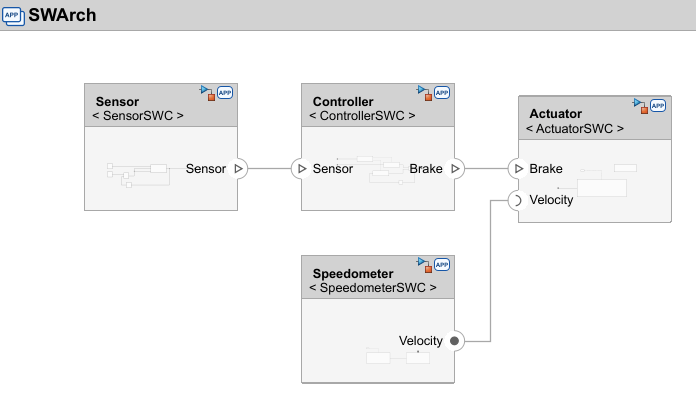
Model and Simulate Services of Brake Control System
Simulate and validate a brake control system software architecture using the Software Component Designer app.

