Overview of the Customization File for Custom Checks
A customization file is a MATLAB® file
that you create and name sl_customization.m. The sl_customization.m file
contains a set of functions for registering and defining custom checks,
tasks, and groups. To set up the sl_customization.m file,
follow the guidelines in this table.
| Function | Description | When Required |
|---|---|---|
sl_customization() | Registers custom checks, tasks, folders, and callbacks with the Simulink® customization manager at start-up. See Define Custom Model Advisor Checks. | Required for programmatic customizations to the Model Advisor. |
| One or more check definitions | Defines custom checks. See Define Custom Model Advisor Checks. |
Required for custom checks and to add custom checks to the By Product folder. If the By Product folder is not displayed in the Model Advisor window, select Show By Product Folder from the Settings > Preferences dialog box. |
| Check callback functions | Defines the actions of the custom checks. See Define Custom Model Advisor Checks. | Required for custom checks. You must write one callback function for each custom check |
| One or more calls to check input parameters | Specifies input parameters to custom checks. See Define Check Input Parameters. | Optional |
| One or more calls to checklist views | Specifies calls to the Model Advisor Result Explorer for custom checks. | Optional |
| One or more calls to check actions | Specifies actions the software performs for custom checks. See Define Custom Model Advisor Checks. | Optional |
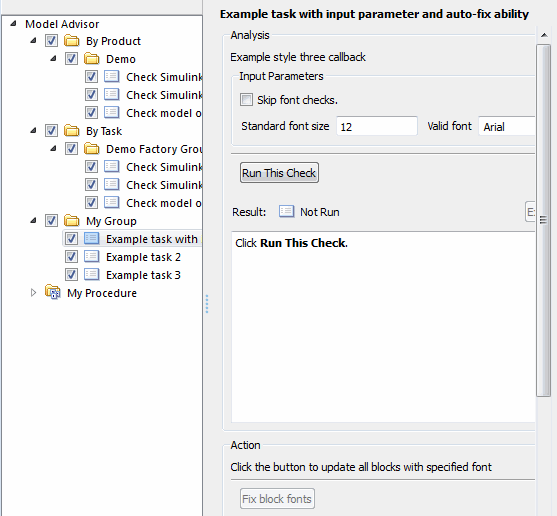
This example shows a custom configuration of the Model Advisor that has custom checks defined in custom folders and procedures. The selected check includes input parameters, list view parameters, and actions.