Contenu principal

Motor & Drive (System Level)

Generic motor and drive with closed-loop torque control

Libraries:
Simscape / Electrical / Electromechanical / System-Level Modeling

Description

The Motor & Drive (System Level) block models a generic motor and drive or servomotor with closed-loop torque control. Use this block to model a wide range of motor types, at system-level, in traction and actuation system. The motors you can model include these brushless motors:

  • Permanent magnet synchronous motors (PMSMs):

    • Interior permanent magnet (IPM) motors or interior permanent magnet synchronous motors (IPMSMs)

    • Surface permanent magnet (SPM) motors or surface permanent magnet synchronous motors (SPMSMs)

  • Brushless direct current (BLDC) motors

  • Axial flux traction motors

You can also use this block to model brushed motors with closed-loop torque control using a block.

To enable fast simulation at a system level, this block abstracts the motor, drive electronics, and controls.

The block permits only the range of torques and speeds defined by the torque-speed envelope. In the default block configuration, you specify this data in the block dialog box as a set of speed data points and the corresponding maximum torque values. This figure shows the Cartesian quadrants definition:

Tabulated torque-speed envelope for brushless motor model

This table shows the operating regions and the values for the speed and electromagnetic torque for each quadrant:

QuadrantDescriptionSpeedElectromagnetic TorqueOperating Mode
1Forward motoring regionPositivePositiveMotoring mode
2Forward generating regionPositiveNegativeGenerating mode
3Reverse motoring regionNegativeNegativeMotoring mode
4Reverse generating regionNegativePositiveGenerating mode

In this table:

  • Motoring mode converts electrical power into mechanical power.

  • Generating mode converts mechanical power into electrical power.

  • A positive rotational velocity means the distance between ports C and R increases over time.

  • A negative rotational velocity means the distance between ports C and R decreases over time.

  • A positive torque means the torque contributes to the increase in the rotational velocity. The block produces a positive torque that acts from the mechanical C to R ports.

  • A negative torque contributes to reducing the rotational velocity. If the rotational velocity is already negative, a negative torque accelerates it in the negative direction.

Specify the torque-speed envelope for the positive torque region only, that is, quadrants 1 and 4. The torque-speed envelope for the motor has the same profile when the motor operates in a reverse direction, which is represented by quadrants 2 and 3. If you specify the envelope only for positive speeds, then the block defines the quadrant 4 torque envelope as the mirror image of quadrant 1. This figure shows a typical torque-speed envelope for a torque-controlled motor and drive:

Tabulated torque-speed envelope for brushless motor model

Instead of providing tabulated torque-speed data, you can specify the maximum torque and maximum power. This figure shows the resulting torque-speed envelope profile in quadrant 1. The same profile constrains the other three operating quadrants.

Torque-speed envelope for brushless motor model based on maximum torque and maximum power

The Visualize Four-Quadrant Operation of Electric Drive System example helps you visualize the torque-speed trajectory of the Motor & Drive (System Level) block operated in all four quadrants.

Note

Simscape™ Electrical™ includes several blocks that can model the same type of motor or actuator. Choose a block that has sufficient modeling detail for the engineering design questions that you need to answer. Do not use a block that has more modeling detail than you need, because higher-fidelity models slow down simulation and are more complex to parameterize.

Blocks like the Motor & Drive (System Level) block use energy balancing or other abstraction methods. These models have a low level of fidelity. Use this block when you need a long simulation time, for example, to analyze drive cycles for electric vehicles. For more information about choosing the right block to model your motor at the right level of fidelity, see Choose Blocks to Model Motors or Actuators.

Intermittent Over-Torque Operation

To over-torque the motor for short periods of time, set the Allow intermittent over-torque parameter to Yes. In this case, you must specify the values for both the Continuous operation maximum torque envelope and the Intermittent operation maximum torque envelope parameters. Internally the block determines which torque envelope to apply based on the torque demand history. You can over-torque the motor drive if the torque demand has been less than the continuous operation torque envelope for more than the value specified in the Recovery time parameter. Over-torquing is disabled if over-torquing has been applied for longer than the value specified in the Over-torque time limit parameter.

For more application specific management of over-torquing, disable the over-torquing in the Motor & Drive block and externally implement the torque limiting in Simulink® between the torque demand and the torque reference input port, Tr, of the Motor & Drive block.

Model Electrical Losses

The block allows both simplified and tabulated definition of electrical losses. The default, simplified, behavior is to model the losses as the sum of the following four terms:

  • A series resistance between the DC power supply and the motor drive.

  • Fixed losses independent of torque and speed, P0. Use this to account for fixed converter losses.

  • A torque-dependent electrical loss kτ2, where τ is the torque and k is a constant. This represents ohmic losses in the copper windings.

  • A speed-dependent electrical loss kwω2, where ω is the speed and kw is a constant. This represents iron losses due to eddy currents.

This simplification of loss dependency on torque and speed might be sufficient for early design work, regardless of the underlying motor type and drive topology.

If you require more accuracy, or later in the design process, you can provide tabulated loss values as a function of motor speed and load torque. When using this option, provide data for all of the operating quadrants that your simulation will run in. If you provide partial data (for example, just for the quadrant 1 forward motoring region), then the other quadrants are assumed to repeat the same pattern of losses. This will normally be correct for the reverse motoring region, but may be an approximation for the braking/generating quadrants. The block does no extrapolation of loss values for speed and torque magnitudes that exceed the range of the table.

Finally, you can specify electrical losses by using tabulated efficiency data, instead of a single efficiency measurement or tabulated loss data. When using this option, also provide data for all of the operating quadrants that your simulation will run in. If you provide partial data (for example, just for the quadrant 1 forward motoring region), then the other quadrants are assumed to repeat the same pattern of losses.

The best practice is to provide tabulated loss data as a function of speed and torque, rather than tabulated efficiency data, because:

  • Efficiency becomes ill-defined for zero speed or zero torque.

  • Using losses, you can also account for fixed losses that are still present for zero speed or torque.

If you use the tabulated efficiencies option:

  • The block converts the efficiency values you provide into losses and uses the tabulated losses for simulation.

  • Efficiency values you provide for zero speed or zero torque are ignored, and losses are assumed zero when either torque or speed is zero.

  • The block uses linear interpolation to determine losses. Provide tabulated data for low speeds and low torques, as required, to get the desired level of accuracy for lower power conditions.

  • The block does no extrapolation of loss values for speed and torque magnitudes that exceed the range of the table.

When you provide tabulated loss or efficiency data, you can also specify it as a function of speed, load torque, and DC supply voltage. This option is useful when the supply voltage is not regulated and can vary during the simulation. One example is an electric vehicle drivetrain that does not have a DC-DC regulator upstream of the motor drive. Use the Motor & Drive (System Level) block to model the motor drive and provide tabulated loss or efficiency values as a function of motor speed, load torque, and DC supply voltage.

Plot Efficiency Map

The block allows you to visualize the map of the torque-speed envelope and the steady-state electrical efficiency of the motor and drive. To plot the efficiency map, either:

  • Double-click the block in your block diagram and, in the Description tab, click Plot efficiency map.

  • Double-click the block in your block diagram and, in the Utilities section, click the Plot button next to the Efficiency map parameter. (since R2026a)

This efficiency map does not include the losses generated by the External supply series resistance and Rotor damping parameters.

Model Thermal Effects

You can expose the thermal port to model the effects of losses that convert power to heat. To expose the thermal port, set the Modeling option parameter to either:

  • No thermal port — The block does not contain a thermal port.

  • Show thermal port — The block contains one thermal conserving port.

For more information about using thermal ports in actuator blocks, see Simulating Thermal Effects in Rotational and Translational Actuators.

Model Faults

To model a fault in the Motor & Drive (System Level) block, in the Faults section, click Add fault next to the fault that you want to model. For more information about fault modeling, see Fault Behavior Modeling and Fault Triggering.

The Motor & Drive (System Level) block allows you to model an open-circuit fault. When the fault is triggered, the servomotor stops operating, takes zero current from the supply side, and supplies zero current to the load side.

Fault Triggers

You specify how and when faults occur by using the Trigger type parameter.

If you set the Trigger type to Timed, the Motor & Drive (System Level) block triggers faults when the simulation time reaches the value you specify for the Trigger fault at time parameter.

If you set the Trigger type to Conditional, you can choose whether faults in the Motor & Drive (System Level) block are reversible (since R2025a). To model irreversible faults, click Open fault properties to open the Property Inspector and select the Trigger stays on once activated parameter. The block enters the faulted state when the trigger condition becomes true for the first time and remains in the faulted state for the rest of the simulation. To model reversible faults, clear the Trigger stays on once activated parameter. The block enters the faulted state when the trigger condition is true and enters the unfaulted state when the trigger condition is false.

For more information about adding faults to blocks and specifying fault triggers, see Introduction to Simscape Faults.

Variables

To set the priority and initial target values for the block variables before simulation, use the Initial Targets section in the block dialog box or Property Inspector. For more information, see Set Priority and Initial Target for Block Variables.

Nominal values provide a way to specify the expected magnitude of a variable in a model. Using system scaling based on nominal values increases the simulation robustness. You can specify nominal values using different sources, including the Nominal Values section in the block dialog box or Property Inspector. For more information, see System Scaling by Nominal Values.

Examples
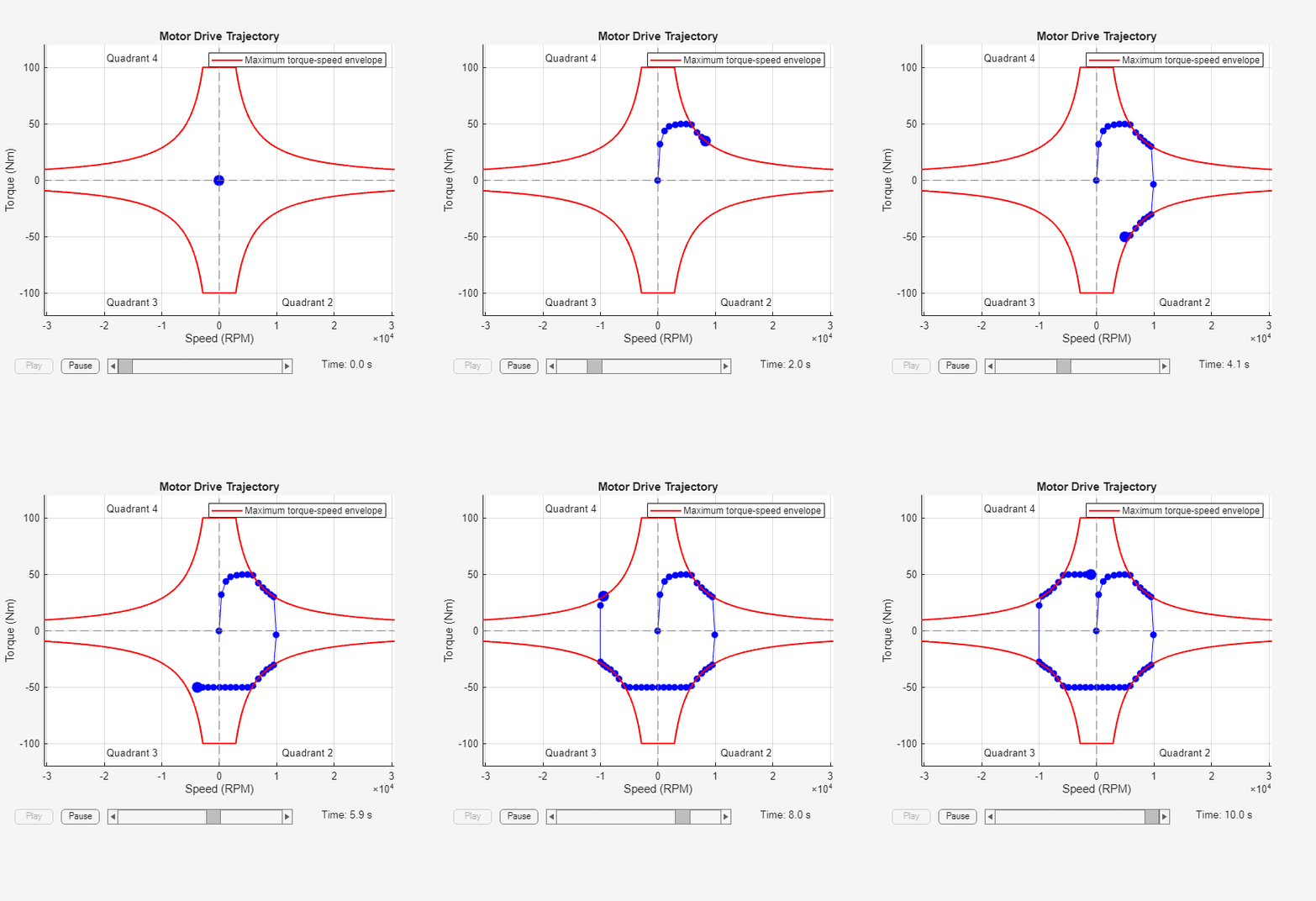
Assumptions and Limitations

  • The motor driver tracks a torque demand with a time constant Tc.

  • Motor speed fluctuations due to mechanical load do not affect the motor torque tracking.

  • The electrical connections must always be connected to a supply, such as a DC voltage source or a battery, that provides a positive voltage and is capable of delivering or absorbing the required power. To simulate turning the supply source on and off, see Model Faults.

Ports

Input

expand all

Physical input port associated with the reference torque demand.

Physical input port associated with the supply switch. A value of 1 means that the switch is off. A value of 0 means that the switch is on.

Dependencies

To enable this port, in the Electrical Torque section, select the Enable supply switch parameter.

Output

expand all

Physical output port associated with the mechanical speed.

Conserving

expand all

Electrical conserving port associated with the positive electrical DC supply.

Electrical conserving port associated with the negative electrical DC supply.

Mechanical rotational conserving port associated with the motor case.

Mechanical rotational conserving port associated with the motor rotor.

Thermal port.

Dependencies

To enable this port, set the Modeling option parameter to Show thermal port.

Parameters

expand all

Whether to enable the thermal port of the block and model the effects of losses that convert power to heat.

Electrical Torque

Method to use to parameterize the torque:

  • Tabulate torque envelope with speed — Provide the vectors of rotational speeds and corresponding maximum torque values.

  • Maximum torque and power — Define the torque-speed envelope by providing values for maximum permissible torque and motor power.

  • Tabulate torque envelope with speed and supply voltage — Provide the vectors of rotational speeds, the vectors of DC supply voltages, and the corresponding maximum torque values.

Whether to allow intermittent over-torque. For more information on over-torquing, see Intermittent Over-Torque Operation.

Maximum torque values for permissible steady-state operation. These values correspond to the speeds in the Corresponding rotational speeds, w parameter and define the torque-speed envelope for the motor.

You can specify this parameter as either a row or column vector (since R2023a).

Dependencies

To enable this parameter, set the Parameterize by parameter to Tabulate torque envelope with speed.

Maximum torque values for permissible steady-state operation. These values correspond to the speeds in the Corresponding rotational speeds, w parameter and to the voltages in the Corresponding DC supply voltage, Vdc parameter. This parameter defines the envelope with speed and supply voltage for the motor.

Dependencies

To enable this parameter, set the Parameterize by parameter to Tabulate torque envelope with speed and supply voltage.

Maximum torque values during intermittent over-torquing operation.

You can specify this parameter as either a row or column vector (since R2023a).

Dependencies

To enable this parameter, set the Parameterize by parameter to Tabulate torque envelope with speed and the Allow intermittent over-torque parameter to Yes.

Maximum torque values during intermittent over-torquing operation tabulated with speeds and voltages. The values of this parameter must be greater than the values of the Continuous operation maximum torque envelope, T_c(w, Vdc) parameter.

Dependencies

To enable this parameter, set the Parameterize by parameter to Tabulate torque envelope with speed and supply voltage and the Allow intermittent over-torque parameter to Yes.

Rotational speeds for permissible steady-state operation. To avoid poor performance due to an infinite slope in the torque-speed curve, specify a vector of rotational speeds that does not contain duplicate consecutive values.

You can specify this parameter as either a row or column vector (since R2023a).

Dependencies

To enable this parameter, set the Parameterize by parameter to Tabulate torque envelope with speed.

DC supply voltages for permissible steady-state operation. The values of this parameter must be strictly ascending.

You can specify this parameter as either a row or column vector (since R2023a).

Dependencies

To enable this parameter, set the Parameterize by parameter to Tabulate torque envelope with speed and supply voltage.

Maximum permissible motor torque during continuous operation.

Dependencies

To enable this parameter, set the Parameterize by parameter to Maximum torque and power.

Maximum permissible motor power during continuous operation.

Dependencies

To enable this parameter, set the Parameterize by parameter to Maximum torque and power.

Maximum permissible motor torque during intermittent over-torquing operation. The value of this parameter must be greater than the value of the Continuous operation maximum torque parameter.

Dependencies

To enable this parameter, set the Parameterize by parameter to Maximum torque and power and the Allow intermittent over-torque parameter to Yes.

Maximum permissible motor power during intermittent over-torquing operation. The value of this parameter must be greater than the value of the Continuous operation maximum power parameter.

Dependencies

To enable this parameter, set the Parameterize by parameter to Maximum torque and power and the Allow intermittent over-torque parameter to Yes.

Maximum amount of time for which you can continuously apply over-torquing.

Dependencies

To enable this parameter, set the Allow intermittent over-torque parameter to Yes.

Amount of time for which the torque demand has to be less than the continuous operation torque envelope for the block to be able to apply over-torquing again.

Dependencies

To enable this parameter, set the Allow intermittent over-torque parameter to Yes.

Time constant with which the motor driver tracks a torque demand.

Option to enable the switching on and the switching off of the motor.

Electrical Losses

Electrical loss parameterization method:

  • Single efficiency measurement — Model the losses as the sum of a constant term plus two additional terms that are proportional to the square of the torque and the square of the speed, respectively.

  • Tabulated loss data as a function of speed and torque — Determine the losses by using a two-dimensional table lookup based on the provided tabulated data for motor speeds, load torques, and corresponding losses.

  • Tabulated efficiency data as a function of speed and torque — Determine the losses by using a two-dimensional table lookup based on the provided tabulated data for motor speeds, load torques, and corresponding efficiencies.

  • Tabulated loss data as a function of speed, torque, and DC supply voltage — Determine the losses by using a three-dimensional table lookup based on the provided tabulated data for motor speeds, load torques, DC supply voltages, and corresponding losses.

  • Tabulated efficiency data as a function of speed, torque, and DC supply voltage — Determine the losses by using a three-dimensional table lookup based on the provided tabulated data for motor speeds, load torques, DC supply voltages, and corresponding efficiencies.

See Model Electrical Losses for details.

Since R2026a

Option to tabulate the electrical losses and efficiency data with three or more temperature values.

Dependencies

To enable this parameter, set Modeling option to Show thermal port and Parameterize losses by to Tabulated loss data as a function of speed and torque, Tabulated efficiency data as a function of speed and torque, Tabulated loss data as a function of speed, torque, and DC supply voltage, or Tabulated efficiency data as a function of speed, torque, and DC supply voltage.

Overall efficiency of the motor and driver. The block defines overall efficiency as

η=100τ0ω0τ0ω0+P0+kτ02+kwω02

where:

  • τ0 is the Torque at which efficiency is measured parameter.

  • ω0 is the Speed at which efficiency is measured parameter.

  • P0 is the Fixed losses independent of torque or speed parameter.

  • kτ02 is the torque-dependent electrical losses.

  • kwω2 is the speed-dependent iron losses.

At initialization, the block solves the efficiency equation for k. The block neglects losses associated with the rotor damping.

Dependencies

To enable this parameter, set the Parameterize losses by parameter to Single efficiency measurement.

Speed that the block uses to calculate torque-dependent electrical losses.

Dependencies

To enable this parameter, set the Parameterize losses by parameter to Single efficiency measurement.

Torque that the block uses to calculate torque-dependent electrical losses.

Dependencies

To enable this parameter, set the Parameterize losses by parameter to Single efficiency measurement.

Iron losses at the speed and torque at which you measure the efficiency.

Dependencies

To enable this parameter, set the Parameterize losses by parameter to Single efficiency measurement.

Fixed electrical loss associated with the driver when the motor current and torque are zero.

Dependencies

To enable this parameter, set the Parameterize losses by parameter to Single efficiency measurement.

Parameter α in the equation defining resistance as a function of temperature, as described in Thermal Model for Actuator Blocks. The default value is for copper.

Dependencies

To enable this parameter, set Parameterize losses by to Single efficiency measurement.

Temperature at which you specify the values of the Corresponding losses, P(w,τ), Corresponding efficiency (percent), E(w,τ), Corresponding losses, P(w,τ,v), and Corresponding efficiency (percent), E(w,τ,v) parameters.

Dependencies

To enable this parameter:

  • Set Parameterize losses by to Tabulated loss data as a function of speed and torque, Tabulated efficiency data as a function of speed and torque, Tabulated loss data as a function of speed, torque, and DC supply voltage, or Tabulated efficiency data as a function of speed, torque, and DC supply voltage.

  • Clear the Tabulate with three or more temperature values parameter. (since R2026a)

Vector of speed values to use for table lookup when calculating losses.

You can specify this parameter as either a row or column vector (since R2023a).

Dependencies

To enable this parameter, set the Parameterize losses by parameter to one of these settings:

  • Tabulated loss data as a function of speed and torque

  • Tabulated loss data as a function of speed, torque, and DC supply voltage

  • Tabulated efficiency data as a function of speed and torque

  • Tabulated efficiency data as a function of speed, torque, and DC supply voltage

Vector of torque values to use for table lookup when calculating losses.

You can specify this parameter as either a row or column vector (since R2023a).

Dependencies

To enable this parameter, set the Parameterize losses by parameter to one of these settings:

  • Tabulated loss data as a function of speed and torque

  • Tabulated loss data as a function of speed, torque, and DC supply voltage

  • Tabulated efficiency data as a function of speed and torque

  • Tabulated efficiency data as a function of speed, torque, and DC supply voltage

Tabulated values for electrical losses as a function of speed and torque to use for 2-D table lookup. Each value in the matrix specifies the losses for a specific combination of speed and torque. The matrix size must match the dimensions defined in the Vector of speeds (w) for tabulated losses and Vector of torques (τ) for tabulated losses parameters.

Dependencies

To enable this parameter:

  • Set Parameterize losses by to Tabulated loss data as a function of speed and torque.

  • Clear the Tabulate with three or more temperature values parameter. (since R2026a)

Temperature at which you specify the values of the Corresponding losses, P(w,τ), at second measurement temperature, Corresponding efficiency (percent), E(w,τ), at second measurement temperature, Corresponding losses, P(w,τ,v), at second measurement temperature, and Corresponding efficiency (percent), E(w,τ,v), at second measurement temperature parameters.

The value of this parameter must be greater than the value of the First measurement temperature parameter.

Dependencies

To enable this parameter:

  • Set Parameterize losses by to Tabulated loss data as a function of speed and torque, Tabulated efficiency data as a function of speed and torque, Tabulated loss data as a function of speed, torque, and DC supply voltage, or Tabulated efficiency data as a function of speed, torque, and DC supply voltage.

  • Clear the Tabulate with three or more temperature values parameter. (since R2026a)

Iron losses at the second measurement temperature that correspond to the speed and torque tabulated values.

Dependencies

To enable this parameter:

  • Set Parameterize losses by to Tabulated loss data as a function of speed and torque.

  • Clear the Tabulate with three or more temperature values parameter. (since R2026a)

Tabulated efficiency values, in percentages, as a function of speed and torque to use for 2-D table lookup.

This parameter models the conversion efficiency between the electrical energy and the mechanical energy when the temperature at the thermal port H is equal to the value of the First measurement temperature parameter. If the temperature at the thermal port H is equal to a value between the First measurement temperature and Second measurement temperature, this block linearly interpolates the efficiency between the values ​​of each table.

Each value in the matrix specifies the efficiency for a specific combination of speed and torque. The matrix size must match the dimensions defined in the Vector of speeds (w) for tabulated losses and Vector of torques (τ) for tabulated losses parameters. The block ignores the efficiency values you provide for zero speed or zero torque and assumes the losses are zero when either the torque or speed is zero. The block uses linear interpolation to determine losses. Provide tabulated data for low speeds and low torques as required to get the desired level of accuracy for lower power conditions.

Dependencies

To enable this parameter:

  • Set Parameterize losses by to Tabulated efficiency data as a function of speed and torque.

  • Clear the Tabulate with three or more temperature values parameter. (since R2026a)

Tabulated efficiency values, in percentages, at the second measurement temperature, corresponding to the speed and torque tabulated values.

This parameter models the conversion efficiency between the electrical energy and the mechanical energy when the temperature at the thermal port H is equal to the value of the Second measurement temperature parameter. If the temperature at the thermal port H is equal to a value between the First measurement temperature and Second measurement temperature, this block linearly interpolates the efficiency between the values ​​of each table.

Dependencies

To enable this parameter:

  • Set Parameterize losses by to Tabulated efficiency data as a function of speed and torque.

  • Clear the Tabulate with three or more temperature values parameter. (since R2026a)

Vector of DC supply voltages to use for table lookup when calculating losses.

You can specify this parameter as either a row or column vector (since R2023a).

Dependencies

To enable this parameter, set the Parameterize losses by parameter to Tabulated loss data as a function of speed, torque, and DC supply voltage or Tabulated efficiency data as a function of speed, torque, and DC supply voltage.

Tabulated values for electrical losses as a function of speed, torque, and DC supply voltage, to use for 3-D table lookup. Each value in the matrix specifies the losses for a specific combination of speed, torque, and DC supply voltage. The matrix size must match the dimensions defined by the Vector of speeds (w) for tabulated losses, Vector of torques (τ) for tabulated losses, and Vector of DC supply voltages (v) for tabulated losses parameters.

Dependencies

To enable this parameter:

  • Set Parameterize losses by to Tabulated loss data as a function of speed, torque, and DC supply voltage.

  • Clear the Tabulate with three or more temperature values parameter. (since R2026a)

Iron losses at the second measurement temperature, corresponding to the speed, torque, and DC supply voltage tabulated values.

Dependencies

To enable this parameter:

  • Set Parameterize losses by to Tabulated loss data as a function of speed, torque, and DC supply voltage.

  • Clear the Tabulate with three or more temperature values parameter. (since R2026a)

Tabulated efficiency values, in percentages, as a function of speed, torque, and DC supply voltage, to use for 3-D table lookup. Each value in the matrix specifies the efficiency for a specific combination of speed, torque, and DC supply voltage. The matrix size must match the dimensions defined by the Vector of speeds (w) for tabulated losses, Vector of torques (τ) for tabulated losses, and Vector of DC supply voltages (v) for tabulated losses parameters. The block ignores the efficiency values you provide for zero speed or zero torque and assumes the losses are zero when either torque or speed is zero. The block uses linear interpolation to determine losses. Provide tabulated data for low speeds and low torques as required to get the desired level of accuracy for lower power conditions.

Dependencies

To enable this parameter:

  • Set Parameterize losses by to Tabulated efficiency data as a function of speed, torque, and DC supply voltage.

  • Clear the Tabulate with three or more temperature values parameter. (since R2026a)

Tabulated efficiency values, in percentages, at the second measurement temperature, corresponding to the speed, torque, and DC supply voltage tabulated values.

Dependencies

To enable this parameter:

  • Set Parameterize losses by to Tabulated efficiency data as a function of speed, torque, and DC supply voltage.

  • Clear the Tabulate with three or more temperature values parameter. (since R2026a)

Since R2026a

Temperatures at which you specify the motor parameters, specified as a vector of three or more nonnegative scalars in ascending order.

Dependencies

To enable this parameter:

  • Set Parameterize losses by to Tabulated loss data as a function of speed and torque, Tabulated efficiency data as a function of speed and torque, Tabulated loss data as a function of speed, torque, and DC supply voltage, or Tabulated efficiency data as a function of speed, torque, and DC supply voltage.

  • Select the Tabulate with three or more temperature values parameter.

Since R2026a

Tabulated values for electrical losses as a function of speed, torque, and measurement temperatures, to use for 3-D table lookup.

Each value in the matrix specifies the losses for a specific combination of speed, torque, and measurement temperature. The matrix size must match the dimensions that you define in the Vector of speeds (w) for tabulated losses, Vector of torques (τ) for tabulated losses, and Vector of measurement temperatures (Tmeas) for tabulated losses parameters.

Dependencies

To enable this parameter:

  • Set Parameterize losses by to Tabulated loss data as a function of speed and torque.

  • Select the Tabulate with three or more temperature values parameter.

Since R2026a

Tabulated efficiency values, in percentages, as a function of speed, torque, and measurement temperatures, to use for 3-D table lookup.

Each value in the matrix specifies the losses for a specific combination of speed, torque, and measurement temperature. The matrix size must match the dimensions that you define in the Vector of speeds (w) for tabulated losses, Vector of torques (τ) for tabulated losses, and Vector of measurement temperatures (Tmeas) for tabulated losses parameters. The block ignores the efficiency values you provide for zero speed or zero torque and assumes the losses are zero when either torque or speed is zero. The block uses linear interpolation to determine losses. Provide tabulated data for low speeds and low torques as required to get the desired level of accuracy for lower power conditions.

Dependencies

To enable this parameter:

  • Set Parameterize losses by to Tabulated efficiency data as a function of speed and torque.

  • Select the Tabulate with three or more temperature values parameter.

Since R2026a

Tabulated values for electrical losses as a function of speed, torque, DC supply voltage, and measurement temperatures, to use for 4-D table lookup.

Each value in the matrix specifies the losses for a specific combination of speed, torque, DC supply voltage, and measurement temperature. The matrix size must match the dimensions that you define in the Vector of speeds (w) for tabulated losses, Vector of torques (τ) for tabulated losses, Vector of DC supply voltage (v) for tabulated losses,and Vector of measurement temperatures (Tmeas) for tabulated losses parameters.

Dependencies

To enable this parameter:

  • Set Parameterize losses by to Tabulated loss data as a function of speed, torque, and DC supply voltage.

  • Select the Tabulate with three or more temperature values parameter.

Since R2026a

Tabulated efficiency values, in percentages, as a function of speed, torque, DC supply voltage, and measurement temperatures, to use for 3-D table lookup.

Each value in the matrix specifies the losses for a specific combination of speed, torque, DC supply voltage, and measurement temperature. The matrix size must match the dimensions that you define in the Vector of speeds (w) for tabulated losses, Vector of torques (τ) for tabulated losses, Vector of DC supply voltage (v) for tabulated losses, and Vector of measurement temperatures (Tmeas) for tabulated losses parameters. The block ignores the efficiency values you provide for zero speed or zero torque and assumes the losses are zero when either torque or speed is zero. The block uses linear interpolation to determine losses. Provide tabulated data for low speeds and low torques as required to get the desired level of accuracy for lower power conditions.

Dependencies

To enable this parameter:

  • Set Parameterize losses by to Tabulated efficiency data as a function of speed, torque, and DC supply voltage.

  • Select the Tabulate with three or more temperature values parameter.

Equivalent resistance used in series with the DC supply to model electrical losses proportional to the driver supply current. The block assumes that the DC supply current is approximately constant under constant load conditions.

Mechanical

Rotor resistance to change in motor motion. The value can be zero.

Rotor damping. The value can be zero.

Rotor speed at the start of the simulation.

Thermal Port

Thermal mass of the electrical winding, defined as the energy required to raise the temperature by one degree.

Dependencies

To enable this parameter, set Modeling option to Show thermal port

Temperature of the thermal port at the start of simulation.

Dependencies

To enable this parameter, set Modeling option to Show thermal port

Faults

Option to add an open-circuit fault.

To add a fault, click the Add fault hyperlink.

Since R2026a

Trigger type, specified as one of these options:

  • Always On — The fault injects at the start of the simulation.

  • Timed — The fault injects when the simulation time reaches the value you specify for the Trigger fault at time parameter.

  • Additional triggers — The fault injects as a result of additional triggers not available in the block dialog box. Select this option and click the Open fault properties hyperlink to set the Trigger type to one of these values in the Property Inspector:

    • Conditional — The fault injects as a result of a condition that reflects a behavior associated with a signal. Conditionals evaluate the Boolean expression in the Condition parameter at each time step. To learn more, see Create and Manage Conditionals.

    • Manual — The fault injects or clears when you toggle the status in the Fault Dashboard pane. To learn more, see Manually Trigger Faults in Models.

Dependencies

To enable this parameter, click the Add fault hyperlink for the Port 2 connection fault parameter.

Simulation time at which the block enters the faulted state.

Dependencies

To enable this parameter, click the Add fault hyperlink for the Port 2 connection fault parameter and set Trigger type to Timed.

Option to enable additional trigger types not available in the block dialog box. To set the Trigger type parameter to Conditional or Manual, click the Open fault properties hyperlink and set the Trigger type in the Property Inspector.

Dependencies

To enable this parameter, click the Add fault hyperlink for the Open circuit fault parameter and set Trigger type to Additional triggers.

Utilities

Since R2026a

Visualize the map of the torque-speed envelope and the steady-state electrical efficiency of the motor and drive.

Extended Capabilities

expand all

C/C++ Code Generation
Generate C and C++ code using Simulink® Coder™.

Version History

Introduced in R2008a

expand all