Install Python 3.8.2 on Windows for Firmware Upload
R2026bTo flash PX4® firmware onto an autopilot board, the UAV Toolbox Support Package for PX4 Autopilots uses Python®
3.8.2 and pySerial 3.4. If these are not already installed on your Windows® computer, the hardware setup wizard guides you through the installation process.
Note
You need an Internet connection to install Python
3.8.2 on your Windows computer.
To install Python
3.8.2 from hardware setup, follow these steps.
After installing the UAV Toolbox Support Package for PX4 Autopilots, start the hardware setup by opening the Add-On Manager.
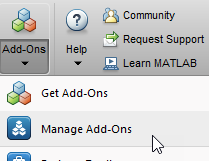
In the Add-On Manager, start the hardware setup process by clicking the Setup button
 .
.The following page appears if you are setting up hardware for PX4 for the first time in the current installation of MATLAB®.

If Python 3.8.2 Is Already Installed
If Python
3.8.2 is already installed on your computer, select I have already installed Python 3.8.2 and click Next. The next hardware setup requires a valid path where you have Python
3.8.2 installed.

After you provide the path where Python
3.8.2 is installed, click Validate. After successful validation, you can move to the next hardware setup pages.

If validation fails, reinstall Python
3.8.2. For more information, see If Python 3.8.2 Is Not Installed.
If Python 3.8.2 Is Not Installed
If Python
3.8.2 is not installed on the computer, select Automatically Download and Install and click Next.
Note
The firmware upload requires Python
3.8.x (any patch version). If you already have a 3.8.x version installed (for example, 3.8.1 or 3.8.3), see If Python 3.8.2 Is Already Installed instead. Other Python 3 versions with a different minor version (such as 3.9.x, 3.10.x, or 3.7.x) are not compatible and require you to install 3.8.2.
The automatic installation fails if a 3.8.x version is already present. In that case, see If Python 3.8.2 Is Already Installed to point to the existing installation.
After clicking Next, the following page appears.

Specify the path where you want to install Python
3.8.2 in your computer and click Install. Python
3.8.2 and pySerial 3.4 are installed at that path. After successful installation, click Next to continue to the next pages.

