triangulateInitialViews
R2026bSyntax
Description
The triangulateInitialViews object function selects the best
pair of views from the view graph geometrically verified by the
verifyImagePairs function and initializes the sparse 3-D
reconstruction. Use the triangulateInitialViews object function as the
third step in the SfM pipeline, followed by the reconstruct object
function, which reconstructs the point cloud of the full 3-D scene by processing all the
remaining views in the view graph. Use the isVerified function to verify
whether an sfm object is ready for 3-D reconstruction initialization before
calling the triangulateInitialViews function.
The triangulateInitialViews object function picks the pair of views
with the most reliable feature matches and sufficient baseline separation, or parallax,
estimates the relative camera pose between the two views, and triangulates the first set of
3-D points. For more information about the algorithm, see Algorithms.
If the initialization fails, the triangulateInitialViews function
returns an error. For more information on resolving issues during initialization, see Tips.
sfmObj = triangulateInitialViews(sfmObj)sfm
object sfmObj, and triangulates the corresponding 3-D points from the
selected views. The function then returns a version of the input SfM object with updated
WorldPointSet, ViewGraph, and ProcessedImages
properties.
sfmObj = triangulateInitialViews(sfmObj,viewPairIDs)viewPairID to triangulate
the first set of 3-D points, instead of automatically selecting the best view pair.
[___] = triangulateInitialViews(
specifies additional options using one or more name-value arguments in addition to any
combination of arguments from previous syntaxes. For example,
sfmObj,Name=Value)triangulateInitialViews(sfmObj,MinMedianAngle=10) relaxes the minimum
parallax requirement for triangulation.
Examples
Use the sfm object to recover camera poses and a sparse 3-D point cloud from images of an indoor scene.
Create Image Datastore and Define Camera Intrinsics
Create an ImageDatastore from the image sequence. Specify the camera intrinsic parameters.
unzip("sfm_images.zip")
imageFolder = fullfile(pwd,"images");
imds = imageDatastore(imageFolder);
intrinsics = cameraIntrinsics([535.1307 532.1860],[323.3722 239.7986],[480 640]);
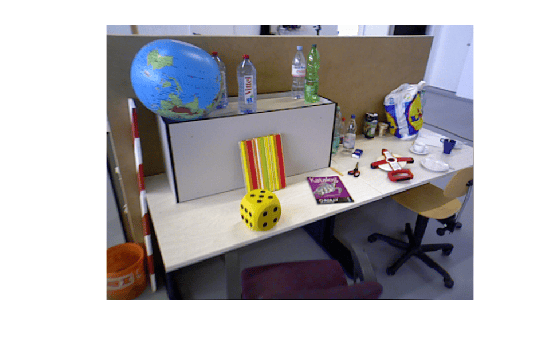
Visualize the indoor scene.
imshow(preview(imds))
Create SfM Object and Run Pipeline
Create an sfm object and execute each stage of the incremental SfM pipeline sequentially.
sfmObj = sfm(imds,intrinsics);
Connect image pairs based on visual similarity.
sfmObj = connectImagePairs(sfmObj);
Visualize the similarity matrix for the connected image pairs using the imagesc function.
imagesc(sfmObj.SimilarityMatrix)
title("Similarity Matrix for Connected Image Pairs")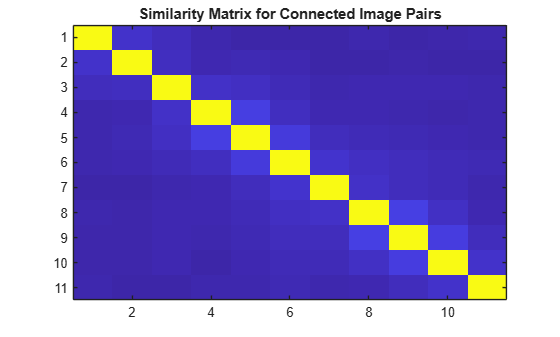
Verify that the view graph was created successfully before proceeding to geometric verification.
if isConnected(sfmObj)
    sfmObj = verifyImagePairs(sfmObj);
end
Visualize the similarity matrix for the refined image pair connections using the imagesc function.
imagesc(sfmObj.SimilarityMatrix)
title("Similarity Matrix after Refining Connected Image Pairs")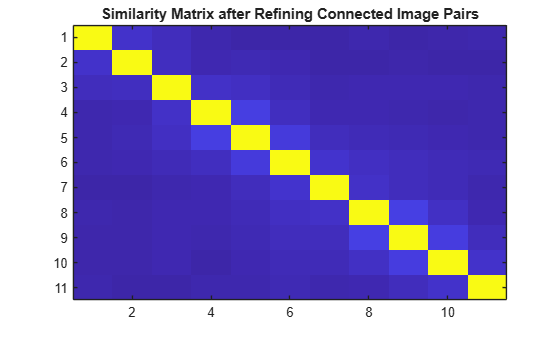
Confirm that geometric verification completed successfully before initializing the reconstruction. Specify a minimum median angle of 5 degrees and a maximum triangulation error of 4 pixels. Display the initialization metrics.
if isVerified(sfmObj)
    [sfmObj,info] = triangulateInitialViews(sfmObj,MinMedianAngle=5,MaxTriangulationError=4);
    disp(info)
end
                     ViewId1: 9
                     ViewId2: 10
                RelativePose: [1×1 rigidtform3d]
                     Matches: [380×2 uint32]
    MedianTriangulationAngle: 8.6016
       MeanReprojectionError: 0.2799
Confirm that initialization succeeded before running incremental reconstruction.
if isInitialized(sfmObj)
    sfmObj = reconstruct(sfmObj);
end
Retrieve Results
Retrieve the estimated camera poses and the sparse 3-D point cloud.
camPoses = poses(sfmObj);
sparsePoints = pointCloud(sfmObj);
Visualize Reconstruction
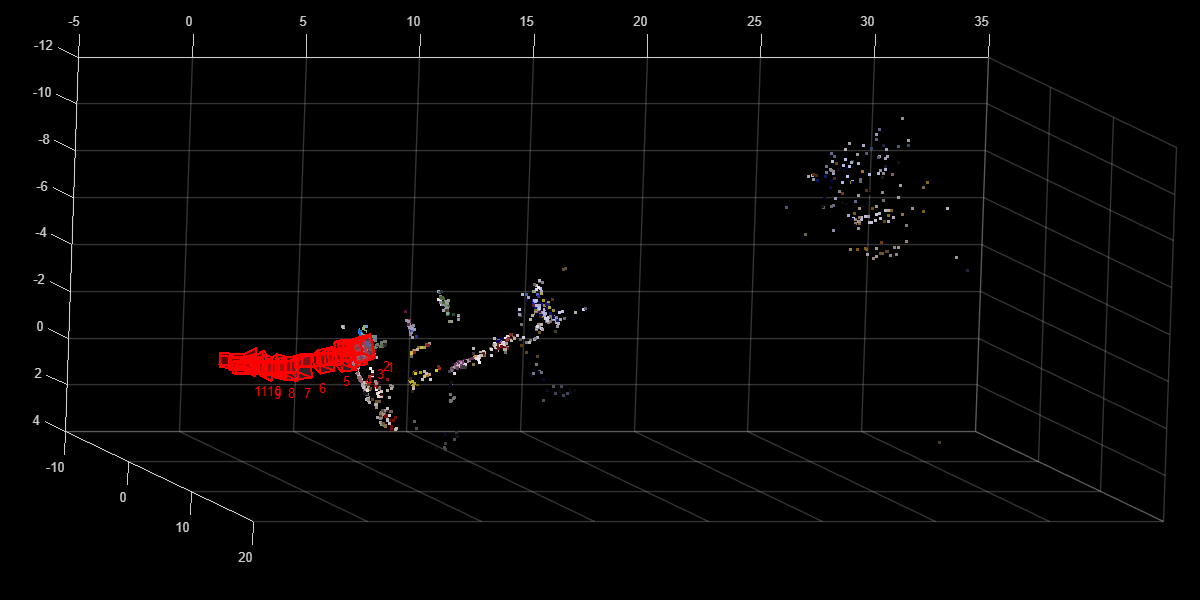
Display the reconstructed scene showing the camera trajectory and sparse point cloud. Adjust the view orientation and zoom for better visualization.
plot(sfmObj,CameraSize=0.5,MarkerSize=25)
view(82.69,-15.53)
camroll(-90)
camva(4.52)
This example shows how to analyze triangulation results and visualize 3-D points reconstructed by the triangulateInitialViews function.
Create Image Datastore and Define Camera Intrinsics
Create an imageDatastore object from the image sequence. Specify the camera intrinsics parameters.
unzip("sfm_images.zip")
imageFolder = fullfile(pwd,"images");
imds = imageDatastore(imageFolder);
intrinsics = cameraIntrinsics([535.1307 532.1860],[323.3722 239.7986],[480 640]);
Visualize images in the sequence.
figure
montage(imds)
title("Image Sequence")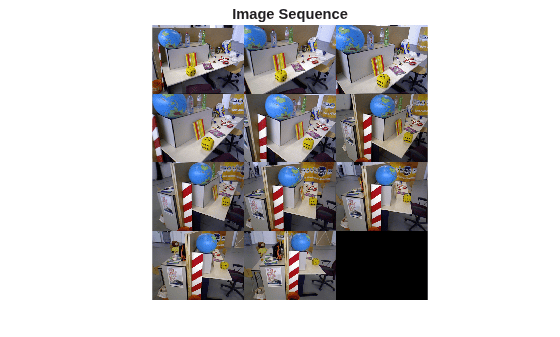
Create sfm Object and Construct Refined View Graph
Initialize the sfm object with the image datastore and camera intrinsics. The first two steps in the Structure from Motion (SfM) process are view graph construction and refinement. Connect visually similar image pairs to create a view graph. Then, refine the view graph by removing edges that violate epipolar geometric constraints.
sfmObj = sfm(imds,intrinsics);
sfmObjViewGraph = connectImagePairs(sfmObj);
sfmObjRefined = verifyImagePairs(sfmObjViewGraph);
Triangulate 3-D Points from Initial View Pair
Select a robust image pair and initialize the 3-D reconstruction. A strong initial pair typically comes from a densely connected region of the refined view graph, where both images share substantial scene overlap. A poor initial pair can reduce accuracy, increase drift during incremental reconstruction, and slow convergence.
[sfmObjInit,info] = triangulateInitialViews(sfmObjRefined, Verbose=true);
23 of 39 edges have more than 100 feature matches.
23 of 23 edges are selected after applying the grid threshold.
Views 3 and 6 are selected for initial triangulation.
Median triangulation angle: 23.571169
Inspect Triangulation Diagnostics
Display the triangulation metrics returned by the info output argument from the triangulateInitialViews function. The info structure contains these triangulation metrics:
Matches— Inlier matches that survived 3-D triangulation and outlier rejection. These differ from the inlier feature matches between connected image pairs insfmObjRefined.MedianTriangulationAngle— A value below 5 degrees indicates a weak baseline, which can produce unreliable 3-D points and cause drift during incremental reconstruction.MeanReprojectionError— A value above several pixels indicates imprecise calibration or poor feature localization.
These thresholds are rough guidelines. Exact values depend on your specific dataset.
disp(info)
                     ViewId1: 3
                     ViewId2: 6
                RelativePose: [1×1 rigidtform3d]
                     Matches: [28×2 uint32]
    MedianTriangulationAngle: 23.5712
       MeanReprojectionError: 0.5639
Visualize Triangulated Image Pair
Visualize the initial image pair and matched 2-D keypoints.
I1 = readimage(imds, info.ViewId1);
I2 = readimage(imds, info.ViewId2);

points1 = sfmObjInit.ViewGraph.Views.Points{info.ViewId1};
points2 = sfmObjInit.ViewGraph.Views.Points{info.ViewId2};
matchedPoints1 = points1(info.Matches(:,1));
matchedPoints2 = points2(info.Matches(:,2));

figure
showMatchedFeatures(I1,I2,matchedPoints1,matchedPoints2,"montage",PlotOptions={"ro","g+","y--"})
title("View pair: "+num2str(info.ViewId1)+" and "+num2str(info.ViewId2))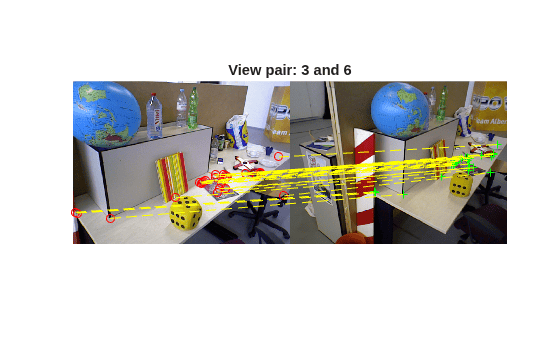
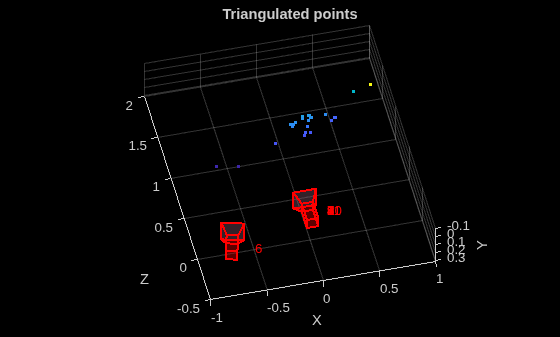
Visualize Triangulated 3-D Points
To visualize the triangulated 3-D points and camera positions of the initial view pair, call the plot object function of the sfm object.
figure
plot(sfmObjInit,CameraSize=0.1,MarkerSize=25)
xlabel("X")
ylabel("Y")
zlabel("Z")
title("Triangulated points")
Tune Initial Triangulation Parameters
The MinMedianAngle and MaxTriangulationError name-value arguments control how strictly the algorithm filters candidate view pairs. These thresholds depend on the scene geometry and camera motion, and may require tuning for your dataset.
Attempt initial triangulation with a strict threshold. The function throws an error because no view pair satisfies the 25-degree minimum angle constraint.
sfmObjInitError = triangulateInitialViews(sfmObjRefined, Verbose=true, MinMedianAngle=25);
23 of 39 edges have more than 100 feature matches.
23 of 23 edges are selected after applying the grid threshold.
Relax the threshold to allow the algorithm to find a valid view pair.
sfmObjInit = triangulateInitialViews(sfmObjRefined, Verbose=true, MinMedianAngle=20);
23 of 39 edges have more than 100 feature matches.
23 of 23 edges are selected after applying the grid threshold.
Views 8 and 11 are selected for initial triangulation.
Median triangulation angle: 33.884075
Similar reasoning applies to MaxTriangulationError argument. Increasing its value relaxes the reprojection error tolerance and admits view pairs that stricter settings would reject. Adjust both thresholds together for your dataset to balance reconstruction accuracy and successful initialization.
Input Arguments
Name-Value Arguments
Output Arguments
Tips
If the function returned an error, the most common cause is that no view pair satisfies the
MinMedianAngleorMaxTriangulationErrorthreshold. Reduce theMinMedianAngleargument or increase theMaxTriangulationErrorargument to enable more view pairs to qualify.Use the
infooutput argument to retrieve the exact view pair selected for initialization and verify that the selected pair makes sense for your scene. Also, a median triangulation angle below5degrees might indicate that the initial points are unreliable.For turntable or orbital capture patterns, you can usually achieve good initialization with the default parameters. For forward-motion sequences, such as driving, you might need to reduce the
MinMedianAngleargument because the baseline between consecutive frames is small.After initialization, use the
plotobject function to visually confirm the two-view reconstruction before proceeding to thereconstructfunction.For more information, see Best Practices for 3-D Reconstruction Using Structure from Motion.
Algorithms
SfM initialization establishes the first stable 3‑D reconstruction for an image sequence
by selecting a robust initial image pair from the verified view graph. By default, the
triangulateInitialViews function selects a pair that provides reliable
feature correspondences and a sufficient baseline for accurate triangulation. It estimates the
relative camera pose for the selected pair and triangulates an initial set of 3‑D points. This
initial reconstruction forms the foundation for incrementally adding views and expanding the
scene structure. Selecting a strong initial view pair is critical because it directly affects
the accuracy, scale consistency, and stability of the entire SfM process.
The function selects the initial view pair using these steps:
Rank candidate image pairs — The function ranks connected image pairs in the view graph based on the number of geometrically verified feature matches obtained during image pair verification. It also evaluates the spatial distribution of these matches to ensure uniform coverage across the image plane, prioritizing pairs that provide both strong connectivity and well‑distributed correspondences.
Estimate relative camera pose — Starting from the highest ranked pair, the function estimates the relative camera pose using the essential matrix to model general 3‑D scene geometry.
Triangulate initial 3‑D points — The function triangulates inlier feature correspondences between the two views to generate an initial set of 3‑D world points.
Evaluate triangulation quality — The function computes the median triangulation angle of the reconstructed points and selects the pair only if this value exceeds the required minimum threshold, indicating a sufficient baseline.
Filter unreliable 3‑D points — The function removes triangulated points with reprojection errors above the maximum allowed threshold or with triangulation angles below the minimum acceptable angle to improve reconstruction robustness.
After selecting a valid initial pair, the function initializes the SfM reconstruction state using the estimated camera poses and filtered 3‑D points.
Version History
Introduced in R2026b
See Also
sfm | connectImagePairs | isConnected | verifyImagePairs | isVerified | isInitialized | reconstruct | poses | pointCloud | plot

