filterpadding
R2026bDescription
[
returns structures containing the same first-order time wavelet filter and lowpass filter
padded to two different lengths: the empirically determined ideal length, and the length
based on the padding factors specified in the joint time-frequency scattering (JTFS) network
wav,lowpass] = filterpadding(jtfn)jtfn. The wav structure contains the padded
wavelet filters, and the lowpass structure contains the padded lowpass
filters. The JTFS network uses the filters of minimum length.
You can use filterpadding to determine which padded length is
sufficient for your application.
[
specifies options using one or more name-value arguments. You can add these arguments to the
previous syntax. For example, to specify the frequency wavelets, set
wav,lowpass] = filterpadding(jtfn,Name=Value)FilterBank to "frequency".
Examples
Create a joint time-frequency scattering network. Specify a signal length of 1025.
jtfn = timeFrequencyScattering(SignalLength=1025);
Obtain the ideal and padded wavelet and lowpass (scaling) filters from the second-order wavelet time filter bank. The ideal filters are the lowest-frequency wavelet and lowpass filters padded so that they decay properly. The JTFS network determines this pad length empirically. The padded filters are the lowest-frequency wavelet and lowpass filters padded to a length of 2^ceil(log2(jtfn.SignalLength)+jtfn.TimeMaxPaddingFactor).
[wav,lowpass] = filterpadding(jtfn,FilterBank="time",NumFilterBank=2)wav = struct with fields:
PaddedLength: 2560
IdealPad: [2560×1 double]
PaddingFactor: [8192×1 double]
IdealPadDownsampled: [20×1 double]
PaddingFactorDownsampled: [64×1 double]
lowpass = struct with fields:
                PaddedLength: 2560
                    IdealPad: [2560×1 double]
               PaddingFactor: [8192×1 double]
         IdealPadDownsampled: [20×1 double]
    PaddingFactorDownsampled: [32×1 double]
Ideal and Padded Filters
Plot the ideal and padded wavelet filters in the time domain. Because the wavelets are complex valued, plot their real and imaginary parts, and their magnitude separately. The helper function helperPlotPaddedFilters does this for you. The source code for the function is in the same folder as this example file.
helperPlotPaddedFilters("wavelet",wav,"notDownsampled")
![Figure contains 2 axes objects. Axes object 1 with title Ideal Wavelet Boundary Values: [4.532e-07 4.5324e-07] contains 3 objects of type line. These objects represent Real, Imaginary, Magnitude. Axes object 2 with title Padded Wavelet Boundary Values: [0 2.0329e-20] contains 3 objects of type line.](../../examples/wavelet/EffectsOfPaddingFactorOnWaveletFilterDecayExample_01.png)
You can use the same helper function to plot the magnitude of the ideal and padded lowpass filters.
helperPlotPaddedFilters("lowpass",lowpass,"notDownsampled")
![Figure contains 2 axes objects. Axes object 1 with title Ideal Lowpass Boundary Values: [6.0798e-07 6.0803e-07] contains an object of type line. Axes object 2 with title Padded Lowpass Boundary Values: [0 1.0842e-19] contains an object of type line.](../../examples/wavelet/EffectsOfPaddingFactorOnWaveletFilterDecayExample_02.png)
Because the ideal filters are shorter than the padded filters, the network will use the ideal filters for the JTFS transform. Create a second JTFS network for a signal length of 262,144. Set the filter data type to single precision and the time maximum padding factor to 0. Inspect the sizes of the ideal and padded wavelet filters. The padded filter length is equal to the signal length, while the ideal filter length is almost twice as large as the signal length. Unlike the first network, this network will use the padded filters for the JTFS transform. By setting the padding factor to zero, you minimize memory usage and improve computational efficiency.
jtfn2 = timeFrequencyScattering(SignalLength=2^18, ...
    TimeMaxPaddingFactor=0, ...
    FilterDataType="single");
[wav2,lowpass2] = filterpadding(jtfn2);
wav2
wav2 = struct with fields:
                PaddedLength: 262144
                    IdealPad: [458752×1 single]
               PaddingFactor: [262144×1 single]
         IdealPadDownsampled: [28×1 single]
    PaddingFactorDownsampled: [16×1 single]
Plot the filters. Depending on your application, the padded filter decay may be sufficient for your purposes.
helperPlotPaddedFilters("wavelet",wav2,"notDownsampled")
![Figure contains 2 axes objects. Axes object 1 with title Ideal Wavelet Boundary Values: [1.0394e-12 1.0714e-12] contains 3 objects of type line. These objects represent Real, Imaginary, Magnitude. Axes object 2 with title Padded Wavelet Boundary Values: [2.1557e-08 2.1557e-08] contains 3 objects of type line.](../../examples/wavelet/EffectsOfPaddingFactorOnWaveletFilterDecayExample_03.png)
Downsampled Ideal and Padded Filters
To determine which padded length is sufficient for your application, you can also view the frequency responses of the maximally downsampled ideal and padded filters. Plot the frequency responses of the downsampled ideal and padded wavelet filters of the first JTFS network. The helper function helperPlotDownsampledFrequencyResponses does this for you. The source code for the function is in the same folder as this example file.
helperPlotDownsampledFrequencyResponses(wav,lowpass)
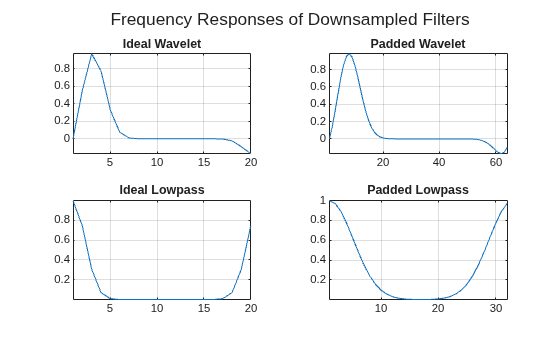
You can use helperPlotPaddedFilters to plot the same filters in the time domain.
helperPlotPaddedFilters("wavelet",wav,"downsampled")
![Figure contains 2 axes objects. Axes object 1 with title Ideal Wavelet Boundary Values: [5.8009e-05 0.00016333] contains 3 objects of type line. These objects represent Real, Imaginary, Magnitude. Axes object 2 with title Padded Wavelet Boundary Values: [0 7.7579e-18] contains 3 objects of type line.](../../examples/wavelet/EffectsOfPaddingFactorOnWaveletFilterDecayExample_05.png)
helperPlotPaddedFilters("lowpass",lowpass,"downsampled")
![Figure contains 2 axes objects. Axes object 1 with title Ideal Lowpass Boundary Values: [7.7821e-05 0.00019653] contains an object of type line. Axes object 2 with title Padded Lowpass Boundary Values: [0 5.2042e-18] contains an object of type line.](../../examples/wavelet/EffectsOfPaddingFactorOnWaveletFilterDecayExample_06.png)

