Route Adaptation in MANET Under Interference
R2026bThis example shows how to simulate a time division multiple access (TDMA) based mobile ad hoc network (MANET) in the presence of a mobile interfering node. Wireless communication networks operating in a shared spectrum are susceptible to co-channel interference from external sources. When an interfering transmitter enters the network area, it can disrupt active communication links, causing packet loss and degrading throughput. Dynamic routing protocols, such as the ad hoc on-demand distance vector (AODV) routing protocol and optimized link state routing (OLSR) protocol, attempt to address this challenge by detecting broken links and discovering alternative paths to avoid the interference zone. In this example, you configure a TDMA network, introduce a mobile interfering node, and analyze how the AODV routing protocol adapts to maintain connectivity.
Simulation Scenario
The example simulates a MANET scenario consisting of 10 communicating TDMA nodes and one mobile interfering node. The interferer node transmits continuously without participating in the routing process. This figure shows the initial network topology, source-destination routing paths, and the trajectory of the interferer.
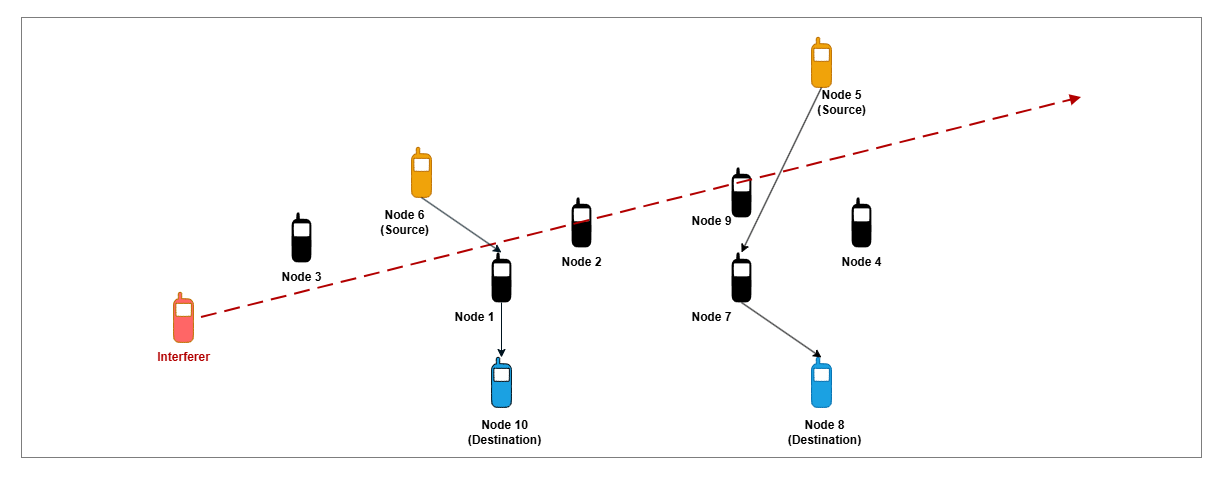
As the simulation runs, the mobile interferer, modeled as a TDMA node that transmits in every time slot, enters the network area and traverses the topology at a constant velocity. As the interferer approaches active relay links, it causes packet decode failures at nearby receivers. For example, the initial route from Node 6 to Node 10 passes through Node 1, as shown in the figure. As the interferer moves along its path and approaches this link, it can cause packet decode failures at Node 1. When the AODV routing protocol detects the broken link, it discovers an alternative route through another node.
Create and Configure Scenario
Set the seed for the random number generator to 1 to ensure repeatability. The seed value controls the pattern of random number generation. The random number generated by the seed value impacts several processes within the simulation, including predicting packet reception success at the physical layer.
rng(1,"combRecursive")Specify the simulation time in seconds. Initialize the wireless network simulator.
simulationTime =  40;
networkSimulator = wirelessNetworkSimulator.init;
40;
networkSimulator = wirelessNetworkSimulator.init;Create Network Nodes
Create and configure the communicating TDMA nodes that form the MANET. Specify their positions (in meters), transmission power (in dBm), and names. These nodes participate in the routing process and serve as relays for multi-hop communication.
nodePositions = [600 300 0; 700 400 0; 400 300 0; ...
    1050 400 0; 1000 700 0; 500 500 0; 900 300 0; ...
    1000 100 0; 900 450 0; 600 100 0];
nodeNames = ["Node1","Node2","Node3","Node4","Node5", ...
    "Node6","Node7","Node8","Node9","Node10"];
communicatingNodes = hTDMANode(Position=nodePositions,Name=nodeNames,TransmitPower=8);
Create the interfering node with dynamic routing disabled so it does not participate in route discovery with the communicating nodes. The interferer starts at position [200 200 0] and moves through the network, disrupting active links.
interferer = hTDMANode(Position=[200 200 0],Name="Interferer",TransmitPower=2,EnableDynamicRouting=false);Configure TDMA Frame
Create the TDMA frame configuration. The number of slots per frame equals the number of communicating nodes, giving each node one dedicated transmission opportunity per frame.
tdmaConfig = hTDMAConfig(NumSlotsPerFrame=size(nodePositions,1));
Apply the TDMA frame configuration to all communicating nodes and the interferer using the configureTDMA helper object function of the hTDMANode helper object.
configureTDMA([communicatingNodes interferer],tdmaConfig)
Assign Transmission Slots
Assign transmission slots to ensure collision-free communication among communicating nodes. Assign slot i to communicating node i using the assignSlot helper object function of the hTDMANode helper object.
assignSlot(communicatingNodes)
Assign all transmission slots to the interferer so it transmits continuously in every time slot, creating persistent interference.
assignSlot(interferer, ones(1,tdmaConfig.NumSlotsPerFrame))
Configure AODV Routing
Configure the AODV routing protocol for the communicating nodes. Set HelloInterval to 1 second so nodes periodically exchange hello messages and can quickly detect broken links caused by interference. Specify the maximum number of hops a packet can traverse in the network using the NETDiameter property of the hAODVRouting helper object. To learn more about the AODV routing protocol, see AODV Routing in TDMA-Based MANET.
aodv = hAODVRouting(HelloInterval=1,NETDiameter=8);
addMeshRouting(communicatingNodes,aodv)
Add Traffic to Communicating Nodes
Generate On-Off application traffic patterns for two source-destination pairs. Node 5 transmits to Node 8 at 800 kbps, and Node 6 transmits to Node 10 at 400 kbps.
srcNodes = [communicatingNodes(5) communicatingNodes(6)];
dstNodes = [communicatingNodes(8) communicatingNodes(10)];

traffic = networkTrafficOnOff(DataRate=800,OnTime=Inf,OffTime=0);
addTrafficSource(srcNodes(1),traffic,DestinationNode=dstNodes(1))

traffic = networkTrafficOnOff(DataRate=400,OnTime=Inf,OffTime=0);
addTrafficSource(srcNodes(2),traffic,DestinationNode=dstNodes(2))
Add Traffic to Interfering Node
Configure the interferer with an On-Off application traffic pattern at a higher data rate. The high data rate ensures that the interferer transmits in every slot, occupying the wireless channel and causing collisions with communicating nodes in its vicinity. Specify the destination node as one of the nodes participating in communication. If you do not specify the destination node when adding traffic, the interfering node broadcasts packets, and the communicating nodes attempt to rebroadcast them. To avoid this behavior, specify the destination node explicitly.
traffic = networkTrafficOnOff(DataRate=10000,OnTime=Inf,OffTime=0);
addTrafficSource(interferer,traffic,DestinationNode=communicatingNodes(3));
Add Mobility to Interfering Node
Assign a constant-velocity mobility model to the interferer so that it traverses the network area, disrupting active links as it moves. Set the RefreshInterval name-value argument to 0.1 seconds to specify how frequently the position of node is updated.
addMobility(interferer,MobilityModel="constant-velocity",Velocity=[40 10 0],RefreshInterval=0.1)Visualize Network Topology
To visualize the network topology, the interferer movement and the routes between the configured source-destination pairs, use the helperRouteViewer object.
nodes = [communicatingNodes interferer];
visualizerObj = helperRouteViewer(SrcDstPairs=[srcNodes(1) dstNodes(1);srcNodes(2) dstNodes(2)]);
addNodes(visualizerObj,communicatingNodes)
addNodes(visualizerObj,interferer,Type="Interferer")
Run Simulation
Add nodes to the wireless network simulator.
addNodes(networkSimulator,nodes)
Display the routes that the AODV routing protocol establishes for each source-destination pair by scheduling a periodic action every 2 seconds.
scheduleAction(networkSimulator,@(actionID,srcDstPair) helperDisplayRoutes(srcDstPair),[srcNodes(1) dstNodes(1);srcNodes(2) dstNodes(2)],0,2);
To calculate the instantaneous application throughput, use the helperTDMAKPIManager helper object with a LogInterval of 1 second.
performanceObj = helperTDMAKPIManager(communicatingNodes,"app-throughput",LogInterval=1);Run the simulation for the specified simulation time.
run(networkSimulator,simulationTime)
At t = 0.000000 seconds
No route exists from Node5 to Node8
No route exists from Node6 to Node10
............................................................
At t = 2.000000 seconds
Node5 -> Node7 -> Node8
Node6 -> Node1 -> Node10
............................................................
At t = 4.000000 seconds
Node5 -> Node7 -> Node8
Node6 -> Node1 -> Node10
............................................................
At t = 6.000000 seconds
Node5 -> Node7 -> Node8
No route exists from Node6 to Node10
............................................................
At t = 8.000000 seconds
Node5 -> Node7 -> Node8
No route exists from Node6 to Node10
............................................................
At t = 10.000000 seconds
Node5 -> Node7 -> Node8
No route exists from Node6 to Node10
............................................................
At t = 12.000000 seconds
Node5 -> Node4 -> Node8
No route exists from Node6 to Node10
............................................................
At t = 14.000000 seconds
Node5 -> Node4 -> Node8
No route exists from Node6 to Node10
............................................................
At t = 16.000000 seconds
No route exists from Node5 to Node8
No route exists from Node6 to Node10
............................................................
At t = 18.000000 seconds
No route exists from Node5 to Node8
Node6 -> Node3 -> Node10
............................................................
At t = 20.000000 seconds
No route exists from Node5 to Node8
Node6 -> Node3 -> Node10
............................................................
At t = 22.000000 seconds
No route exists from Node5 to Node8
Node6 -> Node3 -> Node10
............................................................
At t = 24.000000 seconds
No route exists from Node5 to Node8
Node6 -> Node3 -> Node10
............................................................
At t = 26.000000 seconds
No route exists from Node5 to Node8
Node6 -> Node3 -> Node10
............................................................
At t = 28.000000 seconds
No route exists from Node5 to Node8
Node6 -> Node3 -> Node10
............................................................
At t = 30.000000 seconds
Node5 -> Node9 -> Node7 -> Node8
Node6 -> Node3 -> Node10
............................................................
At t = 32.000000 seconds
Node5 -> Node9 -> Node7 -> Node8
Node6 -> Node3 -> Node10
............................................................
At t = 34.000000 seconds
Node5 -> Node9 -> Node7 -> Node8
Node6 -> Node3 -> Node10
............................................................
At t = 36.000000 seconds
Node5 -> Node9 -> Node7 -> Node8
Node6 -> Node3 -> Node10
............................................................
At t = 38.000000 seconds
Node5 -> Node9 -> Node7 -> Node8
Node6 -> Node3 -> Node10
............................................................
At t = 40.000000 seconds
Node5 -> Node9 -> Node7 -> Node8
Node6 -> Node3 -> Node10
............................................................
Simulation Results
Compute instantaneous application throughput for each source-destination pair at every 1-second interval over the entire simulation duration. This computation shows how the interference impacts each flow over time.
sampleTimes = 1:simulationTime;
throughputNode5ToNode8 = zeros(1,simulationTime);
throughputNode6ToNode10 = zeros(1,simulationTime);

for currTime = sampleTimes
    throughputNode5ToNode8(currTime) = kpi(performanceObj,srcNodes(1),dstNodes(1),"app-throughput",StartTime=currTime-1,EndTime=currTime);
    throughputNode6ToNode10(currTime) = kpi(performanceObj,srcNodes(2),dstNodes(2),"app-throughput",StartTime=currTime-1,EndTime=currTime);
end
Plot the instantaneous application throughput for each source-destination pair.
figure
tiledlayout(2,1)
nexttile
plot(sampleTimes,throughputNode6ToNode10,'-','LineWidth',1.5)
xlabel("Time (s)")
ylabel("Throughput (Mbps)")
title("Instantaneous Application Throughput Between Node 6 and Node 10")

nexttile
plot(sampleTimes,throughputNode5ToNode8,'-','LineWidth',1.5)
xlabel("Time (s)")
ylabel("Throughput (Mbps)")
title("Instantaneous Application Throughput Between Node 5 and Node 8")
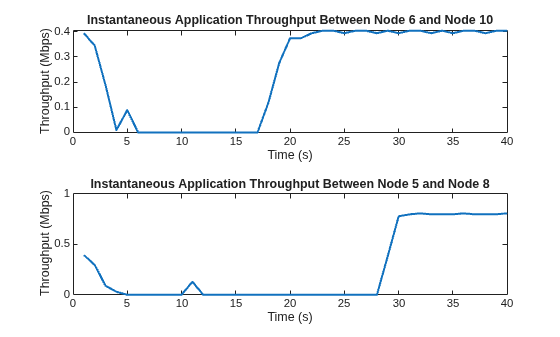
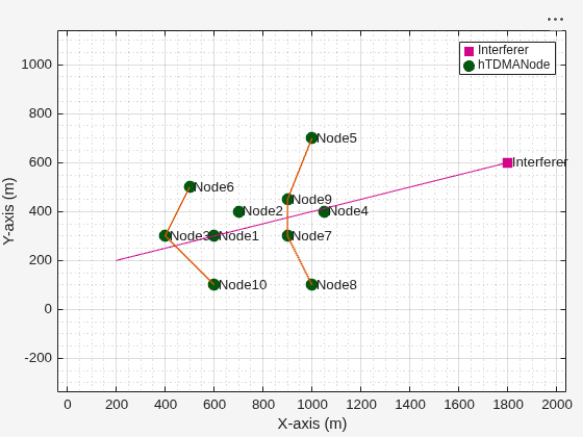
The displayed routes (in the text format), the helperRouteViewer plot and the instantaneous throughput plot show how the interferer impacts each traffic flow as it traverses the network.
The traffic flow from Node 6 to Node 10 initially routes through Node 1 from 0 to 4 seconds before losing connectivity due to interference. After 16 seconds, as the interferer moves away, the AODV routing protocol rediscovers a route through Node 3, and throughput recovers.
The traffic flow from Node 5 to Node 8 initially routes through Node 7 and then reroutes through Node 4 at 10 seconds. As the interferer moves away, after 28 seconds the AODV routing protocol discovers a new path through Node 9 and Node 7. This behavior demonstrates the resilience of AODV routing under mobile interference.
In summary, this example demonstrates how a mobile interferer disrupts active links in a TDMA-based MANET and how the AODV routing protocol dynamically adapts by discovering alternative multi-hop paths to restore connectivity.
Further Exploration
Try running the example with the OLSR routing protocol. Compare how the proactive OLSR routing protocol handles interference in comparison to the reactive AODV protocol. Since AODV is reactive, it initiates route discovery immediately upon detecting a broken link. This behavior leads to faster route re-establishment compared to OLSR, which relies on periodic topology updates. To use OLSR, uncomment this code and replace it in the Configure AODV Routing section.
% olsr = hOLSRRouting(HelloInterval=1,TopologyControlInterval=3);
% addMeshRouting(communicatingNodes,olsr)
To evaluate the comparative performance of the OLSR and AODV routing protocols in a TDMA based MANET under interference, compute key performance indicators (KPIs) including packet delivery ratio, routing overhead, and average end-to-end delay. Uncomment this code and use it in the Run Simulation section.
% performanceObj = helperTDMAKPIManager(communicatingNodes,["app-throughput","app-packet-delivery-ratio","routing-overhead","app-average-end-to-end-delay"],LogInterval=1);To retrieve a specific KPI for a source-destination pair, use the kpi helper object function of the helperTDMAKPIManager helper object. Uncomment this code and run it after the simulation completes.
% avgDelay = kpi(performanceObj,srcNodes(1),dstNodes(1),"app-average-end-to-end-delay",StartTime=0,EndTime=simulationTime);Supporting Functions
The example uses these helper functions and objects:
hTDMANode— Creates a TDMA nodehTDMAConfig— Creates a TDMA frame configuration objecthTDMANodeMesh— Implements mesh layer functionalityhTDMANodeMAC— Implements TDMA-based MAC functionalityhTDMANodePHY— Implements TDMA-based PHY functionalityhelperPacketDuplicateDetector— Detects duplicate packetshAODVRouting— Implements the AODV routing protocolhTDMANodeEventCallback— Invokes registered callbacks for the eventshelperTDMAKPIManager— Computes key performance indicators (KPI) of the TDMA networkhelperDisplayRoutes— Display routes for a given source-destination pair in the text formathelperRouteViewer— View the network topology and routes
See Also
Objects
wirelessNetworkSimulator|wirelessTrafficViewer|wirelessNetworkViewer|networkTrafficOnOff|nodeMobilityRandomWalk|nodeMobilityRandomWaypoint|nodeMobilityConstantVelocity

