wlanTGnChannel
Filter signal through 802.11n multipath fading channel
Description
The wlanTGnChannel
System object™ filters an input signal through an 802.11n™ (TGn) multipath fading channel.
The fading processing assumes the same parameters for all NT-by-NR links of the TGn channel. NT is the number of transmit antennas and NR is the number of receive antennas. Each link comprises all multipaths for that link.
To filter an input signal using a TGn multipath fading channel:
Create the
wlanTGnChannelobject and set its properties.Call the object with arguments, as if it were a function.
To learn more about how System objects work, see What Are System Objects?
Creation
Description
creates a TGn fading
channel System object, tgn = wlanTGnChanneltgn. This object filters a real or complex input
signal through the TGn channel to obtain the channel-impaired signal.
creates a TGn channel object, tgn = wlanTGnChannel(Name,Value)tgn, and sets properties using one or
more name-value pairs. Enclose each property name in quotes. For example,
wlanTGnChannel('NumReceiveAntennas',2,'SampleRate',10e6) creates a
TGn channel with two receive antennas and a 10 MHz sample rate.
Properties
Unless otherwise indicated, properties are nontunable, which means you cannot change their
values after calling the object. Objects lock when you call them, and the
release function unlocks them.
If a property is tunable, you can change its value at any time.
For more information on changing property values, see System Design in MATLAB Using System Objects.
Sample rate of the input signal in Hz, specified as a positive scalar.
Dependencies
When you specify DelayProfile as 'None', this property does not
apply.
Data Types: double
Delay profile model, specified as 'Model-A',
'Model-B', 'Model-C',
'Model-D', 'Model-E',
'Model-F', or 'None'. When you choose
'None', the System object does not apply fading. In this case, the
channel matrix is a discrete Fourier transform (DFT) matrix.
The table summarizes the properties of the models.
| Property | Model | |||||
|---|---|---|---|---|---|---|
| A | B | C | D | E | F | |
| Breakpoint distance (m) | 5 | 5 | 5 | 10 | 20 | 30 |
| RMS delay spread (ns) | 0 | 15 | 30 | 50 | 100 | 150 |
| Maximum delay (ns) | 0 | 80 | 200 | 390 | 730 | 1050 |
| Rician K-factor (dB) | 0 | 0 | 0 | 3 | 6 | 6 |
| Number of taps | 1 | 9 | 14 | 18 | 18 | 18 |
| Number of clusters | 1 | 2 | 2 | 3 | 4 | 6 |
| Propagation scenario | Flat fading | Indoor residential | Indoor residential or small office | Office | Large office/warehouse | Large space indoor (pseudo-outdoor) |
Data Types: char | string
RF carrier frequency in Hz, specified as a positive scalar.
Dependencies
When you specify DelayProfile as 'None', this property does not
apply.
Data Types: double
Speed of the scatterers in km/h, specified as a positive scalar.
Dependencies
When you specify DelayProfile as 'None', this property does not
apply.
Data Types: double
Distance between the transmitter and receiver in meters, specified as a positive scalar.
TransmitReceiveDistance is used to compute the path loss, and
to determine whether the channel has a line of sight (LOS) or non line of sight (NLOS)
condition. The path loss and standard deviation of shadow fading loss depend on the
separation between the transmitter and the receiver.
Dependencies
When you specify DelayProfile as 'None', this property does not
apply.
Data Types: double
Normalize path gains, specified as a numeric or logical 1
(true) or 0 (false). To
normalize the fading processes such that the total power of the path gains, averaged
over time, is 0 dB, set this property to 1 (true).
Otherwise, set this property to 0 (false).
Dependencies
When you specify DelayProfile as 'None', this property does not apply
because the path gains are always normalized when the channel matrix is a DFT
matrix.
Data Types: logical
Number of transmit antennas, specified as a positive integer.
Data Types: double
Distance between transmit antenna elements, specified as a positive scalar expressed in wavelengths.
TransmitAntennaSpacing supports uniform linear arrays
only.
Dependencies
To enable this property, set the
NumTransmitAntennasproperty to a value greater than1.When you specify
DelayProfileas'None', this property does not apply.
Data Types: double
Number of receive antennas, specified as a positive integer.
Data Types: double
Distance between receive antenna elements, specified as a positive scalar expressed in wavelengths.
ReceiveAntennaSpacing supports uniform linear arrays
only.
Dependencies
To enable this property, set the
NumReceiveAntennasproperty to a value greater than1.When you specify
DelayProfileas'None', this property does not apply.
Data Types: double
Large-scale fading effects applied in the channel, specified as
'None', 'Pathloss',
'Shadowing', or 'Pathloss and shadowing'.
Dependencies
When you specify DelayProfile as 'None', the value of this property
must be 'None'.
Data Types: char | string
Fluorescent effect, specified as a numeric or logical 1
(true) or 0 (false). To
include Doppler effects from fluorescent lighting, set this property to
1 (true).
Dependencies
To enable this property, set the DelayProfile property to
'Model-D' or 'Model-E'.
Data Types: logical
Power line frequency in Hz, specified as '50Hz' or
'60Hz'.
The power line frequency is 60 Hz in the United States and 50 Hz in Europe.
Dependencies
To enable this property, set the FluorescentEffect property
to 1 (true) and the
DelayProfile property to 'Model-D' or
'Model-E'.
Data Types: char | string
Normalize channel outputs by the number of receive antennas, specified as a numeric
or logical 1 (true) or 0
(false).
Data Types: logical
Enable channel filtering, specified as a numeric or logical 1
(true) or 0 (false). To
enable channel filtering, set this property to 1
(true). To disable channel filtering, set this property to
0 (false)..
Note
If you set this property to 0 (false), the
step object function does not accept
an input signal. In this case, the NumSamples and SampleRate properties determine the duration of the fading process
realization. The object acts as a source of path gains without filtering an input
signal.
Data Types: logical
Number of time-domain samples used to get path gain samples, specified as a positive integer.
Dependencies
To enable this property, set the ChannelFiltering property to false.
Data Types: double
Data type of impaired signal, specified as one of these values:
'double'– Return thepathGainsoutput as a double-precision matrix'single'– Return thepathGainsoutput as a single-precision matrix
Dependencies
To enable this property, set the ChannelFiltering property to
0 (false).
Data Types: char | string
Source of random number stream, specified as 'Global stream' or
'mt19937ar with seed'.
If you set this property to 'Global stream', the System object uses the current global random number stream to generate random numbers.
In this case, the reset function resets the filters and creates a new
channel realization.
If you set this property to 'mt19937ar with seed', the mt19937ar
algorithm generates random numbers. In this case, the reset function
not only resets the filters, but also reinitializes the random number stream to the
value of the Seed property. This results in the same channel
realization.
Note
The random numbers of the channel components are distributed as follows:
The random phase of the Doppler component due to fluorescent lights is uniformly distributed. See equation 27 of TGn Channel Models for more information.
In multi-user scenarios using the TGac, TGah, or TGax channel models, the per-user angle-of-arrival (AoA) and angle-of-departure (AoD) rotations discussed in the MIMO Enhancements section are uniformly distributed.
The fading samples are generated by a normally-distributed complex uncorrelated Gaussian process with zero mean and unit variance in discrete time.
Dependencies
When you specify DelayProfile as
'None', this property does not apply.
Data Types: char | string
Initial seed of an mt19937ar random number stream, specified as a nonnegative
integer. The Seed property reinitializes the mt19937ar random
number stream in the reset function.
Dependencies
To enable this property, set the
RandomStreamproperty to'mt19937ar with seed'.When you specify
DelayProfileas'None', this property does not apply.
Data Types: double
Enable path gain output computation, specified as a numeric or logical
1 (true) or 0
(false).
Data Types: logical
Usage
Description
[
also returns in y,pathGains] = tgn(x)pathGains the TGn channel path gains of the
underlying fading process.
This syntax applies when you set the PathGainsOutputPort property to 1
(true).
Input Arguments
Input signal, specified as a real or complex NS-by-NT matrix, where:
NS is the number of samples.
NT is the number of transmit antennas and must be equal to the
NumTransmitAntennasproperty value.
Data Types: single | double
Complex Number Support: Yes
Output Arguments
Output signal, returned as an NS-by-NR complex matrix, where:
NS is the number of samples.
NR is the number of receive antennas and is equal to the
NumReceiveAntennasproperty value.
Data Types: single | double
Path gains of the fading process, returned as an NS-by-NP-by-NT-by-NR complex array, where:
NS is the number of samples.
NP is the number of resolvable paths, that is, the number of paths defined for the case specified by the
DelayProfileproperty.NT is the number of transmit antennas and is equal to the
NumTransmitAntennasproperty value.NR is the number of receive antennas and is equal to the
NumReceiveAntennasproperty value.
Data Types: single | double
Object Functions
To use an object function, specify the
System object as the first input argument. For
example, to release system resources of a System object named obj, use
this syntax:
release(obj)
Note
reset: If the
RandomStream property of the System object is set to 'Global stream', the reset function resets the filters only. If you set
RandomStream to 'mt19937ar with seed', the
reset function not only resets the filters, but also
reinitializes the random number stream to the value of the Seed
property. This results in the same channel realization.
Examples
Generate an HT waveform and pass it through a TGn SISO channel. Display the spectrum of the resultant signal.
Set the channel bandwidth and the corresponding sample rate.
bw = 'CBW40';
fs = 40e6;Generate an HT waveform for a 40 MHz channel.
cfg = wlanHTConfig('ChannelBandwidth',bw);
txSig = wlanWaveformGenerator(randi([0 1],1000,1),cfg);Create a TGn SISO channel with path loss and shadowing enabled.
tgnChan = wlanTGnChannel('SampleRate',fs, ... 'LargeScaleFadingEffect','Pathloss and shadowing');
Pass the HT waveform through the channel.
rxSig = tgnChan(txSig);
Plot the spectrum of the received waveform.
saScope = spectrumAnalyzer(SampleRate=fs,YLimits=[-120 -40]); saScope(rxSig)
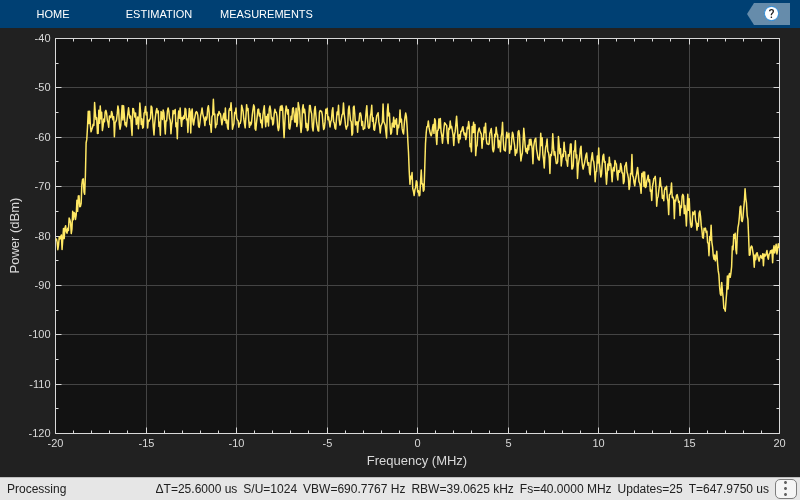
Because path loss and shadowing are enabled, the mean received power across the spectrum is approximately -60 dBm.
Create an HT waveform having four transmit antennas and two space-time streams.
cfg = wlanHTConfig('NumTransmitAntennas',4,'NumSpaceTimeStreams',2, ... 'SpatialMapping','Fourier'); txSig = wlanWaveformGenerator([1;0;0;1],cfg);
Create a 4x2 MIMO TGn channel and disable large-scale fading effects.
tgnChan = wlanTGnChannel('SampleRate',20e6, ... 'NumTransmitAntennas',4, ... 'NumReceiveAntennas',2, ... 'LargeScaleFadingEffect','None');
Pass the transmit waveform through the channel.
rxSig = tgnChan(txSig);
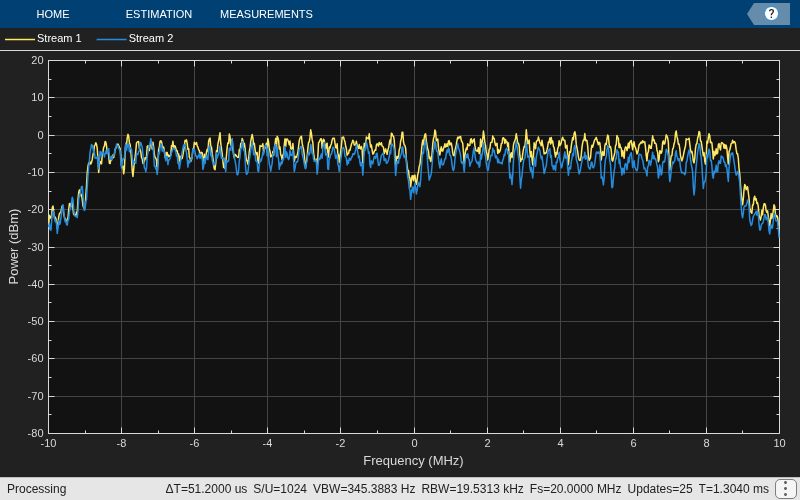
Display the spectrum of the two received space-time streams.
saScope = spectrumAnalyzer(SampleRate=20e6, ... ShowLegend=true, ... ChannelNames={'Stream 1','Stream 2'}); saScope(rxSig)
Transmit an HT-LTF and an HT data field through a noisy 2x2 MIMO channel. Demodulate the received HT-LTF to estimate the channel coefficients. Recover the HT data and determine the number of bit errors.
Set the channel bandwidth and corresponding sample rate.
bw = 'CBW40';
fs = 40e6;Create HT-LTF and HT data fields having two transmit antennas and two space-time streams.
cfg = wlanHTConfig('ChannelBandwidth',bw, ... 'NumTransmitAntennas',2,'NumSpaceTimeStreams',2); txPSDU = randi([0 1],8*cfg.PSDULength,1); txLTF = wlanHTLTF(cfg); txDataSig = wlanHTData(txPSDU,cfg);
Create a 2x2 MIMO TGn channel with path loss and shadowing enabled.
tgnChan = wlanTGnChannel('SampleRate',fs, ... 'NumTransmitAntennas',2,'NumReceiveAntennas',2, ... 'LargeScaleFadingEffect','None');
Create AWGN channel noise, setting SNR = 15 dB.
chNoise = comm.AWGNChannel('NoiseMethod','Signal to noise ratio (SNR)',... 'SNR',15);
Pass the signals through the TGn channel and noise models.
rxLTF = chNoise(tgnChan(txLTF)); rxDataSig = chNoise(tgnChan(txDataSig));
Create an AWGN channel for a 40 MHz channel with a 9 dB noise figure. The noise variance, nVar, is equal to kTBF, where k is Boltzmann's constant, T is the ambient temperature of 290 K, B is the bandwidth (sample rate), and F is the receiver noise figure.
nVar = 10^((-228.6 + 10*log10(290) + 10*log10(fs) + 9)/10); awgnChan = comm.AWGNChannel('NoiseMethod','Variance','Variance',nVar);
Pass the signals through the channel.
rxLTF = awgnChan(rxLTF); rxDataSig = awgnChan(rxDataSig);
Demodulate the HT-LTF. Use the demodulated signal to estimate the channel coefficients.
dLTF = wlanHTLTFDemodulate(rxLTF,cfg); chEst = wlanHTLTFChannelEstimate(dLTF,cfg);
Recover the data and determine the number of bit errors.
rxPSDU = wlanHTDataRecover(rxDataSig,chEst,nVar,cfg); numErr = biterr(txPSDU,rxPSDU)
numErr = 0
Create a non-HT configuration object with default parameters. Generate a waveform for the configuration.
cfg = wlanNonHTConfig; tx = wlanWaveformGenerator([1;0;0;1],cfg);
Create a TGn channel System object with default parameters. Display the value of the RandomStream property.
tgnChan = wlanTGnChannel; disp(tgnChan.RandomStream)
Global stream
Pass the waveform through the channel twice, resetting the System object between the two iterations.
for i = 1:2 rx(:,i) = tgnChan(tx); reset(tgnChan); end
Compare the two received waveforms. They are different because the reset object function resets the filters and the channel object takes new random numbers from the global stream. This causes it to generate a different channel realization.
isequal(rx(:,1),rx(:,2))
ans = logical
0
Now release the System object and set the RandomStream property to "mt19937ar with seed".
release(tgnChan);
tgnChan.RandomStream = "mt19937ar with seed";Pass the waveform through the channel twice, resetting the System object between the two iterations.
for i = 1:2 rx(:,i) = tgnChan(tx); reset(tgnChan); end
Compare the two received waveforms. They are equal because the channel realization is the same for both iterations. This happens because the reset function reinitializes the random number stream to the value of the Seed property, so the channel object uses the same random numbers for both channel realizations.
isequal(rx(:,1),rx(:,2))
ans = logical
1
Algorithms
The 802.11n channel object uses a filtered Gaussian noise model in which the path delays, powers, angular spread, angles of arrival, and angles of departure are determined empirically. The specific modeling approach is described in [1].
The channel is modeled as several clusters, each of which represents an independent propagation path between the transmitter and the receiver. A cluster is composed of subpaths, or taps, which share angular spreads, angles of arrival, and angles of departure. Delay and power level vary from tap to tap. Within the TGn model, clusters comprise 1–7 taps. The cluster parameters for cluster 1 of model B are shown in the table.
| Parameter | Tap | ||||
|---|---|---|---|---|---|
| 1 | 2 | 3 | 4 | 5 | |
| Delay (ns) | 0 | 10 | 20 | 30 | 40 |
| Power (dB) | 0 | –5.4 | –10.8 | –16.2 | –21.7 |
| Angle of arrival (°) | 4.3 | 4.3 | 4.3 | 4.3 | 4.3 |
| Receiver angular spread (°) | 14.4 | 14.4 | 14.4 | 14.4 | 14.4 |
| Angle of departure (°) | 225.1 | 225.1 | 225.1 | 225.1 | 225.1 |
| Transmitter angular spread (°) | 14.4 | 14.4 | 14.4 | 14.4 | 14.4 |
For each model, the first tap has a line of sight (LOS) between the transmitter and receiver, whereas all other taps are non line of sight (NLOS). As a result, the first tap exhibits Rician behavior, while the others exhibit Rayleigh behavior. The Rician K-factor is the ratio between the power in the first tap and the power in the other taps. A large K-factor indicates a strong LOS component.
The angles of arrival and departure for each cluster are randomly selected from a uniform distribution over [0, 2π]. These angles are independent of each other and are fixed for all channel realizations. By fixing the values, the transmit and receive correlation matrices are computed only once. Angular spread values were indirectly determined from empirical data and fall within the 20° to 40° range.
The path loss exponent and the standard deviation of the shadow fading loss characterize each model. The two parameters depend on the presence of a LOS between the transmitter and receiver. For paths with a transmitter-to-receiver distance, d, less that the breakpoint distance, dBP, the LOS parameters apply. For d >dBP, the NLOS parameters apply. The table summarizes the path loss and shadow fading parameters.
| Parameter | Model | |||||
|---|---|---|---|---|---|---|
| A | B | C | D | E | F | |
| Breakpoint distance, dBP (m) | 5 | 5 | 5 | 10 | 20 | 30 |
| Path loss exponent for d ≤ dBP | 2 | 2 | 2 | 2 | 2 | 2 |
| Path loss exponent for d >dBP | 3.5 | 3.5 | 3.5 | 3.5 | 3.5 | 3.5 |
| Shadow fading σ (dB) for d ≤ dBP | 3 | 3 | 3 | 3 | 3 | 3 |
| Shadow fading σ (dB) for d >dBP | 4 | 4 | 5 | 5 | 6 | 6 |
In indoor environments, the transmitter and receiver are stationary, and Doppler effects
arise from people moving between them. The TGn model employs a bell-shaped Doppler spectrum
in which the environmental speed, ν0, is 1.2 km/h
by default (it is specified by the EnvironmentalSpeed property). The
Doppler spread, fd, is calculated as fd =
ν0/λ, where λ is the carrier wavelength.
The channel sampling rate, Fs, must be lower than the input sampling rate to avoid aliasing. It is calculated as:
Fs= (ν0×Fc)/(300×c)
where Fc is the carrier frequency, specified
by the CarrierFrequency property, c is the speed of
light and ν0 is defined in m/s.
In addition to basic Doppler effects resulting from environmental motion, fluorescent lights introduce signal fading at twice the power line frequency. The effects show up as frequency-selective amplitude modulation. Again, to avoid aliasing, the Nyquist frequency of the first interpolation factor must be greater than the highest harmonic.
The effect is included in models D and E. To disable this effect, set the
FluorescentEffect property to false.
References
[1] Erceg, V., L. Schumacher, P. Kyritsi, et al. TGn Channel Models. Version 4. IEEE 802.11-03/940r4, May 2004.
[2] Kermoal, J. P., L. Schumacher, K. I. Pedersen, P. E. Mogensen, and F. Frederiksen, “A Stochastic MIMO Radio Channel Model with Experimental Validation”. IEEE Journal on Selected Areas in Communications., Vol. 20, No. 6, August 2002, pp. 1211–1226.
Extended Capabilities
Usage notes and limitations:
See System Objects in MATLAB Code Generation (MATLAB Coder).
Version History
Introduced in R2015bTo disable fading, specify the DelayProfile property as 'None'.
MATLAB Command
You clicked a link that corresponds to this MATLAB command:
Run the command by entering it in the MATLAB Command Window. Web browsers do not support MATLAB commands.
Sélectionner un site web
Choisissez un site web pour accéder au contenu traduit dans votre langue (lorsqu'il est disponible) et voir les événements et les offres locales. D’après votre position, nous vous recommandons de sélectionner la région suivante : .
Vous pouvez également sélectionner un site web dans la liste suivante :
Comment optimiser les performances du site
Pour optimiser les performances du site, sélectionnez la région Chine (en chinois ou en anglais). Les sites de MathWorks pour les autres pays ne sont pas optimisés pour les visites provenant de votre région.
Amériques
- América Latina (Español)
- Canada (English)
- United States (English)
Europe
- Belgium (English)
- Denmark (English)
- Deutschland (Deutsch)
- España (Español)
- Finland (English)
- France (Français)
- Ireland (English)
- Italia (Italiano)
- Luxembourg (English)
- Netherlands (English)
- Norway (English)
- Österreich (Deutsch)
- Portugal (English)
- Sweden (English)
- Switzerland
- United Kingdom (English)