numericalPropagator
R2026bDescription
options = numericalPropagator(scenario)"Earth" central body if one does
not already exist, and returns an Aero.satellitescenario.NumericalPropagatorOptions object. The object is added to
the NumericalPropagatorOptions property of scenario.
options = numericalPropagator(___,Name=Value)scenario is set to false, you can
specify the optional name-value arguments only if the SimulationStatus property is set to "NotStarted".
Examples
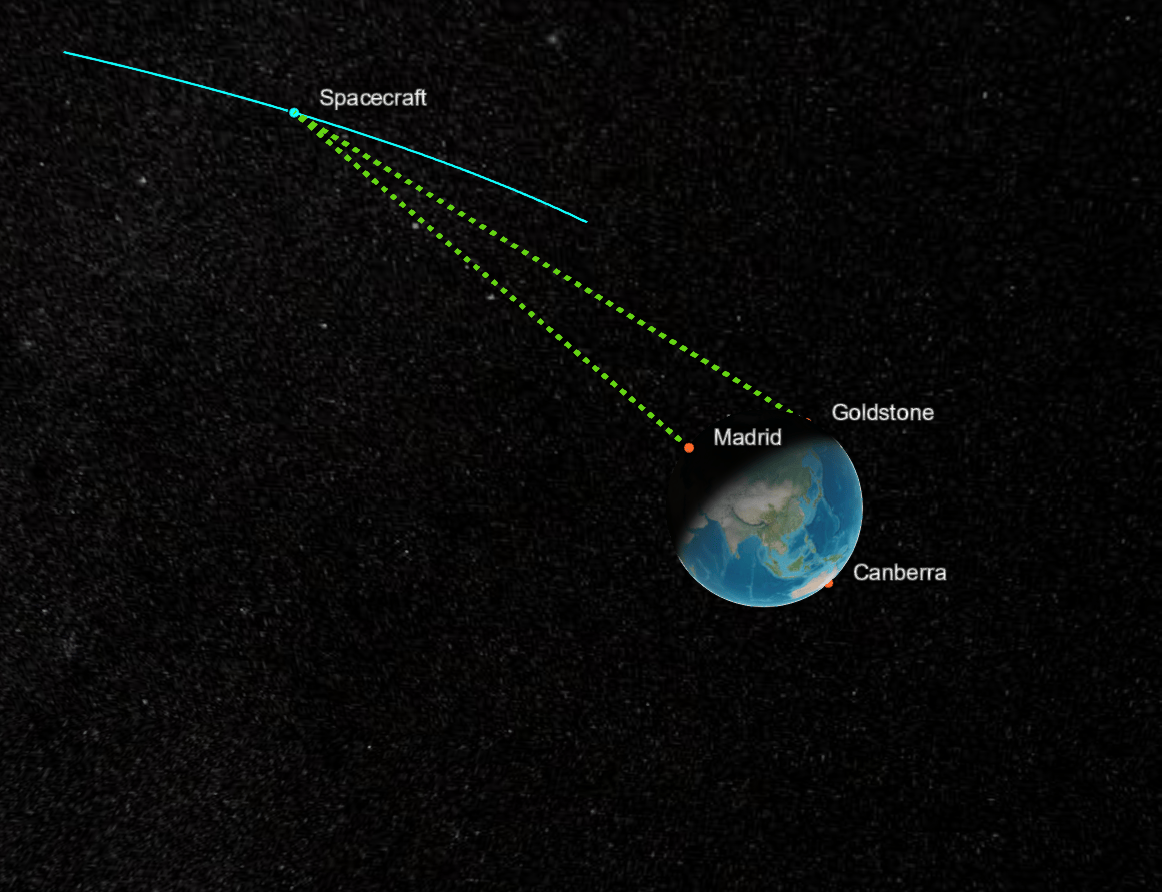
This example simulates a translunar mission trajectory using impulsive maneuvers and analyzes access between the spacecraft and Deep Space Network (DSN) ground stations on Earth. The spacecraft departs low Earth orbit, performs a translunar injection (TLI) burn, and inserts into lunar orbit using a lunar orbit insertion (LOI) burn.
Define the simulation time span and sample time.
startTime  = datetime(2024,1,26);
stopTime   = datetime(2024,1,31);
sampleTime = 60;   % seconds
sc = satelliteScenario(startTime, stopTime, sampleTime);
Use numerical propagation with point-mass gravity and enable third-body gravity from the Moon to model the translunar trajectory.
numericalPropagator(sc, ...
    GravitationalPotentialModel = "point-mass", ...
    IncludeThirdBodyGravity     = true, ...
    ThirdBodyGravitySource      = "Moon");
Create a spacecraft using Keplerian orbital elements and specify numerical orbit propagation.
spacecraft = satellite(sc, ...
    6.578137e6, ...  % Semimajor axis (m)
    0, ...           % Eccentricity
    28.24, ...       % Inclination (deg)
    3.303, ...       % Right ascension of ascending node (deg)
    0, ...           % Argument of periapsis (deg)
    124.96, ...      % True anomaly (deg)
    OrbitPropagator = "numerical", ...
    Name = "Spacecraft");
Specify a translunar injection (TLI) burn defined in the Earth-referenced VNB frame, followed by a lunar orbit insertion (LOI) burn defined in the Moon-referenced VNB frame.
Time = [ ...
    datetime(2024,1,26,0,57,36); ...
    datetime(2024,1,30,0,57,36) ];
DeltaV = [ ...
    3142.27   0   0; ...
    -747.33    0   0 ];
CoordinateFrame = ["vnb"; "vnb"];
ReferenceCelestialBody = ["Earth"; "Moon"];
Name = ["TLI"; "LOI"];
maneuvers = timetable( ...
    Time, DeltaV, CoordinateFrame, Name, ReferenceCelestialBody);

impulsiveManeuver(spacecraft, Insert = maneuvers);
Add DSN ground stations located in Canberra, Goldstone, and Madrid.
dsn = [ ...
    groundStation(sc, -35.4, 148.97, Name="Canberra"); ...
    groundStation(sc,  35.3,-116.78, Name="Goldstone"); ...
    groundStation(sc,  40.4,  -4.25, Name="Madrid") ];
Analyze access between the spacecraft and the DSN ground stations, accounting for obstruction by both Earth and Moon.
ac = access(spacecraft, dsn, ...
    ObstructingBodies = ["Earth","Moon"]);

accessIntervals(ac);
Launch the Satellite Scenario Viewer and animate the scenario to visualize the translunar trajectory and DSN visibility.
v = satelliteScenarioViewer(sc, ...
    CameraReferenceFrame = "Inertial");

play(sc);
camtarget(v, spacecraft);
Input Arguments
Satellite scenario, specified as a scalar satelliteScenario
object.
Name-Value Arguments
Specify optional pairs of arguments as
Name1=Value1,...,NameN=ValueN, where Name is
the argument name and Value is the corresponding value.
Name-value arguments must appear after other arguments, but the order of the
pairs does not matter.
Example: ODESolver = 'ode78' sets the ODE solver to
'ode78'.
Since R2026b
Central body used by the numerical orbit propagator, specified as
"Earth" or "Moon".
If the scenario already contains a numerical propagator for the specified
CentralBody name-value argument, the existing object is returned.
Data Types: string
Ordinary differential equation (ODE) solver used by the numerical orbit
propagator, specified as 'ode45', 'ode23',
'ode78', 'ode89', 'ode113',
'ode15s',
'ode23s','ode23t', or
'ode23tb'.
Default Value
The default value is:
The value of the ODESolver property of the
Aero.satellitescenario.NumericalPropagatorOptionsobject when the NumericalPropagatorOptions property ofscenariocontains such an object and its CentralBodyOptions property equals theCentralBodyname‑value argument"ode45"otherwise
ODE solver options, specified as the structure returned by odeset(RelTol=1e-8, AbsTol=1e-8).
Default Value
The default value is:
The value of the
ODESetproperty of theAero.satellitescenario.NumericalPropagatorOptionsobject when the NumericalPropagatorOptions property ofscenariocontains such an object and its CentralBodyOptions property equals theCentralBodyname‑value argumentThe structure returned by
odeset(RelTol=1e-8,AbsTol=1e-8)otherwise
Gravitational potential model of central body, specified
'spherical-harmonics', 'point-mass', or
'oblate-ellipsoid'. For information on these models, see Gravitational Potential Models.
Default Value
The default value is:
The value of the
GravitationalPotentialModelproperty of theAero.satellitescenario.NumericalPropagatorOptionsobject when the NumericalPropagatorOptions property ofscenariocontains such an object and its CentralBodyOptions property equals theCentralBodyname‑value argument"spherical-harmonics"otherwise
Spherical harmonic model of gravitational potential of central body, specified as one of these values:
For
"Earth"central body,"EGM2008","EGM96", or"EIGENGL04C"For
"Moon"central body,"LP100K"or"LP165P"
Default Value
The default value is:
The current value of
SphericalHarmonicModelin the NumericalPropagatorOptions property ofscenariowhen that property is nonempty and its CentralBodyOptions property equals theCentralBodyname‑value argumentOtherwise:
"EGM2008"when theCentralBodyname‑value argument equals"Earth""LP100K"when theCentralBodyname‑value argument equals"Moon"
Dependencies
To use this input, GravitationalPotentialModel must be set
to 'spherical-harmonics'.
Spherical harmonic degree of gravitational potential of central body, specified as a scalar.
Default Value
The default value is:
The value of the
SphericalHarmonicDegreeproperty of theAero.satellitescenario.NumericalPropagatorOptionsobject when the NumericalPropagatorOptions property ofscenariois nonempty and its CentralBodyOptions property equals theCentralBodyname‑value argument100whenSphericalHarmonicModelequals"LP100K"120otherwise
Dependencies
To use this input, GravitationalPotentialModel must be set
to 'spherical-harmonics'.
Data Types: double
Option to indicate whether the propagator accounts for atmospheric drag for an
Earth central body, specified as false (0) or
true (1). When set to
true, the propagator computes atmospheric drag using the
NRLMSISE‑00 atmospheric density model.
Default Value
The default value is:
The value of the
IncludeAtmosDragproperty of theAero.satellitescenario.NumericalPropagatorOptionsobject when the NumericalPropagatorOptions property ofscenariocontains such an object and its CentralBodyOptions property equals theCentralBodyname‑value argumentfalseotherwise
Dependencies
This input is applicable only when CentralBody equals
"Earth". Specifying this input when
CentralBody equals "Moon" returns an
error.
Data Types: logical
Option to use MAT file containing consolidated space weather data file in
atmospheric density calculation, specified as false
(0) or true (1). For more
information on how to generate this MAT file, see
aeroReadSpaceWeatherData.
Default Value
The default value is:
The value of the
UseSpaceWeatherDataFileproperty of theAero.satellitescenario.NumericalPropagatorOptionsobject when the NumericalPropagatorOptions property ofscenariocontains such an object and its CentralBodyOptions property equals theCentralBodyname‑value argumentfalseotherwise
Dependencies
This input is applicable only when CentralBody equals
"Earth". Specifying this input when
CentralBody equals "Moon" returns an
error.
Data Types: logical
MAT file containing consolidated space weather data file, specified as a string scalar or character vector.
Default Value
The default value is:
The value of the
SpaceWeatherDataFileproperty of theAero.satellitescenario.NumericalPropagatorOptionsobject when the NumericalPropagatorOptions property ofscenariocontains such an object and itsCentralBodyproperty equals"Earth""aeroSpaceWeatherData.mat"otherwise
Dependencies
To use this input,
UseSpaceWeatherDataFilemust be set totrue.This input is applicable only when
CentralBodyequals"Earth".
Data Types: char | string
Method used to extrapolate F10.7 solar flux outside the range of the space weather data file, specified as one of these values:
"none-clip"— F10.7 value is set to the nearest data point available in the space weather data file."constant"— F10.7 value is set to a constant value specified by theF107ExtrapValuename-value argument."least-squares-fit"— F10.7 value is approximated using a least-squares fit of the space weather data from October 1, 1957, to December 1, 2040, using the trigonometric function a+b*cos(ct + d*sin(et)).
Default Value
The default value is:
The value of the
F107ExtrapMethodproperty of theAero.satellitescenario.NumericalPropagatorOptionsobject when the NumericalPropagatorOptions property ofscenariocontains such an object and itsCentralBodyproperty equals"Earth""none-clip"otherwise
Dependencies
This input is applicable only when CentralBody equals
"Earth".
Data Types: char | string
Value used to extrapolate F10.7 solar flux outside the range of the space weather data file, specified as a nonnegative scalar.
Default Value
The default value is:
The value of the
F107ExtrapValueproperty of theAero.satellitescenario.NumericalPropagatorOptionsobject when the NumericalPropagatorOptions property ofscenariocontains such an object and itsCentralBodyproperty equals"Earth"150otherwise
Dependencies
This value is used only when the
F107ExtrapMethodname‑value argument is set to"constant"and the scenario simulation time falls outside the data range in the space weather data file.This input is applicable only when
CentralBodyequals"Earth".
Data Types: scalar
Centered 81-day average value of the F10.7 solar flux, specified as a nonnegative scalar.
Default Value
The default value is:
The value of the
F107Averageproperty of theAero.satellitescenario.NumericalPropagatorOptionsobject when the NumericalPropagatorOptions property ofscenariocontains such an object and itsCentralBodyproperty equals"Earth"150otherwise
Dependencies
This value is used when the
UseSpaceWeatherDataFilename‑value argument is set tofalse.This input is applicable only when
CentralBodyequals"Earth".
Data Types: scalar
Daily value of F10.7 solar flux from the previous day, specified as a nonnegative scalar.
Default Value
The default value is:
The value of the
F107Dailyproperty of theAero.satellitescenario.NumericalPropagatorOptionsobject when the NumericalPropagatorOptions property ofscenariocontains such an object and itsCentralBodyproperty equals"Earth"150otherwise
Dependencies
To use this input,
UseSpaceWeatherDataFilemust be set tofalse.This input is applicable only when
CentralBodyequals"Earth".
Method used to extrapolate magnetic index for times outside the range of the space weather data file, specified as one of these values:
"none-clip"— Magnetic index is set to the nearest data point available in the space weather data file."constant"— Magnetic index is set to a constant value specified byMagneticIndexExtrapValue."igrf"— Magnetic index is calculated using International Geomagnetic Reference Field. Because this model is defined for times between January 1, 1900, 12:00 AM UTC and January 1, 2025, 12:00 AM UTC, the predictions for times outside this range are clipped to values at these time limits.
Default Value
The default value is:
The value of the
MagneticIndexExtrapMethodproperty of theAero.satellitescenario.NumericalPropagatorOptionsobject when the NumericalPropagatorOptions property ofscenariocontains such an object and itsCentralBodyproperty equals"Earth""none-clip"otherwise
Dependencies
This input is applicable only when CentralBody equals
"Earth".
Value used to extrapolate the magnetic index outside the range of the space weather data file, specified as a nonnegative scalar.
Default Value
The default value is:
The value of the
MagneticIndexExtrapValueproperty of theAero.satellitescenario.NumericalPropagatorOptionsobject when the NumericalPropagatorOptions property ofscenariocontains such an object and itsCentralBodyproperty equals"Earth"4otherwise
Dependencies
This value is used only when the
MagneticIndexExtrapMethodname‑value argument is set to"constant"and the scenario simulation time falls outside the data range in the space weather data file.This input is applicable only when
CentralBodyequals"Earth".
Magnetic index information, specified as a seven-element nonnegative row vector. This vector is constant for the entire scenario.
The elements represent, in order:
Daily magnetic index value (AP)
3‑hour AP value at the reference time
3‑hour AP value 3 hours before the reference time
3‑hour AP value 6 hours before the reference time
3‑hour AP value 9 hours before the reference time
Average of eight 3‑hour AP indices from 12 to 33 hours before the reference time
Average of eight 3‑hour AP indices from 36 to 57 hours before the reference time
Default Value
The default value is:
The value of the
MagneticIndexproperty of theAero.satellitescenario.NumericalPropagatorOptionsobject when the NumericalPropagatorOptions property ofscenariocontains such an object and itsCentralBodyproperty equals"Earth"[4 4 4 4 4 4 4]otherwise
Dependencies
This value is used only when the
UseSpaceWeatherDataFilename‑value argument is set to false.This input is applicable only when
CentralBodyequals"Earth".
Data Types: double
Option to include anomalous oxygen in the atmospheric
mass density calculation, specified as true (1)
or false (0).
Default Value
The default value is:
The value of the
IncludeAnomalousOxygenproperty of theAero.satellitescenario.NumericalPropagatorOptionsobject when the NumericalPropagatorOptions property ofscenariocontains such an object and itsCentralBodyproperty equals"Earth"trueotherwise
Dependencies
This input is applicable only when CentralBody equals
"Earth".
Data Types: logical
Option to enable or disable particular variations in atmospheric mass density calculation, specified as a vector of 23 double elements. The elements are defined in the order shown in the table.
AtmosFlags elements
| Element | Value |
|---|---|
| 1 | F10.7 effect on mean |
| 2 | Independent of time |
| 3 | Symmetrical annual |
| 4 | Symmetrical semiannual |
| 5 | Asymmetrical annual |
| 6 | Asymmetrical semiannual |
| 7 | Diurnal |
| 8 | Semidiurnal |
| 9 | Daily AP. If you set this value to -1, the atmospheric mass density computation uses the entire magnetic index information that includes the three-hour averages, as opposed to just the daily value. |
| 10 | All UT seconds, longitudinal effects |
| 11 | Longitudinal |
| 12 | UT seconds and mixed UT seconds, longitudinal |
| 13 | Mixed AP, UT seconds, longitudinal |
| 14 | Terdiurnal |
| 15 | Departures from diffusive equilibrium |
| 16 | All exospheric temperature variations |
| 17 | All variations from 120,000 meter temperature (TLB) |
| 18 | All lower thermosphere (TN1) temperature variations |
| 19 | All 120,000 meter gradient (S) variations |
| 20 | All upper stratosphere (TN2) temperature variations |
| 21 | All variations from 120,000 meter values (ZLB) |
| 22 | All lower mesosphere temperature (TN3) variations |
| 23 | Turbopause scale height variations |
With the exception of element 9 (daily AP), the elements are specified as 0 or 1.
Element 9 is specified as –1, 0, or 1.
Default Value
The default value is:
The value of the
AtmosFlagsproperty of theAero.satellitescenario.NumericalPropagatorOptionsobject when the NumericalPropagatorOptions property ofscenariocontains such an object and itsCentralBodyproperty equals"Earth"ones(1,23)otherwise
Dependencies
This input is applicable only when CentralBody equals
"Earth".
Option to include third body gravity, specified as
false (0) or true
(1). The third body gravity sources are assumed to be point
masses.
Default Value
The default value is:
The value of the
IncludeThirdBodyGravityproperty of theAero.satellitescenario.NumericalPropagatorOptionsobject when the NumericalPropagatorOptions property ofscenariocontains such an object and itsCentralBodyproperty equals"Earth"falseotherwise
Third body gravity source, specified as a string vector. The valid strings in the
vector are "Sun", "Mercury",
"Venus", "Earth",
"Moon", "Mars",
"Jupiter", "Saturn",
"Uranus", "Neptune", and
"Pluto".
Valid values depend on the specified central body.
When the
CentralBodyname-value argument equals"Earth", the accepted values are"Sun","Mercury","Venus","Moon","Mars","Jupiter","Saturn","Uranus","Neptune", or"Pluto".When the
CentralBodyname-value argument equals"Moon", the accepted values are"Sun","Mercury","Venus","Earth","Mars","Jupiter","Saturn","Uranus","Neptune", or"Pluto".
Default Value
The default value is:
The value of the
ThirdBodyGravitySourceproperty of theAero.satellitescenario.NumericalPropagatorOptionsobject when the NumericalPropagatorOptions property ofscenariocontains such an object and itsCentralBodyproperty equals"Earth"Otherwise:
["Sun" "Moon"]whenCentralBodyequals"Earth"["Sun" "Earth"]whenCentralBodyequals"Moon"
Dependencies
This input is applicable only when CentralBody is
specified.
Data Types: string
Option to include solar radiation pressure, specified
as false (0) or true
(1).
Default Value
The default value is:
The value of the
IncludeSRPproperty of theAero.satellitescenario.NumericalPropagatorOptionsobject when the NumericalPropagatorOptions property ofscenariocontains such an object and itsCentralBodyproperty equals"Earth"falseotherwise
Dependencies
This input is applicable only when CentralBody is
specified.
Data Types: logical
Solar flux pressure acting at 1 Astronomical Unit (AU) from Sun, specified as a nonnegative scalar in W*s/m3.
Default Value
The default value is:
The value of the
SolarFluxPressureproperty of theAero.satellitescenario.NumericalPropagatorOptionsobject when the NumericalPropagatorOptions property ofscenariocontains such an object and itsCentralBodyproperty equals"Earth"4.5344321e‑6otherwise
Dependencies
This input is applicable only when CentralBody is
specified.
Data Types: double
Eclipse model used in the solar radiation pressure computation, specified as one of these values:
"dual-cone"— Models the umbra, penumbra, and antumbra regions using a dual‑cone geometry"cylindrical"— Models the eclipse using a cylindrical shadow approximation
Default Value
The default value is:
The value of the
EclipseModelproperty of theAero.satellitescenario.NumericalPropagatorOptionsobject when the NumericalPropagatorOptions property ofscenariocontains such an object and itsCentralBodyproperty matches theCentralBodyname‑value argument"dual-cone"otherwise
Dependencies
This input is applicable only when CentralBody is
specified.
Data Types: string
Option to include lunar occultation in the solar
radiation pressure calculation when performing numerical orbit propagation with Earth central body, specified
as false (0) or true
(1).
Default Value
The default value is:
The value of the
IncludeLunarEclipseproperty of theAero.satellitescenario.NumericalPropagatorOptionsobject when the NumericalPropagatorOptions property ofscenariocontains such an object and itsCentralBodyproperty equals"Earth"falseotherwise
Dependencies
This input is applicable only when CentralBody equals
"Earth".
Data Types: logical
Since R2026b
Option to include Earth occultation in the solar
radiation pressure calculation when performing numerical orbit propagation with Moon central body, specified
as false (0) or true
(1).
Default Value
The default value is:
The value of the
IncludeEarthEclipseproperty of theAero.satellitescenario.NumericalPropagatorOptionsobject when the NumericalPropagatorOptions property ofscenariocontains such an object and itsCentralBodyproperty equals"Moon"falseotherwise
Dependencies
This input is applicable only when CentralBody equals
"Moon". In addition, Moon must have been added to the scenario as a central body.
Data Types: logical
Output Arguments
Currently used options for the numerical orbit propagator, returned as a scalar
NumericalPropagatorOptions object or 1-by-2 vector of Aero.satellitescenario.NumericalPropagatorOptions objects.
More About
Gravitational potential models are used to describe the gravitational field of celestial bodies like planets. The Aerospace Toolbox offers these three models:
In the Point-Mass Model, a celestial body is treated as a point mass. This model assumes that the mass is concentrated at a single point at the center of the body. Mathematically, this model is defined as:
where V(r) is the gravitational potential, G is the gravitational constant, M is the mass of the body, and r is the distance from the center of the body.
The Spherical-Harmonic Model accounts for the fact that many celestial bodies, like Earth, are not perfect spheres but rather oblate due to their rotation. This model involves an expansion of the gravitational potential in terms of spherical harmonics, which better represents the body's shape. The first few terms in this expansion are crucial for understanding perturbations:
J2: Represents the quadrupole moment, accounting for the flattening at the poles and bulging at the equator. It is the most significant term after the point-mass term and leads to perturbations in satellite orbits, such as precession.
J4: Represents the hexadecapole moment, a smaller correction that further refines the model by considering more subtle deviations from spherical symmetry.
In the spherical-harmonic model, the gravitational potential is expressed as:
where
R is the mean radius of the body.
θ is the colatitude, which describes the position of a point on a celestial body. It is defined as the angular distance from the point to the North Pole of the sphere. Colatitude is calculated by subtracting the latitude from 90 degrees.
Jn are the zonal harmonics coefficients (with J2 and J4 being the most significant).
Pn are the Legendre polynomials.
The Oblate-Ellipsoid Model is a simplification of the spherical-harmonic model that includes only the point-mass term and the J2 term (n = 2). The J2 term is responsible for most of the non-spherical nature of the gravitational potential, accounting for the flattening at the poles and bulging at the equator of the central body. This model provides a good approximation for many applications where higher-order terms are not significant.
Version History
Introduced in R2024a
See Also
Objects
Functions
MATLAB Command
You clicked a link that corresponds to this MATLAB command:
Run the command by entering it in the MATLAB Command Window. Web browsers do not support MATLAB commands.


Sélectionner un site web
Choisissez un site web pour accéder au contenu traduit dans votre langue (lorsqu'il est disponible) et voir les événements et les offres locales. D’après votre position, nous vous recommandons de sélectionner la région suivante : .
Vous pouvez également sélectionner un site web dans la liste suivante :
Comment optimiser les performances du site
Pour optimiser les performances du site, sélectionnez la région Chine (en chinois ou en anglais). Les sites de MathWorks pour les autres pays ne sont pas optimisés pour les visites provenant de votre région.
Amériques
- América Latina (Español)
- Canada (English)
- United States (English)
Europe
- Belgium (English)
- Denmark (English)
- Deutschland (Deutsch)
- España (Español)
- Finland (English)
- France (Français)
- Ireland (English)
- Italia (Italiano)
- Luxembourg (English)
- Netherlands (English)
- Norway (English)
- Österreich (Deutsch)
- Portugal (English)
- Sweden (English)
- Switzerland
- United Kingdom (English)