Modeling and Analysis of 5G NR FR1 Ultra-Wideband Antenna
This example shows how to construct and feed a coplanar waveguide (CPW) structure without a backside ground plane, where CPW grounds are present on the same metal layer, using the pcbComponent object with feeds defined by the FeedDefinition object. The example models the device specified in [1].
Define Dimensions
The dimensions and schematic of the coplanar structure are as given in Figure 1 of [1]. Note that Wr and Lr, which represent the tapered slot width and length respectively, are erroneously reused in [1]. The second entries for these variables have been renamed in this example to Wr2 and Lr2, respectively. This table maps the dimension variables to the shapes in the Figure in [1].
Shape | Dimension Variables | Shape Variable |
|---|---|---|
Signal strip |
|
|
CPW Ground |
|
|
Delay Slot |
|
|
Tapered Slot |
|
|
Substrate tip extension |
| Part of |
Define the dimensions in meters.
Lt = 50e-3;
Wt = 55.4e-3;

h = 1.55e-3;
Wr = 34.4e-3;
Lr = 38.5e-3;
W = 2.6e-3;
Ws = 3.2e-3;
xh = 6e-3;
yh = 4e-3;
S = 0.3e-3;
Ls1 = 10e-3;
Ls2 = 1.9e-3;
Ls3 = 3e-3;
Wf = 17.7e-3;
Lf = 30e-3;
Rh = 2.1e-3;

Wr2 = 4e-3;
Lr2 = 10e-3;
Create Dielectric Shape
To create the dielectric shape with tip extension, begin with a rectangle.
shapeDiel = antenna.Rectangle(Center=[Wt/2 (Lt+Lr2-Lf)/2],Length=Wt,Width=Lf+Lt+Lr2);
Cut out three appropriately positioned rectangles from the main rectangle.
shapeDiel = shapeDiel - antenna.Rectangle(Center=[Wt/2, -Lf/2],Length=(Wt-2*Wf),Width=Lf);
shapeDiel = shapeDiel - antenna.Rectangle(Center=[(Wt-Wr2)/4, Lt+Lr2/2],Length=(Wt-Wr2)/2,Width=Lr2);
shapeDiel = shapeDiel - antenna.Rectangle(Center=[(Wt+Wr2)/2+(Wt-Wr2)/4, Lt+Lr2/2],Length=(Wt-Wr2)/2,Width=Lr2);
figure
show(shapeDiel)
Create Antenna Geometry
To create the antenna structure, begin with a rectangle for the overall metal region.
shapeMetalBase = antenna.Rectangle(Center=[Wt/2,Lt/2],Length=Wt,Width=Lt);
Create a triangle that matches the shape and orientation of the cavity. Choose the triangle's angle so that the triangular sot achieves a width of Wr over a height Lr with a center strip of width Ws. Rotate and reposition the triangle so that its top right corner aligns at [0,0]. Later, use feed edges at y = 0.
shapeResonatorCutout = antenna.Triangle(InputType="ASA",Side=Wr,Angle=atan(2*Lr/(Wr-Ws))*[1 1]*180/pi);
shapeResonatorCutout = rotate(shapeResonatorCutout, 180, [0 0 0], [0 0 1]);
shapeResonatorCutout = translate(shapeResonatorCutout,[Wt/2+Wr/2, Lt, 0]);
Create rectangles matching the shape and orientation of the void that would be present if there were no radiating element or phase shifter.
shapeTraceCutout = antenna.Rectangle(Center=[Wt/2, (Lt-Lr)/2],Length=W+2*S,Width=Lt-Lr);
shapePhaseCutout = antenna.Rectangle(Center=[(Wt/2-W/2-S-Ls1/2), (Lt-Lr-Ls3-Ls2/2)],Length=Ls1+2*S,Width=Ls2);
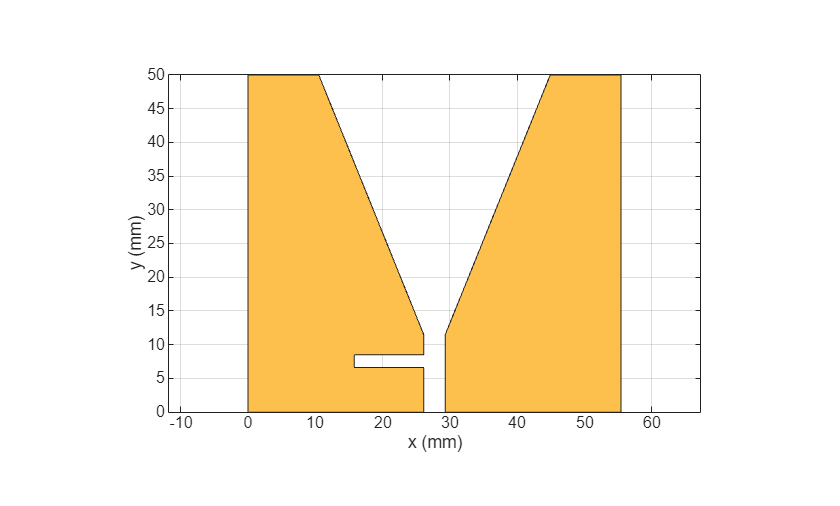
Subtract the triangular cavity shape, rectangular void shapes from the metal region. The remaining metal is the ground area.
shapeGnd = shapeMetalBase - shapeResonatorCutout - shapeTraceCutout - shapePhaseCutout;
figure
show(shapeGnd)
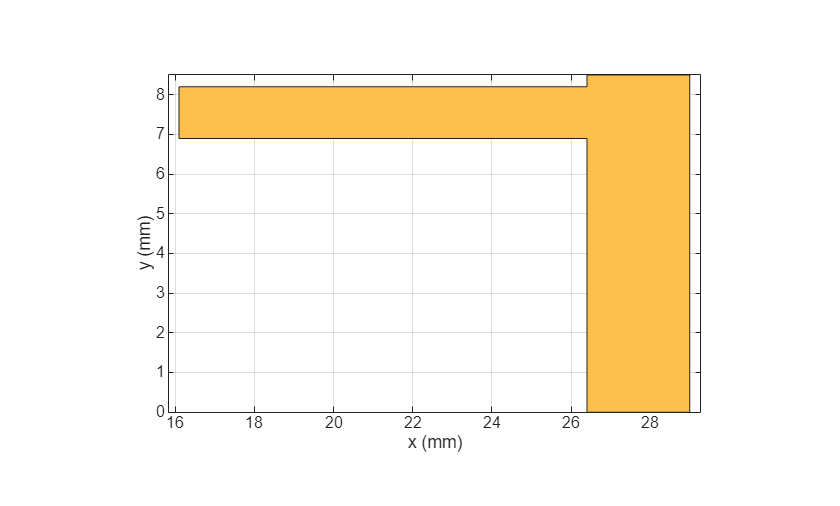
Create the trace and phase shifter shapes.
shapeTrace = antenna.Rectangle(Center=[Wt/2, (Lt-Lr-Ls3)/2],Length=W,Width=Lt-Lr-Ls3);
shapePhase = antenna.Rectangle(Center=[Wt/2-(Ls1+S+W/2)/2, Lt-Lr-Ls3-Ls2/2],Length=Ls1+S+W/2,Width=Ls2-2*S);
Add these shapes to create a shape for the radiating element.
shapeRadiator = shapeTrace + shapePhase;
figure
show(shapeRadiator)
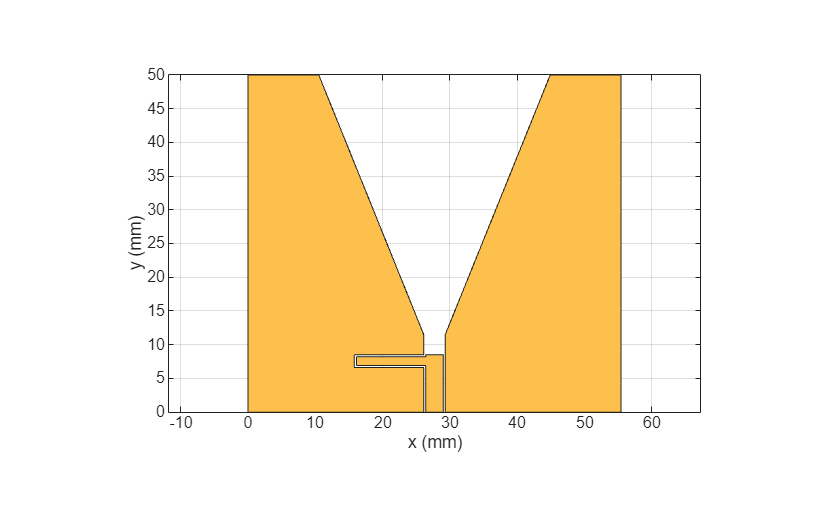
Add the radiating element shape to the ground shape. Adding these shapes completes the geometry of the metallic portion of the antenna.
shapeMetal = shapeGnd + shapeRadiator;
figure
show(shapeMetal)

Create PCB Antenna
Use the pcbComponent object to create a PCB antenna. Define the board thickness and dielectric material for the antenna. Use the metal and dielectric shapes created in the previous section as layers of this object.
p = pcbComponent;
p.BoardThickness = 1.55e-3;
diel = dielectric(EpsilonR=4.5,LossTangent=0.03,Name="sub1",Thickness=1.55e-3);
p.Layers = {shapeMetal diel};
p.BoardShape = shapeDiel;
Define Feed
To appropriately feed the structure, the radiating element must be excited against the left and right ground structures simultaneously. This feed is too complex to specify using the FeedLocations property of the pcbComponent object. Instead, specify the FeedFormat property of the pcbComponent object from 'FeedLocations' to 'FeedDefinitions' to enable the FeedDefinitions property. The FeedDefinitions property accepts objects from a catalog of predefined feeds that you can use to specify the feed requirements more precisely.
Use the ArbitraryFiniteGapFeed object from the feed catalog to excite one signal location against multiple parallel ground locations separated by nonmetallic gaps on the same layer. To initialize this feed, assign N rows to each property, where N is the number of sets of paired +/– edges in the model. In this case, there are two sets of paired +/– edges:
The y = 0 edges of the radiating element and left ground region.
The y = 0 edges of the radiating element and the right ground region.
f = ArbitraryFiniteGapFeed;
Both rows of SignalLocations are identical because the positive excitation of each +/– pair is in the same place.
f.SignalLocations = [Wt/2, 0; Wt/2, 0];
The rows of GroundLocations are not identical because the negative excitation of the +/– pairs is in different places (one on each ground region).
f.GroundLocations = [(Wt/2+Ws/2+W/2), 0; (Wt/2-Ws/2-W/2), 0];
All signal and ground edges are on the same layer (1).
f.SignalLayers = [1 1]';
f.GroundLayers = [1 1]';
Both signal widths are equal to the width of the radiating element trace.
f.SignalWidths = [W W]';
In contrast to the signal widths, the ground widths are not strictly determined by features of the geometry in this case. Set them to be equal to the signal widths.
f.GroundWidths = [W W]';
Set the feed format, assign the feeds, and view the assembled PCB antenna.
p.FeedFormat = "FeedDefinitions";
p.FeedDefinitions = f;
figure
show(p)
camzoom(2);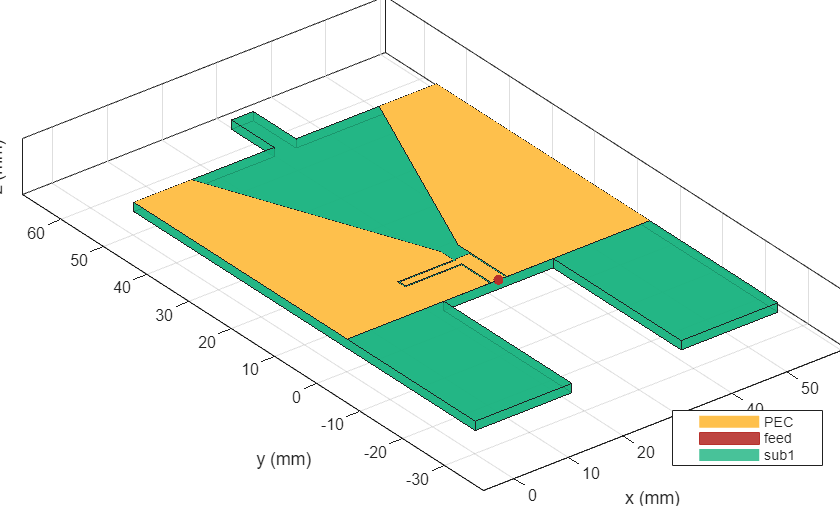
Analyze PCB Antenna
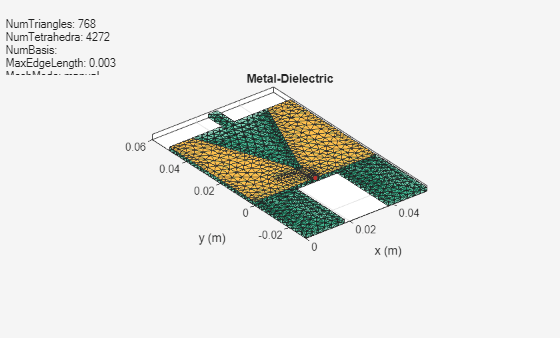
Apply mesh to the antenna.
figure
mesh(p,MaxEdgeLength=3e-3,MinEdgeLength=2e-3);
Plot the S-parameters of the antenna.
freq = 0.05e9:0.1e9:6e9;
sp = sparameters(p,freq);
figure
rfplot(sp)
title("S11")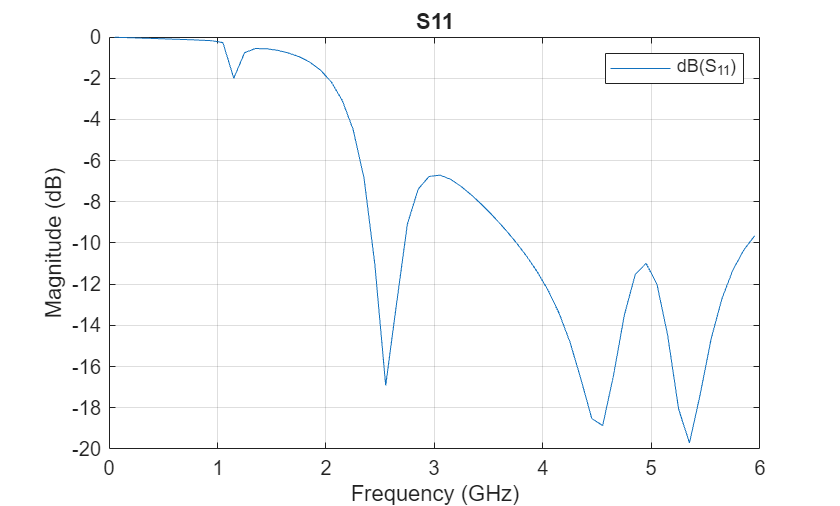
Reference
[1] Monebhurrun, Vikass, Satyajit Chakrabarti, and Richelieu Quoi. “A 5G NR FR1 UWB Antenna as Benchmark for the Development of IEEE Standard P2816.” In 2023 Antenna Measurement Techniques Association Symposium (AMTA), 1–2. Renton, WA, USA: IEEE, 2023. https://doi.org/10.23919/AMTA58553.2023.10293360.
See Also
Objects
antenna.Rectangle|antenna.Triangle|pcbComponent(RF PCB Toolbox)
Functions
rotate|translate|mesh|sparameters

