sofaread
R2026bSyntax
Description
Examples
Use sofaread to read in a SOFA file. The file follows the SimpleFreeFieldHRIR convention, which stores head-related transfer function (HRTF) measurement data in FIR filter form.
filename = "ReferenceHRTF.sofa";
s = sofaread(filename)
s =
audio.sofa.SimpleFreeFieldHRIR handle with properties:
Numerator: [1550×2×256 double]
Delay: [0 0]
SamplingRate: 48000
SamplingRateUnits: "hertz"
Show all properties
Select the impulse response data corresponding to the fifth measurement for the left ear.
measurementIdx = 5;
ear = 1;
ir = squeeze(s.Numerator(measurementIdx,ear,:));
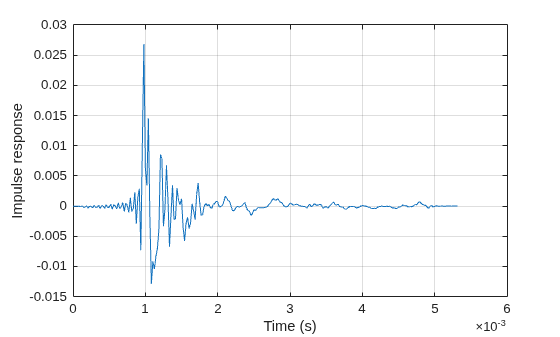
Plot the impulse response. Use the sample rate specified in the file to convert from samples to seconds.
fs = s.SamplingRate;
t = (0:size(ir,1)-1)/fs;
plot(t,ir)
grid on
xlabel("Time (s)")
ylabel("Impulse response")
Print the source position corresponding to this impulse response measurement.
srPos = s.SourcePosition(measurementIdx,:);
fprintf("The coordinates are %s.\n", s.SourcePositionType);
The coordinates are spherical.
fprintf("Units are %s.\n", s.SourcePositionUnits);Units are degree, degree, meter.
fprintf("Azimuth: %f. Elevation: %f. Radius: %f.\n",...
    srPos(1), srPos(2), srPos(3));
Azimuth: 0.000000. Elevation: -10.000000. Radius: 3.000000.
Load a SOFA file.
s = sofaread("ReferenceHRTF.sofa");Inspect the DateModified property to see when the file was last modified.
s.DateModified
ans =
"2023-04-28 13:37:09"
Modify the Title and History properties of the SOFA object.
s.Title = "Modified title";
s.History = sprintf("%s\nModified title.", s.History);
Save the modified object to a new SOFA file.
sofawrite("myFile.sofa",s);Read in a SOFA file containing HRTF measurements.
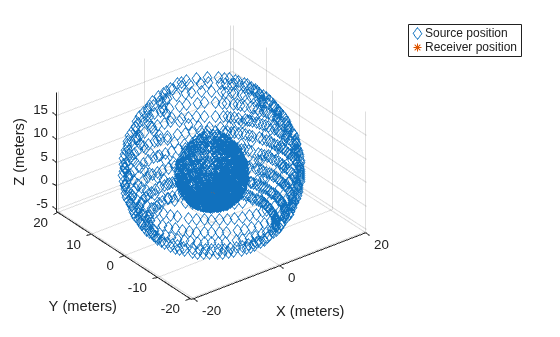
s = sofaread("ReferenceHRTF.sofa");Call plotGeometry to visualize the 3-D locations of the receiver and moving source from the measurements.
figure
plotGeometry(s)
Use findMeasurements to get the indices of measurements in the median plane. Plot the 3-D geometry of the specified measurements.
idx = findMeasurements(s,Plane="median");
figure
plotGeometry(s,MeasurementIndex=idx);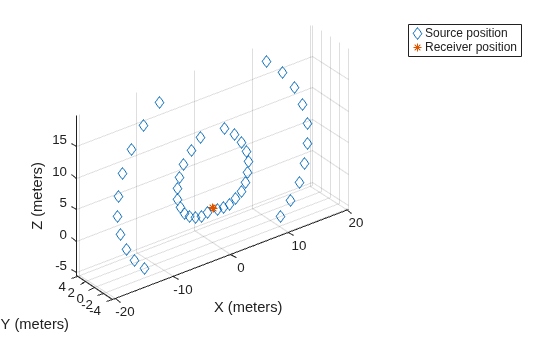
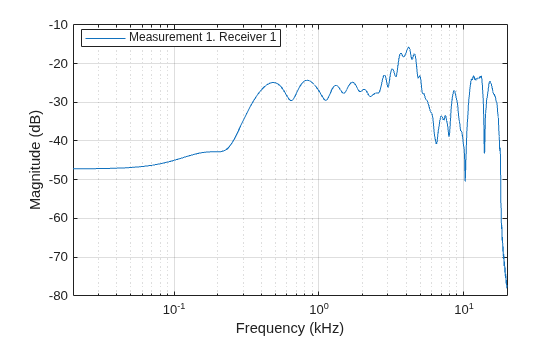
Use freqz to compute and visualize the frequency response of the first measurement for the first receiver.
figure
freqz(s)
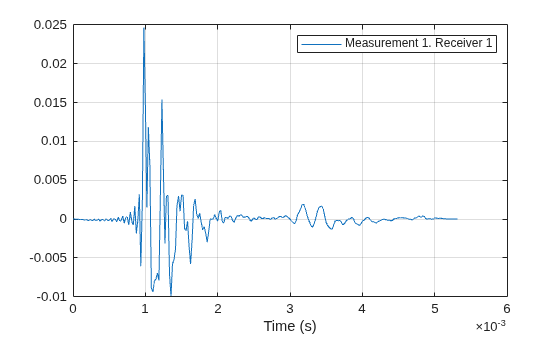
Use impz to compute and visualize the impulse response of the first measurement for the first receiver.
figure
impz(s)
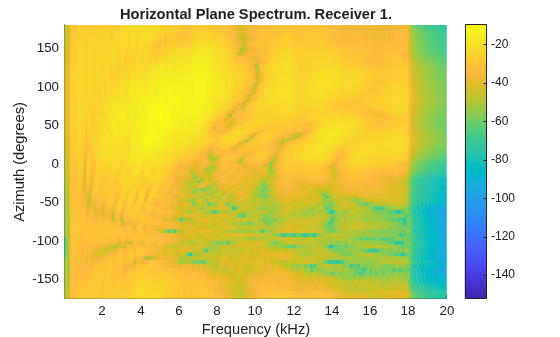
Use spectrum to compute and visualize the power spectrum of the HRTF data in the horizontal plane at zero elevation for the first receiver.
figure
spectrum(s)
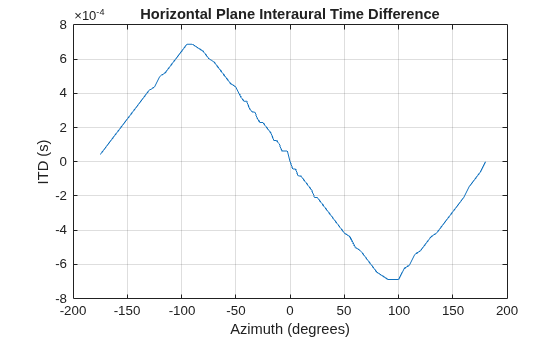
Compute and visualize the interaural time difference of the HRTF data in the horizontal plane at zero elevation.
figure
interauralTimeDifference(s)
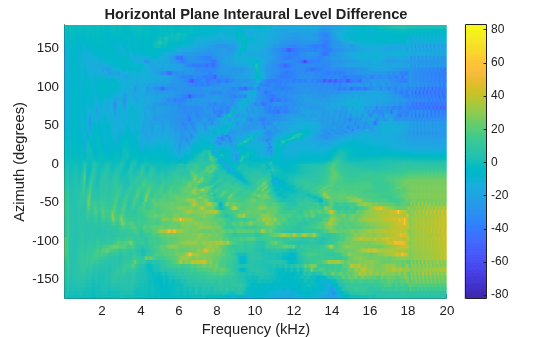
Compute and visualize the interaural level difference of the HRTF data in the horizontal plane.
figure
interauralLevelDifference(s)
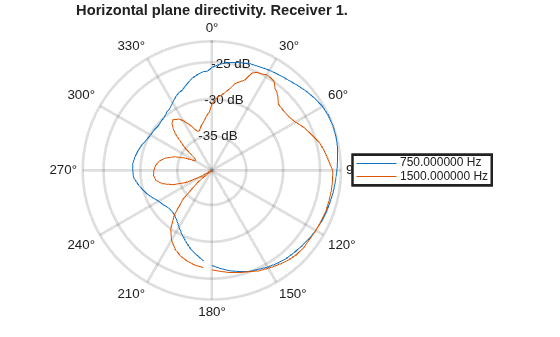
Compute and visualize the directivity of the HRTF data at 750 Hz and 1500 Hz in the horizontal plane.
figure
directivity(s,[750 1500])
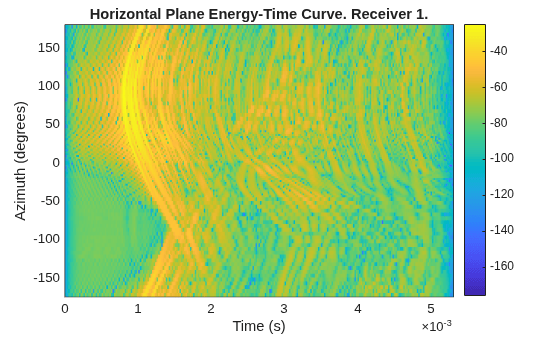
Compute and visualize the energy-time curve of the HRTF data in the horizontal plane.
figure
energyTimeCurve(s)
Load a SOFA file containing HRTF measurements.
s = sofaread("ReferenceHRTF.sofa");Specify the desired source positions and then calculate the HRTF at these locations using the interpolateHRTF function.
desiredAz = [-120;-60;0;60;120;0;-120;120];
desiredEl = [-90;90;45;0;-45;0;45;45];
desiredPosition = [desiredAz desiredEl];

interpolatedIR  = interpolateHRTF(s,desiredPosition);
Create an audio file sampled at 48 kHz for compatibility with the SOFA file.
[audio,fs] = audioread("Counting-16-44p1-mono-15secs.wav");
audio = audioresample(audio,InputRate=fs,OutputRate=s.SamplingRate);
audio = audio./max(abs(audio));
audiowrite("Counting-16-48-mono-15secs.wav",audio,s.SamplingRate);
Create a dsp.AudioFileReader object to read in a file frame by frame. Create an audioDeviceWriter object to play audio to your sound card frame by frame. Create a dsp.FrequencyDomainFIRFilter object. Set the Numerator property to the combined left-ear and right-ear filter pair. Since you want to keep the received signals at each ear separate, set SumFilteredOutputs to false.
fileReader = dsp.AudioFileReader("Counting-16-48-mono-15secs.wav");
deviceWriter = audioDeviceWriter(SampleRate=fileReader.SampleRate);

spatialFilter = dsp.FrequencyDomainFIRFilter(squeeze(interpolatedIR(1,:,:)),SumFilteredOutputs=false);
In an audio stream loop:
Read in a frame of audio data.
Feed the audio data through filter.
Write the audio to your output device. If you have a stereo output hardware, such as headphones, you can hear the source shifting position over time.
Modify the desired source position in 2-second intervals by updating the filter coefficients.
durationPerPosition = 2;
samplesPerPosition = durationPerPosition*fileReader.SampleRate;
samplesPerPosition = samplesPerPosition - rem(samplesPerPosition,fileReader.SamplesPerFrame);

sourcePositionIndex = 1;
samplesRead = 0;
while ~isDone(fileReader)
    audioIn = fileReader();
    samplesRead = samplesRead + fileReader.SamplesPerFrame;

    audioOut = spatialFilter(audioIn);
    deviceWriter(audioOut);

    if mod(samplesRead,samplesPerPosition) == 0
        sourcePositionIndex = sourcePositionIndex + 1;
        spatialFilter.Numerator = squeeze(interpolatedIR(sourcePositionIndex,:,:));
    end
end
As a best practice, release your System objects when complete.
release(deviceWriter)
release(fileReader)
Read in a SOFA file that follows the SimpleFreeFieldHRTF convention and contains measurements in frequency response form.
s = sofaread("freqResponseData.sofa");Select the complex frequency response corresponding to the tenth measurement and the right ear.
measurementIdx = 10;
ear = 2;

freqResponse = squeeze(s.FrequencyResponse(measurementIdx,ear,:));
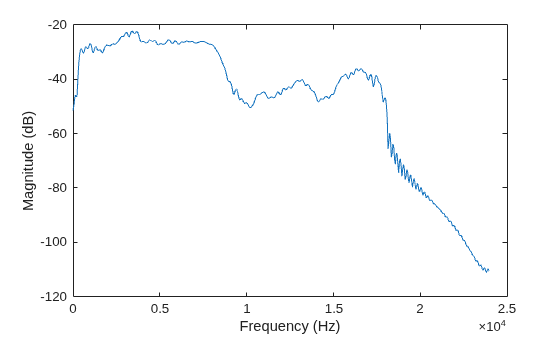
Plot the magnitude response in decibels.
plot(s.FrequencyVector,20*log10(abs(freqResponse)))
xlabel("Frequency (Hz)")
ylabel("Magnitude (dB)")
Read in a SOFA file that follows the SimpleFreeFieldHRSOS convention and contains mock SOS data.
s = sofaread("mockSOSData.sofa");Select the numerator and denominator coefficients of the SOS filter corresponding to the first measurement and left ear.
measurementIdx = 1;
ear = 1;
numerator = squeeze(s.Numerator(measurementIdx,ear,:,:));
denominator = squeeze(s.Denominator(measurementIdx,ear,:,:));
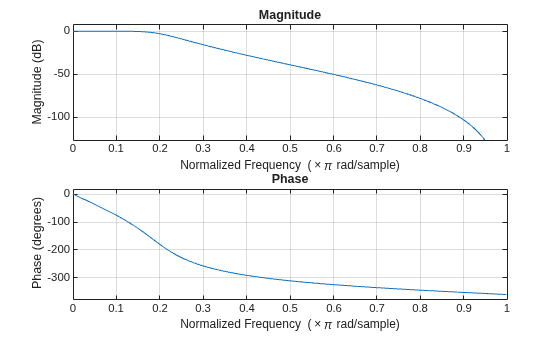
Use freqz to visualize the frequency response of the filter.
sos = [numerator denominator];
freqz(sos)
Input Arguments
Output Arguments
More About
References
[1] Majdak, P., Zotter, F. Brinkmann, F., De Muynke, J., Mihocic, M., and Noisternig, M., “Spatially Oriented Format for Acoustics 2.1: Introduction and Recent Advances.” Journal of the Audio Engineering Society 70, no. 7/8 (July 25, 2022): 565–84. https://doi.org/10.17743/jaes.2022.0026.
[2] Majdak, P., Carpentier, T., Nicol, R., Roginska, A., Suzuki, Y., Watanabe, K., Wierstorf, H., et al., “Spatially Oriented Format for Acoustics: A Data Exchange Format Representing Head-Related Transfer Functions.” In Proceedings of the 134th Convention of the Audio Engineering Society (AES), Paper 8880. Roma, Italy, 2013.
[3] AES69-2022. "AES standard for file exchange - Spatial acoustic data file format." Standard of the Audio Engineering Society.
Version History
Introduced in R2023b

