Bioinformatics Pipeline SplitDimension
R2026bSome of the blocks in a bioinformatics pipeline operate on their input data arrays as one
single input while other blocks can operate on individual elements or slices of the input data
array independently. The SplitDimension
property of a block input controls how to split the block input data (or input array) across
multiple runs of the same block in a pipeline. In other words,
SplitDimension allows you to control how to parallelize independent
runs of the same block (with a different input for each run).
Specify SplitDimension to Select Which Input Array Dimensions to
Split
You can specify a vector of integers to indicate which dimensions (such the row or
column dimension) of the input array to split and pass to the block run
method. By splitting the input data, you are specifying how many times you want to run the
same block with different inputs.
For example, the bioinfo.pipeline.block.SeqSplit block can apply the same trimming operation on
an array of input FASTQ files. To specify that SeqTrim runs on each input
file in the array independently, set the SplitDimension property of the
block input to a specific dimension (such as 1 for the row dimension or 2 for the column
dimension of the array).
You can also specify an empty array [] as the value to perform no
dimension splitting of input data, that is, the block runs one time for all of input data.
Alternatively, specify "all" to pass all elements of the input array to
the run method of the block independently. For instance, if there are
n elements, the block runs n times
independently.
For an example of how to use SplitDimension, see Split Input SAM Files and Assemble Transcriptomes Using Bioinformatics Pipeline.
Note
If you are running the Bioinformatics Toolbox Software Support Packages (such as
Bowtie2, BWA, or Cufflinks)
remotely, ensure that these support packages are installed in the remote clusters that you
are running the pipeline.
Provide Compatible Array sizes
A block can have different split dimensions for each input (port), but inputs that share split dimensions must have compatible sizes. As with binary operations on MATLAB arrays, two inputs have a compatible size for a dimension if the size of the inputs is the same or one of the dimension sizes is 1. For an input whose size is 1 (or scalar) in a split dimension, the value in that dimension is implicitly expanded to match the same size as the other dimensions. For MATLAB® arrays, dimension one refers to the number of rows and dimension two refers to the number of columns.
The total number of times the block runs within a pipeline is the product of the sizes
of the input value in the split dimensions. For example, consider a block with two input
ports X and Y. The following table shows the total
number of runs (or processes) for various values of
SplitDimension.
| X array size | Y array size | X.SplitDimension | Y.SplitDimension | Total number of runs |
|---|---|---|---|---|
| 1-by-1 | 2-by-2 | [] | [] | 1⨉1 = 1. This is the default (no dimensional splitting). |
| 1-by-1 | 2-by-3 | [] | 1 | 2⨉1 = 2 |
| 5-by-1 | 1-by-3 | 1 | 2 | 5⨉3 = 15 |
| 2-by-2 | 3-by-3 | 2 | 2 | 0 because of dimension mismatch |
| 2-by-3 | 2-by-4 | 2 | "all" | 0 because of dimension mismatch |
| 3-by-1-by-4 | 1-by-3 | "all" | 2 | 3⨉3⨉4 = 36 |
| 0-by-1 | 1-by-1 | [] | [] | 1⨉1 = 1 |
| 0-by-1 | 1-by-1 | 1 | [] | 0 because of size 0 in dimension 1 |
Empty sizes are allowed only in non-SplitDimension. If no inputs
specify a SplitDimension, there will always be exactly one run,
regardless of the input array sizes. You can merge the output results from multiple block
runs with cell arrays. For details, see UniformOutput.
Default Value of SplitDimension for Built-In Pipeline Blocks
Since R2026a
The default value of the SplitDimension property is
"all", instead of being empty, for some input ports of built-in
pipeline blocks when the expected use case for the blocks is to parallelize across all input
data for those input ports.
The table below lists all the built-in blocks with their corresponding
SplitDimension values. (The UserFunction and
FileChooser blocks have no input ports.)
| Built-in Block | Input Port | SplitDimension Default
Value |
| BLASTN | QueryFile | "all" |
| BlastDatabase | [] | |
| BLASTP | QueryFile | "all" |
| BlastDatabase | [] | |
| BLASTX | QueryFile | "all" |
| BlastDatabase | [] | |
| BamSort | BAMFile | "all" |
| Bowtie2 | IndexBaseName | [] |
| Reads1Files | "all" | |
| Reads2Files | "all" | |
| Bowtie2Build | ReferenceFASTAFiles | [] |
| IndexBaseName | [] | |
| BwaIndex | ReferenceFASTAFile | "all" |
| BwaMEM | IndexBaseName | [] |
| Reads1File | "all" | |
| Reads2File | "all" | |
| CuffCompare | GenomicAnnotationFiles | [] |
| CuffDiff | GenomicAnnotationFile | [] |
| GenomicAlignmentFiles | [] | |
| CuffMerge | GenomicAnnotationFiles | [] |
| CuffNorm | GenomicAnnotationFile | [] |
| GenomicAlignmentFiles | [] | |
| CuffQuant | GenomicAnnotationFile | [] |
| GenomicAlignmentFiles | [] | |
| Cufflinks | GenomicAlignmentFiles | "all" |
| FeatureCount | GTFFile | [] |
| GenomicAlignmentFiles | [] | |
| GenomicsViewer | Reference | [] |
| Cytoband | [] | |
| Tracks | [] | |
| Load | MatFile | [] |
| MakeBlastDatabase | InputFile | [] |
| SRAFasterqDump | SRRID | "all" |
| SRASAMDump | SRRID | "all" |
| SamSort | SAMFile | "all" |
| Save | Var1 | [] |
| SeqFilter | FASTQFiles | "all" |
| SeqSplit | FASTQFiles | "all" |
| BarcodeFile | "all" | |
| SeqTrim | FASTQFiles | "all" |
| TBLASTN | QueryFile | "all" |
| BlastDatabase | [] | |
| TBLASTX | QueryFile | "all" |
| TBLASTX | BlastDatabase | [] |
Show split dimensions in Biopipeline Designer
In Biopipeline Designer, you can see dedicated icons for the split dimension settings of the input ports of your pipeline blocks. To show or hide the icons, open the diagram context menu and select Show split dimension icons.
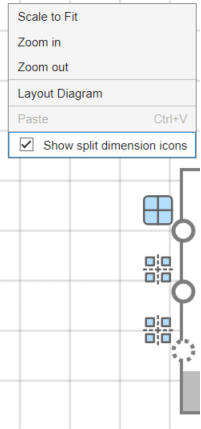
The three icons indicate the following:
— Inputs to this port are not split along any dimension.
— Inputs to this port are split along one dimension.
— Inputs to this port are split along more than one dimension.
See Also
SplitDimension | bioinfo.pipeline.Input | bioinfo.pipeline.Pipeline | Biopipeline
Designer

