mmseweights
R2026bLinear equalizer MMSE tap weights
Description
Examples
Calculate the minimum mean squared error (MMSE) solution and use the weights for the linear equalizer taps weights.
Initialize simulation variables.
M = 4; % QPSK
numSymbols = 10000;
numTrainingSymbols = 1000;
chtaps = [1 0.5*exp(1i*pi/6) 0.1*exp(-1i*pi/8)];
SNR = 20;
Generate QPSK modulated symbols. Apply delayed multipath channel filtering and AWGN impairments to the symbols.
data = randi([0 M-1],numSymbols,1);
tx = pskmod(data,M,pi/4);
rx = awgn(filter(chtaps,1,tx),25,'measured');
Create a linear equalizer System object configured to use CMA algorithm and input the taps weights. Calculate the MMSE weights. Set the initial tap weights to the calculated MMSE weights. Equalize the impaired symbols.
eq = comm.LinearEqualizer(Algorithm='CMA', ...
    AdaptWeights=false,InitialWeightsSource='Property')
eq =
  comm.LinearEqualizer with properties:

                Algorithm: 'CMA'
                  NumTaps: 5
                 StepSize: 0.0100
            Constellation: [0.7071 + 0.7071i -0.7071 + 0.7071i -0.7071 - 0.7071i 0.7071 - 0.7071i]
    InputSamplesPerSymbol: 1
       AdaptWeightsSource: 'Property'
             AdaptWeights: false
     InitialWeightsSource: 'Property'
           InitialWeights: [5×1 double]
       WeightUpdatePeriod: 1
wgts = mmseweights(eq,chtaps,SNR)
wgts = 5×1 complex

   0.0005 - 0.0068i
   0.0103 + 0.0117i
   0.9694 - 0.0019i
  -0.3987 + 0.2186i
   0.0389 - 0.1756i
eq.InitialWeights = wgts;

[y,err,weights] = eq(rx);
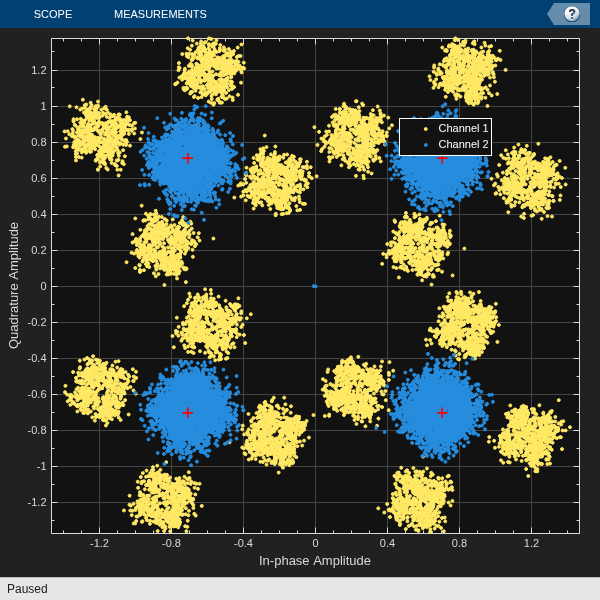
Plot constellation of impaired and equalized symbols.
constell = comm.ConstellationDiagram(NumInputPorts=2);
constell(rx,y)
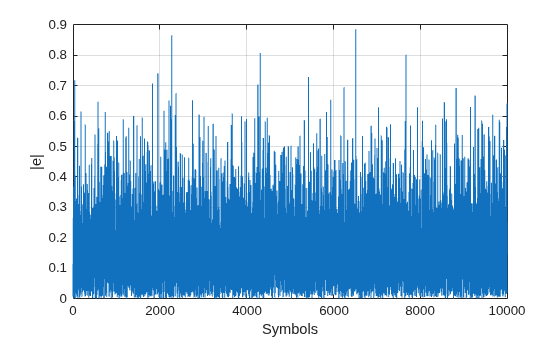
Plot the equalizer error signal and compute the error vector magnitude of the equalized symbols.
plot(abs(err))
grid on; xlabel('Symbols'); ylabel('|e|')
errevm = comm.EVM;
evm = errevm(tx,y)
evm =
139.0863
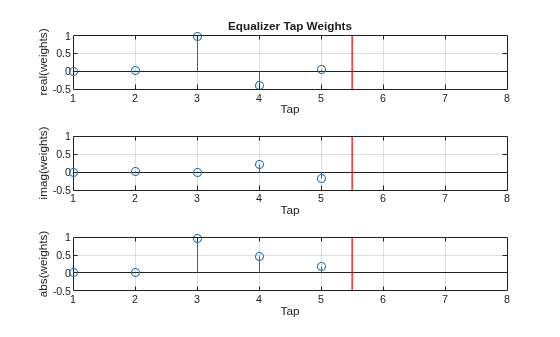
Plot equalizer tap weights.
subplot(3,1,1);
stem(real(weights));
ylabel('real(weights)'); xlabel('Tap');
grid on; axis([1 8 -0.5 1])
line([eq.NumTaps+0.5 eq.NumTaps+0.5],[-0.5 1], ...
    Color='r',LineWidth=1)
title('Equalizer Tap Weights')
subplot(3,1,2);
stem(imag(weights));
ylabel('imag(weights)'); xlabel('Tap');
grid on; axis([1 8 -0.5 1])
line([eq.NumTaps+0.5 eq.NumTaps+0.5],[-0.5 1], ...
    Color='r',LineWidth=1)
subplot(3,1,3);
stem(abs(weights));
ylabel('abs(weights)'); xlabel('Tap');
grid on; axis([1 8 -0.5 1])
line([eq.NumTaps+0.5 eq.NumTaps+0.5],[-0.5 1], ...
    Color='r',LineWidth=1)
Input Arguments
Output Arguments
Version History
Introduced in R2019a

