Contenu principal

concatenationLayer

Concatenation layer

Description

A concatenation layer takes inputs and concatenates them along a specified dimension. The inputs must have the same size in all dimensions except the concatenation dimension.

Specify the number of inputs to the layer when you create it. The inputs have the names 'in1','in2',...,'inN', where N is the number of inputs. Use the input names when connecting or disconnecting the layer by using connectLayers or disconnectLayers.

Creation

Description

layer = concatenationLayer(dim,numInputs) creates a concatenation layer that concatenates numInputs inputs along the specified dimension, dim. This function also sets the Dim and NumInputs properties.

example

layer = concatenationLayer(dim,numInputs,Name=name) also specifies the layer name.

Input Arguments

expand all

Concatenation dimension, specified as a positive integer.

Before R2026a: The layer supports concatenating over the channel and spatial dimensions only.

This argument sets the Dim property.

Data Types: single | double | int8 | int16 | int32 | int64 | uint8 | uint16 | uint32 | uint64

Number of inputs to the layer, specified as a positive integer greater than or equal to 2.

This argument sets the NumInputs property.

Data Types: single | double | int8 | int16 | int32 | int64 | uint8 | uint16 | uint32 | uint64

Layer name, specified as a character vector or a string scalar. For Layer array input, the trainnet and dlnetwork functions automatically assign names to unnamed layers.

This argument sets the Name property.

Data Types: char | string

Properties

expand all

Concatenation

This property is read-only after object creation. To set this property, use the corresponding positional input argument when you create the ConcatenationLayer object.

Concatenation dimension, specified as a positive integer.

Before R2026a: The layer supports concatenating over the channel and spatial dimensions only.

Data Types: double

Layer

Layer name, specified as a character vector. For Layer array input, the trainnet and dlnetwork functions automatically assign names to unnamed layers.

Data Types: char

This property is read-only after object creation. To set this property, use the corresponding positional input argument when you create the ConcatenationLayer object.

Number of inputs to the layer, specified as a positive integer greater than or equal to 2.

The inputs have the names "in1","in2",...,"inN", where N is NumInputs. For example, if NumInputs is 3, then the inputs have the names "in1","in2", and "in3". Use the input names when connecting or disconnecting the layer using the connectLayers or disconnectLayers functions.

This property is read-only.

Input names, specified as {'in1','in2',...,'inN'}, where N is the number of inputs of the layer.

Data Types: cell

This property is read-only.

Number of outputs from the layer, stored as 1. This layer has a single output only.

Data Types: double

This property is read-only.

Output names, stored as {'out'}. This layer has a single output only.

Data Types: cell

Examples

collapse all

Create a concatenation layer that concatenates two inputs along the fourth dimension (channels). Name the concatenation layer 'concat'.

concat = concatenationLayer(4,2,'Name','concat')
concat = 
  ConcatenationLayer with properties:

          Name: 'concat'
           Dim: 4
     NumInputs: 2
    InputNames: {'in1'  'in2'}

Create two ReLU layers and connect them to the concatenation layer. The concatenation layer concatenates the outputs from the ReLU layers.

relu_1 = reluLayer('Name','relu_1');
relu_2 = reluLayer('Name','relu_2');

net = dlnetwork;
net = addLayers(net, relu_1);
net = addLayers(net, relu_2);
net = addLayers(net, concat);

net = connectLayers(net, 'relu_1', 'concat/in1');
net = connectLayers(net, 'relu_2', 'concat/in2');
plot(net)
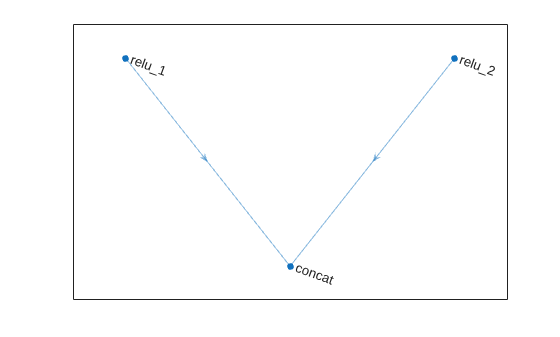
Figure contains an axes object. The axes object contains an object of type graphplot.

Algorithms

expand all

Extended Capabilities

expand all

Version History

Introduced in R2019a

expand all