setUpAxis
R2026bDescription
Add-On Required: This feature requires the 3D Asset Processing Library for MATLAB add-on.
setUpAxis(
changes the up axis convention of mesh or scene object meshORsceneObj,targetAxis)meshORsceneObj
by transforming their vertices using the specified target up axis
targetAxis.
Examples
Define a simple pyramid with 5 vertices and 6 triangular faces.
vertices = [0 0 0; 1 0 0; 1 1 0; 0 1 0; 0.5 0.5 1];
faces = [1 2 5; 2 3 5; 3 4 5; 4 1 5; 1 3 4; 1 2 3];
Create a mesh with per-face color.
faceColors = uint8([230 50  50;    % red - front
                    50  180 50;    % green - right
                    50  100 230;   % blue - back
                    230 180 25;    % yellow - left
                    150 75  200;   % purple - bottom 1
                    25  200 200]); % cyan - bottom 2
pyramidMesh = asset3d.Mesh(vertices,faces,FaceColors=faceColors);
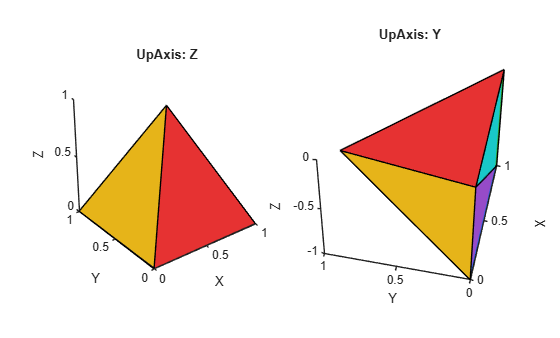
Convert mesh from Z-up to Y-up axis convention.
convertedMesh = copy(pyramidMesh);
setUpAxis(convertedMesh,"Y")
Visualize the mesh with the up axis changed from Z-axis to Y-axis.
figure
subplot(1,2,1)
patch(pyramidMesh,EdgeColor="k")
axis equal
title("UpAxis: Z")
subplot(1,2,2)
patch(convertedMesh,EdgeColor="k")
view([-77.55 50.87])
axis equal
title("UpAxis: Y")
Input Arguments
Version History
Introduced in R2026b
See Also
Mesh | rotate | transform | asset3d.read

