QHVXIPCV.dilate7x7
2-D grayscale dilation with a 7-by-7 square structuring element for HVX
Since R2026a
Description
Examples
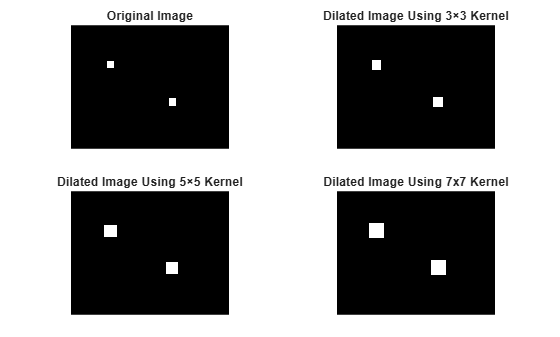
Create a grayscale image with two bright squares.
%% Create a simple binary-style image (uint8)
H = 100; W = 128;
img = zeros(H, W, 'uint8');
% Draw two white squares
img(30:35, 30:35) = 255;        % Square 1
img(60:65, 80:85) = 255;        % Square 2
To apply dilation to the grayscale image with different kernel sizes, use the QHVXIPCV.dilate3x3, QHVXIPCV.dilate5x5, and QHVXIPCV.dilate3x3 functions.
%% Apply dilation with different kernel sizes
out3 = QHVXIPCV.dilate3x3(img);   % 3x3 kernel
out5 = QHVXIPCV.dilate5x5(img);   % 5x5 kernel
out7 = QHVXIPCV.dilate7x7(img);   % 7x7 kernel
Visualize the original and dilated images.
tiledlayout(2,2,'TileSpacing','compact','Padding','compact');
nexttile
imshow(img, []);
title('Original Image');
nexttile
imshow(out3, []);
title('Dilated Image Using 3×3 Kernel');
nexttile
imshow(out5, []);
title('Dilated Image Using 5×5 Kernel');
nexttile
imshow(out7, []);
title('Dilated Image Using 7x7 Kernel')
Input Arguments
Output Arguments
Version History
Introduced in R2026a

