Contenu principal

blockproc

R2026b

Distinct block processing for image

Description

B = blockproc(A,[m n],fun) processes the input image A by applying the function fun to each distinct block of size [m n] and concatenating the results into the output image, B.

example

B = blockproc(A,[m n],fun,Name=Value) uses name-value pair arguments to control various aspects of the block behavior.

example

Examples

collapse all

Read image into the workspace.

I = imread('pears.png');

Create block processing function.

fun = @(block_struct) imresize(block_struct.data,0.15);

Process the image, block-by-block.

I2 = blockproc(I,[100 100],fun);

Display the original image and the processed image.

figure;
imshow(I);

Figure contains an axes object. The hidden axes object contains an object of type image.

figure;
imshow(I2);

Figure contains an axes object. The hidden axes object contains an object of type image.

Read image into the workspace.

I = imread("peppers.png");

Create block processing function.

fun = @(block_struct) block_struct.data(:,:,[2 1 3]);

Perform the block processing operation.

grb_peppers = blockproc(I,[200 200],fun);

Display original image and the processed image.

figure;
imshow("peppers.png")

Figure contains an axes object. The hidden axes object contains an object of type image.

figure;
imshow(grb_peppers)

Figure contains an axes object. The hidden axes object contains an object of type image.

Use the blockproc function to set every pixel in each 32-by-32 block of an image to the average of the elements in that block. The anonymous function calculates the mean of the block, and then multiplies the result by a matrix of ones, so that the output block is the same size as the input block. As a result, the output image is the same size as the input image.

myfun = @(block_struct) ...
   uint8(mean2(block_struct.data)* ...
   ones(size(block_struct.data)));
I2 = blockproc("moon.tif",[32 32],myfun);
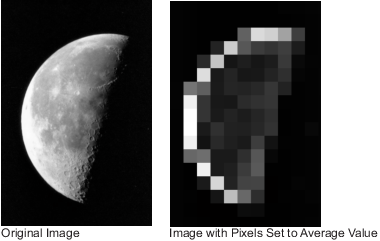
Original image of moon and a processed image in which every pixel in each 32-by-32 block is set to the average of the elements in that block.

Input Arguments

collapse all

Image to process, specified as a numeric array.

Block size, specified as a 2-element vector. m is the number of rows and n is the number of columns in the block.

Processing function, specified as a function handle. For more information, see Create Function Handle. The function must accept a structure as input and return an array, vector, or scalar. If fun returns empty, then blockproc does not generate any output and returns empty after processing all blocks.

These are the required fields in the input structure.

FieldDescription
borderSize of the vertical and horizontal padding around the block of data, specified as a 2-element vector of the form [v h]. See the BorderSize argument for more information.
blockSizeSize of the block data, specified as a 2-element vector of the form [rows cols]. If a border has been specified, the size does not include the border pixels.
dataBlock data, specified as an m-by-n or m-by-n-by-p array.
imageSizeFull size of the input image, specified as a 2-element vector of the form [rows cols].
locationPosition of the first pixel of the block in the input image, specified as a 2-element vector of the form [row col]. The first pixel in a block is located in the upper leftmost corner of the block of data, ignoring any border padding.

Name-Value Arguments

collapse all

Specify optional pairs of arguments as Name1=Value1,...,NameN=ValueN, where Name is the argument name and Value is the corresponding value. Name-value arguments must appear after other arguments, but the order of the pairs does not matter.

Example: B = blockproc(A,[m,n],fun,BorderSize=[8 4]) creates a border with 8 rows and 4 columns around each block.

Number of border pixels to add to each block, specified as a 2-element vector of positive integers of the form [v h]. Use the BorderSize argument to create overlapping borders to each block, which can help reduce edge artifacts.

When you specify a border size, the blockproc function adds v rows above and below each block and h columns left and right of each block. The size of each resulting block is [m+2*v, n+2*h]. For blocks in the center of the image, the border pixels surrounding each block have the same values as the image pixels adjacent to the block. For blocks on the edge of the image, blockproc pads the external boundary of blocks according to the value of PadMethod.

By default, the function automatically removes the border from the result of fun. See the TrimBorder argument for more information.

Method used to pad partial blocks, specified as "replicate", "symmetric", or a numeric scalar. The table defines each method and gives an example for padding a 3-by-3 pixel block with a border size of 2.

ValueDescriptionExample
"replicate"Repeat border elements.

[314159265][3331444333144433314441115999222655522265552226555]

"symmetric"Pad image with mirror reflections of itself.

[314159265][5115995133144113314415115995622655662265565115995]

numeric scalarPad image with a scalar value. By default, the image boundary is padded with the value 0.

[314159265][2222222222222222314222215922222652222222222222222]

Data Types: char | string

Pad partial blocks to make them full-sized, specified as false or true. Partial blocks arise when the image size is not exactly divisible by the block size. If they exist, partial blocks lie along the right and bottom edge of the image. By default, blockproc does not pad the partial blocks and processes them as-is.

When you specify PadPartialBlocks as true, blockproc pads the right and bottom of partial blocks as needed to make them full-sized m-by-n blocks. By default, blockproc pads the partial blocks with zeros. If you need a different type of padding, then use the PadMethod name-value argument.

When you pad partial blocks, the output image B is larger than the input image A.

Remove border pixels from the output of the processing function fun, specified as true or false. When set to true, the blockproc function removes the border pixels from the output fun. The size of the border is defined by the BorderSize argument.

The blockproc function does not trim padding added to partial blocks.

Option to perform computations in parallel using a parallel pool of workers, specified as one of these values:

  • "off" — Run in serial on the MATLAB® client.

  • "auto" — Use a parallel pool if one is open or if MATLAB can automatically create one. If a parallel pool is not available, then run in serial on the MATLAB client.

  • "on" — Use a parallel pool if one is open or if MATLAB can automatically create one. If a parallel pool is not available, then throw an error.

Before R2026b: To run in parallel, set UseParallel to true (1).

If you do not have a parallel pool open and automatic pool creation is enabled, then MATLAB opens a pool using the default cluster profile. To use a parallel pool to run computations in MATLAB, you must have Parallel Computing Toolbox™. For more information, see Run MATLAB Functions with Automatic Parallel Support (Parallel Computing Toolbox).

Data Types: char | string

Display wait bar, specified as true or false. When set to true, blockproc displays a wait bar to indicate progress for long-running operations. To prevent blockproc from displaying a wait bar, set DisplayWaitbar to false.

Output Arguments

collapse all

Processed image, returned as a numeric array.

Tips

  • The blockedImage object and apply function are recommended over the blockproc function in several situations, such as when you want to:

    • Process an image that is too large to fit in memory.

    • Write the processed image to memory.

    • Process an image of a file type unsupported by blockproc. For more information, see images.blocked.Adapter.

    • Process 3-D blocks of a volumetric image.

  • Choosing an appropriate block size can significantly improve performance. For more information, see Block Size and Performance.

  • Due to block edge artifacts, for some image processing operations, blockproc may not produce the same results as when you process the entire image at once. The BorderSize argument can help reduce edge artifacts.

  • The performance of parallel block processing depends on three factors:

    • Function used for processing.

    • Image size. When processing small images, serial processing is typically faster than parallel processing. For larger images, however, you might see significant performance gains from parallel processing.

    • Block size. Larger blocks generally process faster than smaller blocks, and processing large blocks in parallel might not save time. However, some algorithms require smaller blocks, which typically benefit from parallel processing. You might need to experiment to determine whether parallel processing saves time for a given block size.

Extended Capabilities

expand all

Version History

Introduced in R2009b

expand all