readPointCloud
Description
reads the point cloud specified by the point cloud number ptCloud = readPointCloud(e57Reader,ptCloudNum)ptCloudNum
from the E57 file specified by the e57FileReader
object e57Reader.
[
returns the metadata of the point cloud read from the file using all input arguments from
the previous syntax.ptCloud,pcMetadata] = readPointCloud(___)
Examples
Download a ZIP file containing an E57 file, and then unzip the file.
zipFile = matlab.internal.examples.downloadSupportFile("lidar","data/e57ParkingLot.zip"); saveFolder = fileparts(zipFile); e57FileName = [saveFolder filesep 'parkingLot.e57']; if ~exist(e57FileName,"file") unzip(zipFile,saveFolder) end
Create an e57FileReader object using the downloaded E57 file.
e57Reader = e57FileReader(e57FileName);
Define a variable for storing point clouds, ptCloudArr and their corresponding poses, tformArr.
ptCloudArr = []; tformArr = [];
Read the point cloud data.
for i = 1:e57Reader.NumPointClouds [ptCloud,pcMetadata] = readPointCloud(e57Reader,i); for j = 1:numel(ptCloud) ptCloudArr = [ptCloudArr ptCloud(j)]; tformArr = [tformArr pcMetadata.RelativePose]; end end
Align the point clouds from the file to create a map.
pcMap = pcalign(ptCloudArr,tformArr);
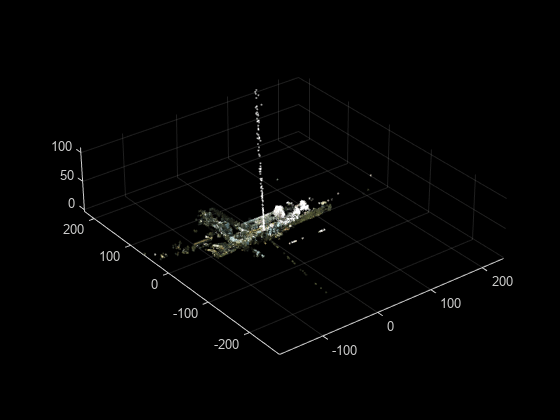
Display the map.
figure pcshow(pcMap)
Input Arguments
E57 file reader, specified as an e57FileReader
object.
Point cloud number to read from the file, specified as a positive integer. This
value must be less than or equal to the total number of point clouds in the file, as
indicated by the value of the NumPointClouds property of the
e57Reader input.
Data Types: single | double | int8 | int16 | int32 | int64 | uint8 | uint16 | uint32 | uint64
Output Arguments
Point cloud read from the file, returned as a pointCloud object. The function returns organized point clouds when the file
contains organization information. Otherwise, it returns unorganized point
clouds.
Note
The function returns an array of organized point clouds when the file contains organization information for multiple returns.
Point cloud metadata, returned as a structure with these fields.
| Field | Description | ||||||||||||||||||
|---|---|---|---|---|---|---|---|---|---|---|---|---|---|---|---|---|---|---|---|
PointAttributes | Attributes of the points in the point cloud, returned as a structure containing these fields.
For an unorganized point cloud, each of these fields is an M-element vector. M is the number of points in the point cloud. For an organized point cloud, each of these fields is an M-by-N matrix. M and N are the number of rows and columns of the point cloud, respectively. Note The function returns | ||||||||||||||||||
RelativePose | Rigid transformation of the point cloud from the sensor local coordinate
system to the file coordinate system, returned as a rigidtform3d object. | ||||||||||||||||||
AcquisitionPeriod | Absolute start time and end time between which the sensor records the point
cloud, respectively returned as a two-element datetime vector. | ||||||||||||||||||
GUID | Globally unique identifier (GUID) of the point cloud in the
Data3D element of the file, returned as a character
vector. | ||||||||||||||||||
OriginalGUIDs | GUIDs of the data sets to which the points in the Data3D
element belong, returned as a cell array of character vectors. | ||||||||||||||||||
Name | User-defined name of the Data3D element, returned as a
character vector. | ||||||||||||||||||
Description | User-defined description for the Data3D element,
returned as a character vector. | ||||||||||||||||||
CartesianBounds | Allowed bounds for the Cartesian coordinates of the points in the
| ||||||||||||||||||
SphericalBounds | Allowed bounds for the Spherical coordinates of the points in the
| ||||||||||||||||||
IndexBounds | Bounds for point indices, returned as a structure with these fields.
| ||||||||||||||||||
SensorData | Metadata of the lidar sensor capturing the point cloud, returned as a structure with these fields.
| ||||||||||||||||||
WeatherData | Weather data, returned as a structure with these fields.
|
For more information on the E57 file format, see E57 File Format.
Version History
Introduced in R2023aThe readPointCloud function now returns the entire point cloud without truncating any points. As a result, you might notice more number of points in the returned point cloud than in the previous release.
To get the same number of point cloud points as in the previous release, you must crop
the point cloud based on the bounds for the Cartesian coordinates of the points. For
example, this code crops the first point cloud of the input E57 file
fileName.
% Load E57 file
e57Reader = e57FileReader(fileName);
% Read the first point cloud
[ptCloud,pcMetaData] = readPointCloud(e57Reader,1);
% Iterate through each point cloud for multiple returns and crop it based
% on bounds for the Cartesian coordinates
ptCropped = pointCloud.empty;
for i = 1:numel(ptCloud)
validIdx = findPointsInROI(ptCloud(i),pcMetaData.CartesianBounds);
if ~ismatrix(ptCloud(i).Location)
ptCropped(i) = select(ptCloud(i),validIdx,OutputSize="full");
else
ptCropped(i) = select(ptCloud(i),validIdx);
end
endMATLAB Command
You clicked a link that corresponds to this MATLAB command:
Run the command by entering it in the MATLAB Command Window. Web browsers do not support MATLAB commands.
Sélectionner un site web
Choisissez un site web pour accéder au contenu traduit dans votre langue (lorsqu'il est disponible) et voir les événements et les offres locales. D’après votre position, nous vous recommandons de sélectionner la région suivante : .
Vous pouvez également sélectionner un site web dans la liste suivante :
Comment optimiser les performances du site
Pour optimiser les performances du site, sélectionnez la région Chine (en chinois ou en anglais). Les sites de MathWorks pour les autres pays ne sont pas optimisés pour les visites provenant de votre région.
Amériques
- América Latina (Español)
- Canada (English)
- United States (English)
Europe
- Belgium (English)
- Denmark (English)
- Deutschland (Deutsch)
- España (Español)
- Finland (English)
- France (Français)
- Ireland (English)
- Italia (Italiano)
- Luxembourg (English)
- Netherlands (English)
- Norway (English)
- Österreich (Deutsch)
- Portugal (English)
- Sweden (English)
- Switzerland
- United Kingdom (English)