Contenu principal

SingleSelectionGroup

R2026b

Exclusive selection group

Since R2026b

Description

A SingleSelectionGroup object represents a set of radio buttons or toggle buttons with mutually exclusive selection. Use a single selection group when you want only one button to be selected at a time.

Creation

Create a selection group using the uiselectiongroup function.

Properties

expand all

Selection Group

This property is read-only.

Buttons managed by the selection group, represented as an array of RadioButton objects or an array of ToggleButton objects. This property updates automatically when you call addMember or removeMember, or when you delete a member.

Currently selected radio button or toggle button, specified as a RadioButton or ToggleButton object. If the group contains radio buttons or toggle buttons, then SelectedObject must be set to one of those buttons. By default, the first button in the Members property is selected.

Query the value of this property to determine which button is currently selected in the selection group. Set the value of this property to change the currently selected button. When you change the selection using this property, MATLAB® adjusts the Value property for the buttons in the selection group accordingly.

For example, suppose that a selection group contains three radio buttons and you set the SelectedObject property to radiobutton3. MATLAB sets the Value property for each child RadioButton object as follows:

  • radiobutton1.Value = false;

  • radiobutton2.Value = false;

  • radiobutton3.Value = true;

In other words, setting the SelectedObject property has the same effect as setting the Value property of the buttons in the selection group.

Callbacks

Selection changed callback, specified as one of these values:

  • Function handle

  • Cell array in which the first element is a function handle and subsequent elements are the arguments to pass to the callback function

  • String scalar or character vector containing a valid MATLAB command or function, which is evaluated in the base workspace (not recommended)

This callback executes when a user selects a different button in the selection group in the app. It does not execute if the selection is changed programmatically, either using the Value property of a radio button or toggle button or the SelectedObject property of the selection group.

This callback function can access specific information about the selection change. MATLAB passes this information in a SelectedObjectChangedData object as the second argument to your callback function. In App Designer, the argument is named event. You can query the object properties using dot notation. For example, event.SelectedObject returns the currently selected button. The SelectedObjectChangedData object is not available to callback functions specified as character vectors.

This table lists the properties of the SelectedObjectChangedData object.

Property

Description

SelectedObject

Currently selected button

PreviousSelectedObject

Previously selected button

Source

Component that executes the callback

EventName

'SelectionChanged'

For more information about writing callbacks, see Callbacks in App Designer.

Object Functions

addMemberAdd button to selection group
removeMemberRemove button from selection group

Examples

collapse all

Create a grid layout in a figure and add three radio buttons. Then create a selection group to manage the three radio buttons.

fig = uifigure(Position=[100 100 200 200]);
gl = uigridlayout(fig,[3 1]);
rb1 = uiradiobutton(gl,Text="English");
rb2 = uiradiobutton(gl,Text="French");
rb3 = uiradiobutton(gl,Text="German");
sg = uiselectiongroup([rb1 rb2 rb3]);
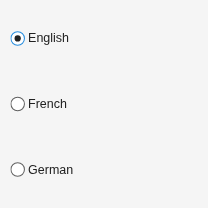
Figure contains an object of type uigridlayout.

Change the radio button selection to French.

rb2.Value = true;
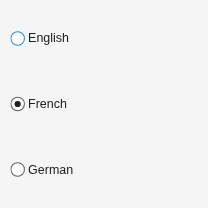
Figure contains an object of type uigridlayout.

Create a grid layout in a figure and add three toggle buttons. Then create a selection group to manage the three toggle buttons.

fig = uifigure(Position=[100 100 200 200]);
gl = uigridlayout(fig,[3 1]);
tb1 = uitogglebutton(gl,Text="English");
tb2 = uitogglebutton(gl,Text="French");
tb3 = uitogglebutton(gl,Text="German");
sg = uiselectiongroup([tb1 tb2 tb3]);
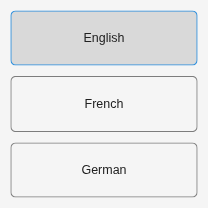
Figure containing three toggle buttons labeled English, French, and German. The first button labeled English is selected.

Change the toggle button selection to French.

tb2.Value = true;
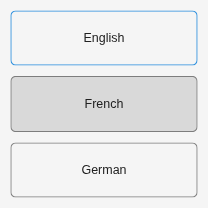
Figure contains an object of type uigridlayout.

Version History

Introduced in R2026b