thetatickformat
R2026bSpecify theta-axis tick label format
Description
tfmt = thetatickformattfmt is
a character vector of a numeric format.
tfmt = thetatickformat(pax)pax instead
of the current axes.
Examples
Create a polar plot. Display the tick labels along the theta-axis as degree values.
th = linspace(0,2*pi);
r = 2*th;
polarplot(th,r)
thetatickformat('degrees')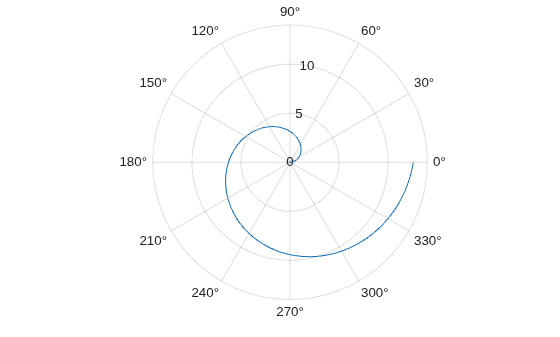
Create a polar plot. Display the tick labels along the theta-axis with the text "deg" after each value.
th = linspace(0,2*pi);
r = th.^2;
polarplot(th,r)
thetatickformat('%g deg')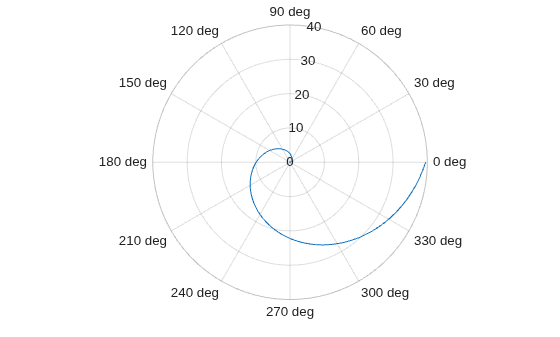
Display the theta-axis tick labels with two decimal places. Control the decimal places by passing thetatickformat a character vector of a numeric format that uses fixed-point notation for the conversion character and a precision value of 2.
theta = 0:0.01:2*pi;
rho = sin(2*theta).*cos(2*theta);
polarplot(theta,rho)
thetatickformat('%.2f')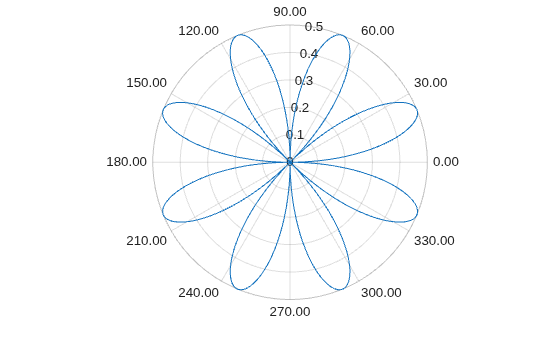
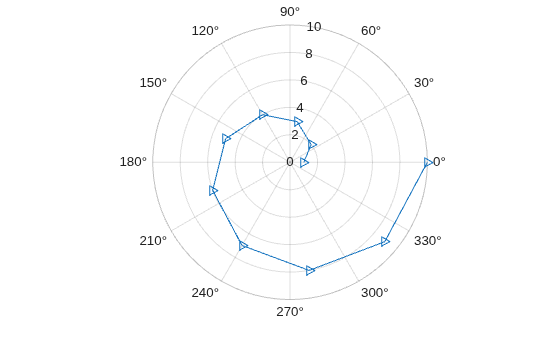
Create a polar plot and assign the polar axes object to the variable pax. Ensure that thetatickformat affects the polar axes you just created by passing pax as the first input argument to the function.
polarplot(1:10,'->')
pax = gca;
thetatickformat(pax,'degrees')
Input Arguments
Format for numeric tick labels, specified as a character vector or string. You can specify one of the formats listed in this table. Alternatively, you can specify a custom format.
| Predefined Format | Description |
|---|---|
'usd' | US dollars. This option is equivalent using
|
'eur' |
Euro. This option is equivalent to using
|
'gbp' |
British pound. This option is equivalent to using
|
'jpy' |
Japanese yen. This option is equivalent to using
|
'degrees' |
Display degree symbol after values. This option is
equivalent to using |
'percentage' |
Display percent sign after values. This option is
equivalent to using |
'auto' |
Default format of |
Example: thetatickformat('usd')
Custom Numeric Format
You can specify a custom numeric format by creating a character vector or string containing identifiers.
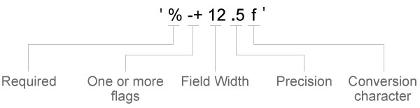
Identifiers are optional, except the percent sign and conversion character. Construct the format in this order:
One or more flags — Options such as adding a plus sign before positive values. For a full list of options, see the table of Optional Flags.
Field width — Minimum number of characters to print in the tick label. Specify the field width as an integer value. If the number of significant digits in the tick value is smaller than the field width, then the label is padded with spaces.
Precision — Number of digits to the right of the decimal point or the number of significant digits, depending on the conversion character. Specify the precision as an integer value.
Conversion character — Value type. For a full list of options, see the table of Conversion Characters. If you specify a conversion that does not fit the data, then MATLAB® overrides the specified conversion, and uses
%e.
Also, you can specify literal text at the beginning
or end of the format. To print a single quotation mark, use ''.
To print a percent character, use %%.
Example: thetatickformat('%.2f') displays
the values using fixed-point notation with two decimal places.
Example: thetatickformat('$%.2f') displays
a dollar sign before each value.
Example: thetatickformat('%.2f
million') displays million after each
value.
Optional Flags
| Identifier | Description | Example of Numeric Format |
|---|---|---|
, | Display commas every three digits, such as '1,000'. | '%,4.4g' |
+ | Print the sign character (+) for positive values, such as '+100'. | '%+4.4g' |
0 | Pad the field width with leading zeros instead of spaces, such
as '0100'. | '%04.4g' |
– | Left-justify, which pads the end of the value with spaces instead
of the beginning. For example, if the field width is 4,
then this flag formats the label as '100 ' instead
of ' 100'. | '%-4.4g' |
# | For the | '%#4.4g' |
Conversion Characters
| Identifier | Description | Example |
|---|---|---|
d or i | Signed integer with base 10. The precision value indicates the number of significant digits. | '%.4d' displays π as 0003. |
f | Fixed-point notation. The precision value indicates the number of decimal places. | '%.4f' displays π as 3.1416. |
e | Exponential notation. The precision value indicates the number of decimal places. | '%.4e' displays π as 3.1416x100. |
g | The more compact version of e or f,
with no trailing zeros. The precision value indicates the maximum
number of decimal places. | '%.4g' displays π as 3.1416. |
Polar axes, or an array of polar axes. If you do not specify this
argument, then thetatickformat modifies the current axes
(provided that the current axes is a polar axes object).
Algorithms
The thetatickformat function sets and queries
the TickLabelFormat property of the ruler object
associated with the theta-axis.
Version History
Introduced in R2016b

