phased.ReplicatedSubarray
R2026bPhased array formed by replicated subarrays
Description
The ReplicatedSubarray object represents a phased
array that contains copies of a subarray created by replicating a single specified
array.
To obtain the response of the subarrays:
Create the
phased.ReplicatedSubarrayobject and set its properties.Call the object with arguments, as if it were a function.
To learn more about how System objects work, see What Are System Objects?
You can also use a ReplicatedSubarray object as the
value of the SensorArray or Sensor property of
objects that perform beamforming, steering, and other operations.
Creation
Description
array = phased.ReplicatedSubarray creates a replicated
subarray System object™, array. This object represents an array that
contains copies of a subarray.
array = phased.ReplicatedSubarray(
creates a replicated subarray object, Name=Value)array, with each
specified property Name set to the specified Value. You can specify additional
name-value pair arguments in any order as
(Name1=Value1,...,NameN=ValueN).
Properties
Unless otherwise indicated, properties are nontunable, which means you cannot change their
values after calling the object. Objects lock when you call them, and the
release function unlocks them.
If a property is tunable, you can change its value at any time.
For more information on changing property values, see System Design in MATLAB Using System Objects.
An array type to use to replicate as subarrays, specified as:
phased.ULASystem objectphased.URASystem objectphased.UCASystem objectphased.ConformalArraySystem object
You cannot use the phased.HeterogeneousULA,
phased.HeterogeneousURA.
phased.HeterogeneousConformalArray, or phased.NRRectangularPanelArray
System object.
Layout of the replicated subarrays, specified as
"Rectangular" or "Custom".
Data Types: char | string
The size of the rectangular grid, specified as a single positive integer or 1-by-2 positive integer row vector.
If GridSize is a scalar, the array has the same
number of subarrays in each row and column.
If GridSize is a 1-by-2 vector, the vector has the
form [NumberOfRows, NumberOfColumns]. The first entry is
the number of subarrays along each column, while the second entry is the
number of subarrays in each row. A row is along the local
y-axis, and a column is along the local
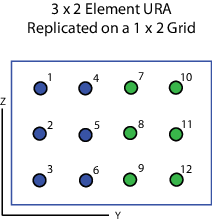
z-axis. This figure shows how a 3-by-2 URA subarray
is replicated using a GridSize value of
[1,2].
Dependencies
To enable this property, set the Layout property
to "Rectangular".
Data Types: double
The rectangular grid spacing of subarrays, specified as a positive
real-valued scalar, a 1-by-2 row vector, or "Auto". Grid
spacing units are expressed in meters.
If GridSpacing is a scalar, the spacing along the row
and the spacing along the column is the same.
If GridSpacing is a length-2 row vector, it has the
form [SpacingBetweenRows, SpacingBetweenColumn]. The
first entry specifies the spacing between rows along a column. The second
entry specifies the spacing between columns along a row.
If GridSpacing is "Auto", the
replication preserves the element spacing in both row and column. This
option is available only if you use a phased.ULA or phased.URA
object as the subarray.
Dependencies
To enable this property, set the Layout property
to "Rectangular".
Data Types: char | string | double
The positions of the subarrays in the custom grid, specified as a 3-by-N matrix, where N indicates the number of subarrays in the array. Each column of the matrix represents the position of a single subarray in the array’s local coordinate system, in meters, using the form [x; y; z].
Dependencies
To enable this property, set the Layout property
to "Custom".
Data Types: double
The normal directions of the subarrays in the array, specified as a 2-by-N matrix, where N is the number of subarrays in the array. Each column of the matrix specifies the normal direction of the corresponding subarray, in the form [azimuth; elevation]. Each angle is in degrees and is defined in the local coordinate system.
You can use the SubarrayPosition and
SubarrayNormal properties to represent any
arrangement in which pairs of subarrays differ by certain transformations.
The transformations can combine translation, azimuth rotation, and elevation
rotation. However, you cannot use transformations that require rotation
about the normal.
Dependencies
To enable this property, set the Layout property
to "Custom".
Data Types: double
The method of subarray steering, specified as either
"None", "Phase",
"Time", or "Custom".
When you set this property to
"Phase", a phase shifter is used to steer the subarray. Use theSTEERANGargument of thestepmethod to define the steering direction.When you set this property to
"Time", subarrays are steered using time delays. Use theSTEERANGargument of thestepmethod to define the steering direction.When you set this property to
"Custom", subarrays are steered by setting independent weights for all elements in each subarray. Use theWSargument of thestepmethod to define the weights for all subarrays.
Data Types: string | char
The operating frequency of phase shifters that perform subarray steering, specified as a positive scalar in Hz.
Dependencies
To enable this property, set the SubarraySteering
property to "Phase".
Data Types: double
The number of bits used to quantize the phase shift component of beamformer or steering vector weights, specified as a non-negative integer. A value of zero indicates that no quantization is performed.
Data Types: double
Usage
Description
Input Arguments
Output Arguments
Object Functions
To use an object function, specify the
System object as the first input argument. For
example, to release system resources of a System object named obj, use
this syntax:
release(obj)
Examples
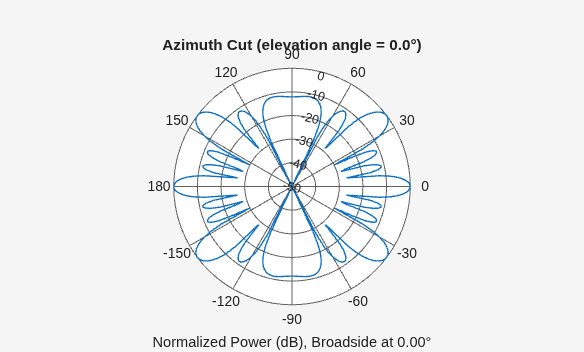
Plot the azimuth response of a 4-element ULA composed of two 2-element ULAs. By default, the antenna elements are isotropic.
sArray = phased.ULA(NumElements=2,ElementSpacing=0.5);
sRSA = phased.ReplicatedSubarray(Subarray=sArray, ...
   Layout="Rectangular",GridSize=[1 2], ...
   GridSpacing="Auto");
Plot the azimuth response of the array. Assume the operating frequency is 1 GHz and the wave propagation speed is the speed of light.
fc = 1.0e9;
pattern(sRSA,fc,[-180:180],0, ...
    PropagationSpeed=physconst("LightSpeed"), ...
    Type="powerdb", ...
    Normalize=true, ...
    CoordinateSystem="polar")
Create a 4-element ULA from two 2-element ULA subarrays consisting of short-dipole antenna elements. Then, calculate the response at boresight. Because the array elements support polarization, the response consists of horizontal and vertical components.
Create the arrays from subarrays.
sSD = phased.ShortDipoleAntennaElement;
sULA = phased.ULA(Element=sSD, ...
    NumElements=2,...
    ElementSpacing=0.5);
sRSA = phased.ReplicatedSubarray(Subarray=sULA, ...
    Layout="Rectangular", ...
    GridSize=[1 2], ...
    GridSpacing="Auto");
Show the vertical polarization response for the subarrays.
fc = 1.0e9;
ang = [0;0];
resp = sRSA(fc,ang,physconst("LightSpeed"));
disp(resp.V)
-2.4495 -2.4495
Create an array consisting of three copies of a 4-element ULA having elements spaced 1/2 wavelength apart. The array operates at 300 MHz.
c = physconst("LightSpeed");
fc = 300e6;
lambda = c/fc;
subarray = phased.ULA(4,0.5*lambda);
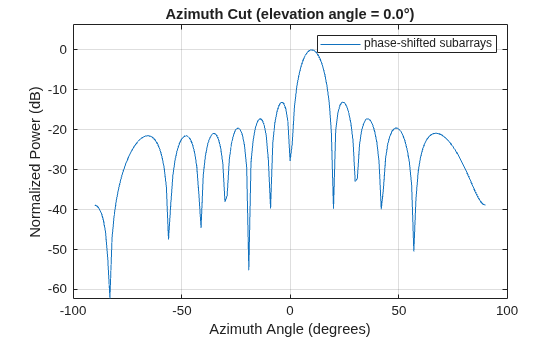
Steer all subarrays by a common phase shift to 10° azimuth.
array = phased.ReplicatedSubarray(Subarray=subarray,GridSize=[1 3], ...
    SubarraySteering="Phase",PhaseShifterFrequency=fc);
steer_ang = [10;0];
sv_array = phased.SteeringVector(SensorArray=array, ...
    PropagationSpeed=c);
wts_array = sv_array(fc,steer_ang);
pattern(array,fc,-90:90,0,CoordinateSystem="Rectangular", ...
    Type="powerdb",PropagationSpeed=c,Weights=wts_array, ...
    SteerAngle=steer_ang);
legend("phase-shifted subarrays")
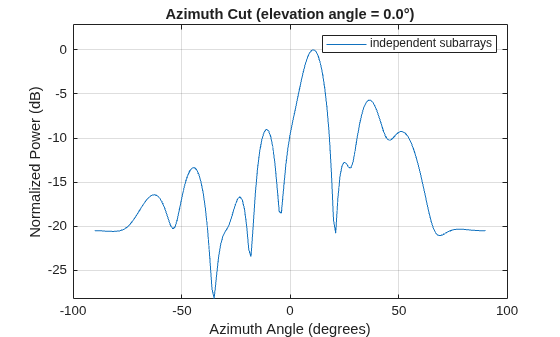
Compute independent subarray weights from subarray steering vectors. The weights point to 5°, 15°, and 30° azimuth. Set the SubarraySteering property to "Custom".
steer_ang_subarrays = [5 15 30;0 0 0];
sv_subarray = phased.SteeringVector(SensorArray=subarray, ...
    PropagationSpeed=c);
wc = sv_subarray(fc,steer_ang_subarrays);
array.SubarraySteering = "Custom";
pattern(array,fc,-90:90,0,CoordinateSystem="Rectangular", ...
    Type="powerdb",PropagationSpeed=c,Weights=wts_array, ...
    ElementWeight=conj(wc));
legend("independent subarrays")
hold off
Calculate the response at boresight for two 2-element ULA arrays that form subarrays of a 4-element ULA array of short-dipole antenna elements.
Create a two-element ULA of short-dipole antenna elements. Then, arrange two copies to form a 4-element ULA.
antenna = phased.ShortDipoleAntennaElement;
array = phased.ULA(Element=antenna,NumElements=2,ElementSpacing=0.5);
replicatedarray = phased.ReplicatedSubarray(Subarray=array, ...
    Layout="Rectangular",GridSize=[1 2], ...
    GridSpacing="Auto");
Find the response of each subarray at boresight. Assume the operating frequency is 1 GHz and the wave propagation speed is the speed of light.
c = physconst("LightSpeed");
resp = replicatedarray(1.0e9,[0;0],c)
resp = struct with fields:
H: [2×1 double]
V: [2×1 double]
References
[1] Mailloux, Robert J. Electronically Scanned Arrays. San Rafael, CA: Morgan & Claypool Publishers, 2007.
[2] Mailloux, Robert J. Phased Array Antenna Handbook, 2nd Ed. Norwood, MA: Artech House, 2005.
Extended Capabilities
Version History
Introduced in R2012a

