derivative
R2026bTime derivative of vehicle state
Description
stateDot = derivative(motionModel,state,cmds)stateDot,
as a three-element vector [xDot yDot thetaDot] if the motion model is a
bicycleKinematics, differentialDriveKinematics, or unicycleKinematics object.
It returns stateDot as a four-element vector, [xDot yDot
thetaDot psiDot], if the motion model is a ackermannKinematics object. xDot and
yDot refer to the vehicle velocity, specified in meters per second.
thetaDot is the angular velocity of the vehicle heading and
psiDot is the angular velocity of the vehicle steering, both
specified in radians per second.
For articulatedSteeringKinematics motion model, it returns
stateDot as a four-element vector, [xDot yDot thetaDot
gammaDot].xDot and yDot refer to the
vehicle velocity, specified in meters per second. thetaDot is the
angular velocity of the front body and gammaDot is the angular velocity
of the front body relative to the rear body, both specified in radians per second.
Examples
Simulate a mobile robot model that uses Ackermann steering with constraints on its steering angle. During simulation, the model maintains maximum steering angle after it reaches the steering limit. To see the effect of steering saturation, you compare the trajectory of two robots, one with the constraints on the steering angle and the other without any steering constraints.
Define the Model
Define the Ackermann kinematic model. In this car-like model, the front wheels are a given distance apart. To ensure that they turn on concentric circles, the wheels have different steering angles. While turning, the front wheels receive the steering input as rate of change of steering angle.
carLike = ackermannKinematics;
Set Up Simulation Parameters
Set the mobile robot to follow a constant linear velocity and receive a constant steering rate as input. Simulate the constrained robot for a longer period to demonstrate steering saturation.
velo = 5;    % Constant linear velocity
psidot = 1;  % Constant left steering rate

% Define the total time and sample rate
sampleTime = 0.05;                  % Sample time [s]
timeEnd1 = 1.5;                     % Simulation end time for unconstrained robot
timeEnd2 = 10;                      % Simulation end time for constrained robot
tVec1 = 0:sampleTime:timeEnd1;      % Time array for unconstrained robot
tVec2 = 0:sampleTime:timeEnd2;      % Time array for constrained robot

initPose = [0;0;0;0];               % Initial pose (x y theta phi)
Create Options Structure for ODE Solver
In this example, you pass an options structure as argument to the ODE solver. The options structure contains the information about the steering angle limit. To create the options structure, use the Events option of odeset and the created event function, detectSteeringSaturation. detectSteeringSaturation sets the maximum steering angle to 45 degrees.
For a description of how to define detectSteeringSaturation, see Define Event Function at the end of this example.
options = odeset('Events',@detectSteeringSaturation);Simulate Model Using ODE Solver
Next, you use the derivative function and an ODE solver, ode45, to solve the model and generate the solution.
% Simulate the unconstrained robot
[t1,pose1] = ode45(@(t,y)derivative(carLike,y,[velo psidot]),tVec1,initPose);

% Simulate the constrained robot
[t2,pose2,te,ye,ie] = ode45(@(t,y)derivative(carLike,y,[velo psidot]),tVec2,initPose,options);
Detect Steering Saturation
When the model reaches the steering limit, it registers a timestamp of the event. The time it took to reach the limit is stored in te.
if te < timeEnd2
    str1 = "Steering angle limit was reached at ";
    str2 = " seconds";
    comp = str1 + te + str2;
    disp(comp)
end
Steering angle limit was reached at 0.785 seconds
Simulate Constrained Robot with New Initial Conditions
Now use the state of the constrained robot before termination of integration as initial condition for the second simulation. Modify the input vector to represent steering saturation, that is, set the steering rate to zero.
saturatedPsiDot = 0;             % Steering rate after saturation
cmds = [velo saturatedPsiDot];   % Command vector
tVec3 = te:sampleTime:timeEnd2;  % Time vector
pose3 = pose2(length(pose2),:);
[t3,pose3,te3,ye3,ie3] = ode45(@(t,y)derivative(carLike,y,cmds),tVec3,pose3,options);
Plot the Results
Plot the trajectory of the robot using plot and the data stored in pose.
figure(1)
plot(pose1(:,1),pose1(:,2),LineWidth=2)
hold on
plot([pose2(:,1); pose3(:,1)],[pose2(:,2);pose3(:,2)])
title("Trajectory X-Y")
xlabel("X")
ylabel("Y")
legend("Unconstrained Robot","Constrained Robot",Location="northwest")
axis equal
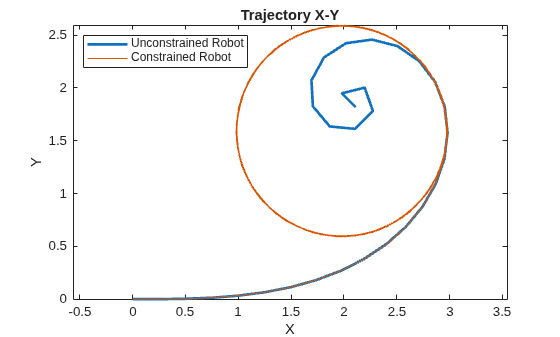
The unconstrained robot follows a spiral trajectory with decreasing radius of curvature while the constrained robot follows a circular trajectory with constant radius of curvature after the steering limit is reached.
Define Event Function
Set the event function such that integration terminates when 4th state, theta, is equal to maximum steering angle.
function [state,isterminal,direction] = detectSteeringSaturation(t,y)
  maxSteerAngle = 0.785;               % Maximum steering angle (pi/4 radians)
  state(4) = (y(4) - maxSteerAngle);   % Saturation event occurs when the 4th state, theta, is equal to the max steering angle
  isterminal(4) = 1;                   % Integration is terminated when event occurs
  direction(4) = 0;                    % Bidirectional termination

end
Create a bicycle kinematic model.
model = bicycleKinematics;
Set the four states and set the control commands for the respective states.
state = [0 0 0;
         1 1 0;
         2 2 0;
         3 3 0];
control = [0.1 pi/10;
           1.0 pi/10;
           5.0 pi/10;
           9.0 pi/10];
Calculate state derivatives for all control commands.
stateDot = model.derivative(state,control)
stateDot = 3×4

    0.1000    1.0000    5.0000    9.0000
         0         0         0         0
    0.0325    0.3249    1.6246    2.9243
Input Arguments
Output Arguments
References
[1] Lynch, Kevin M., and Frank C. Park. Modern Robotics: Mechanics, Planning, and Control. 1st ed. Cambridge, MA: Cambridge University Press, 2017.

