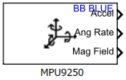
MPU9250
Measure acceleration, angular rate, and magnetic field, and calculate fusion values such as Euler angles and quaternion along the axes of MPU-9250 sensor
Libraries:
Simulink Coder Support Package for BeagleBone Blue Hardware /
Sensors
Description
Add-On Required: This feature requires the Simulink Coder Support Package for BeagleBone Blue Hardware add-on.
The MPU9250 block reads data from the MPU-9250 sensor that is connected to the hardware. The block has two operation modes: Random and DMP.
The block outputs acceleration, angular rate, and strength of the magnetic field along
the axes of the sensor in Random and DMP mode. In DMP mode, the block also outputs the
orientation of the sensor as an Euler angle and quaternions. The values emitted in the
Random mode are raw values, whereas the values emitted in the DMP mode are calibrated
values. The block outputs all the values except for quaternion as a 3-by-1 array of
double data type. The quaternion is a 4-by-1 array of
double data type.
This illustration shows the default orientation of the x-, y-, and z- axes of the MPU-9250 sensor.

If you simulate a model that contains the MPU9250 block without connecting the hardware, the block outputs zeros. For more information, see Block Produces Zeros or Does Nothing in Simulation.
Note
Before generating code from the MPU9250 block in
DMP mode, calibrate the sensor using the calibrateGyro, calibrateAccel, and calibrateMag functions. These functions calibrate the three-axis
gyroscope, accelerometer, and magnetometer located inside the sensor.
Ports
Output
The Accel port outputs acceleration along the x-, y-, and z- axes of the sensor as a 3-by-1 vector. In DMP mode, the elements of the vector represent calibrated values, whereas in Random mode, the elements represent raw values. The acceleration is measured in m/s2 and also includes acceleration due to gravity.
Dependencies
The Accel port is available only when you select the Acceleration (m/s^2) parameter.
Data Types: double
The Ang rate port outputs the angle of rotation per second along the x-, y-, and z- axes of the sensor as a 3-by-1 vector. In DMP mode, the elements of the vector represent calibrated values, whereas in Random mode, the elements represent raw values. The angular rate is measured in dps.
Dependencies
The Ang rate port is available only when you select the Angular rate (dps) parameter.
Data Types: double
The Mag field port outputs the strength of the magnetic field along the x-, y-, and z- axes of the sensor as a 3-by-1 vector. In DMP mode, the elements of the vector represent calibrated values, whereas in Random mode, the elements represent raw values. The magnetic strength is measured in μT.
Dependencies
The Mag field port is available only when you select the Magnetic field (μT) parameter.
Data Types: double
The Euler port outputs the orientation along the axes of the sensor as a 3-by-1 vector. The elements of the vector represent the orientation using three angular quantities – azimuth (rotation around z- axis), roll (rotation around y- axis), and pitch (rotation around x- axis) of the sensor.
| Angular Quantity | Description | Range in Degrees |
|---|---|---|
| Azimuth | Angle between y- axis of the sensor and magnetic north | [0, 360] |
| Roll | Angle between z- axis and x- axis of the sensor | [−90, 90] |
| Pitch | Angle between z- axis and y- axis of the sensor | [−180, 180] |
Dependencies
The Euler port is available only when you set
the Operation mode to
DMP and select the Euler
angles (degrees) parameter.
Data Types: double
The Quat port outputs the orientation along the
w-, x-, y-,
and z- axes of the sensor as a 4-by-1 vector. The
orientation is measured in quaternion. For more information on
quaternions, see quaternion (Robotics System Toolbox).
Dependencies
The Quat port is available only when you set
the Operation mode to
DMP and select the
Quaternion (quaternion) parameter.
Data Types: double
Parameters
DMP— When you set Operation mode toDMP, the sensor operates in 9 degrees of freedom (NDOF) mode. The block outputs calibrated values from the sensor.This table lists the block output, measurement unit, dimension, and the axes of the sensor along which each of these outputs are measured.
Output Unit Dimension Axes Acceleration Meter per second squared (m/s2) 3-by-1 x, y, and z Angular rate degrees per second (dps) 3-by-1 x, y, and z Magnetic field microtesla (μT) 3-by-1 x, y, and z Euler angles degrees per second (dps) 3-by-1 x, y, and z Quaternions Quaternion units 4-by-1 w, x, y, and z Note
Before generating code from the MPU9250 block in
DMPmode, calibrate the sensor using thecalibrateGyro,calibrateAccel, andcalibrateMagfunctions. These functions run an internal fusion algorithm to configure the range and bandwidth of the sensor with some values.Random— When you set Operation mode toRandom, the sensor operates outputs raw values from the sensor.This table lists the block output, measurement unit, dimension, and the axes of the sensor along which each of these outputs are measured in
Randommode.Output Unit Dimension Axes Acceleration Meter per second squared (m/s2) 3-by-1 x, y, and z Angular rate degrees per second (dps) 3-by-1 x, y, and z Magnetic field microtesla (μT) 3-by-1 x, y, and z
Specify how often the block read values from the sensor, in seconds. When
you specify this parameter as -1, Simulink® determines the best sample time for the block based on the
block context within the model.
Select Outputs
When you select the Acceleration (m/s^2) parameter, the Accel port becomes available. For more information on the Accel port, see Accel.
When you select the Angular rate (dps) parameter, the Ang rate port becomes available. For more information on the Ang rate port, see Ang rate.
When you select the Magnetic field (μT) parameter, the Mag field port becomes available. For more information on the Mag field port, see Mag field.
Data Types: double
When you select the Euler angles (degrees) parameter, the Euler port becomes available. For more information on the Euler port, see Euler.
Dependencies
The Euler angles (degrees) parameter is
available only when you set the Operation mode
to DMP.
When you select the Quaternion (quaternion) parameter, the Quat port becomes available. For more information on the Quat port, see Quat.
Dependencies
The Quaternion (quaternion) parameter is
available only when you set the Operation mode
to DMP
Data Types: double
Advanced Sensor Settings
Select a deviation in the acceleration that the accelerometer can measure. The smaller the accelerometer range is, the more sensitive the readings from the accelerometer are. A small range provides more detailed data, resulting in a more precise reading from the accelerometer.
Dependencies
The Accelerometer range parameter is
available only when you set the Operation mode
to Random.
Specify the highest frequency at which the accelerometer samples the signal without aliasing by the specified DMP ODR.
Dependencies
The Accelerometer bandwidth parameter is
available only when you set the Operation mode
to Random.
Specify the maximum angular velocity that the gyroscope can measure per second.
Dependencies
The Gyroscope range parameter is available
only when you set the Operation mode to
Random.
Specify the highest frequency at which the gyroscope samples the signal without aliasing by the specified DMP ODR.
Dependencies
The Gyroscope bandwidth parameter is
available only when you set the Operation mode
to Random.
Specify how many times the sensor measures the values per second.
Dependencies
The DMP ODR parameter is available only when
you set the Operation mode to
DMP
Data Types: double
Version History
Introduced in R2019a
MATLAB Command
You clicked a link that corresponds to this MATLAB command:
Run the command by entering it in the MATLAB Command Window. Web browsers do not support MATLAB commands.
Sélectionner un site web
Choisissez un site web pour accéder au contenu traduit dans votre langue (lorsqu'il est disponible) et voir les événements et les offres locales. D’après votre position, nous vous recommandons de sélectionner la région suivante : .
Vous pouvez également sélectionner un site web dans la liste suivante :
Comment optimiser les performances du site
Pour optimiser les performances du site, sélectionnez la région Chine (en chinois ou en anglais). Les sites de MathWorks pour les autres pays ne sont pas optimisés pour les visites provenant de votre région.
Amériques
- América Latina (Español)
- Canada (English)
- United States (English)
Europe
- Belgium (English)
- Denmark (English)
- Deutschland (Deutsch)
- España (Español)
- Finland (English)
- France (Français)
- Ireland (English)
- Italia (Italiano)
- Luxembourg (English)
- Netherlands (English)
- Norway (English)
- Österreich (Deutsch)
- Portugal (English)
- Sweden (English)
- Switzerland
- United Kingdom (English)